CacheManager
GitHub Overview
MichaCo/CacheManager
CacheManager is an open source caching abstraction layer for .NET written in C#. It supports various cache providers and implements many advanced features.
Topics
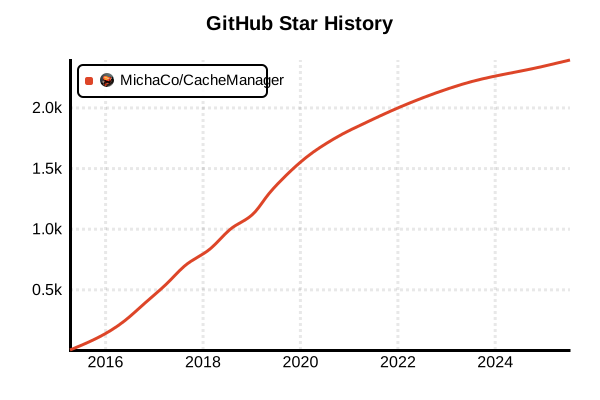
Star History
Cache Library
CacheManager
Overview
CacheManager is an open-source cache abstraction layer for .NET written in C#, supporting multiple cache providers and implementing advanced caching features.
Details
CacheManager is a comprehensive caching solution designed to make .NET developers' lives easier and enable implementation of complex caching scenarios with just a few lines of code. The multi-layer caching feature allows placing in-process cache in front of distributed cache to speed up read access. It supports both sliding and absolute expiration, with expiration settings configurable per cache handle or per cache item. The cache region feature enables grouping elements and bulk deletion, even implementing this functionality when some cache systems don't support it natively. It offers rich features including statistics counters, event systems, and serialization configuration, and can integrate with various cache providers like Redis, Memcached, and Couchbase. Cross-platform support for .NET Core / ASP.NET Core enables operation on Windows, Linux, and macOS.
Advantages and Disadvantages
Advantages
- Unified Interface: Handle different cache technologies with a single ICache
- Multi-layer: Optimization through combination of in-process and distributed caches
- Rich Features: Comprehensive functionality including expiration, regions, statistics, events
- Cross-platform: .NET Standard support for Windows/Linux/macOS operation
- Diverse Providers: Wide support for Redis, Memcached, Couchbase, and more
- Configurable: Flexible serialization and cache policy configuration
- Performance: Optimized performance and memory management
Disadvantages
- .NET Only: Cannot be used from other languages/platforms
- Complexity: Configuration and understanding complexity due to rich features
- Overhead: Over-featured for simple caching use cases
- Dependencies: Dependencies on multiple external libraries
- Learning Curve: High learning cost due to multiple features
- Debugging: Debugging complexity due to multi-layer structure
Key Links
- CacheManager Official Site
- CacheManager GitHub Repository
- CacheManager NuGet Package
- Microsoft .NET Caching Documentation
Code Examples
Basic Cache Usage
using CacheManager.Core;

// Create simple in-memory cache
var cache = CacheFactory.New()
    .WithUpdateMode(CacheUpdateMode.Up)
    .WithSerializer(typeof(JsonCacheSerializer))
    .WithMicrosoftMemoryCaching()
    .Build();

// Store data
cache.Put("user:123", new { Name = "John", Age = 30 });

// Retrieve data
var user = cache.Get("user:123");
if (user != null)
{
    Console.WriteLine($"Cache hit: {user}");
}
else
{
    Console.WriteLine("Cache miss");
}
Multi-layer Cache Configuration
using CacheManager.Core;
using CacheManager.Microsoft.Extensions.Caching.Memory;
using CacheManager.Redis;

// Two-layer cache: In-memory + Redis
var cache = CacheFactory.New()
    .WithUpdateMode(CacheUpdateMode.Up)
    .WithMicrosoftMemoryCaching("memory")
    .WithRedisConfiguration("redis", config => {
        config.WithEndpoint("localhost", 6379);
        config.WithDatabase(0);
    })
    .WithRedisCaching("redis")
    .WithJsonSerializer()
    .Build();

// Data access (automatic tier management)
var result = cache.GetOrAdd("expensive-data", (key) => {
    // Heavy processing (DB access, etc.)
    return ComputeExpensiveData();
});
Using Expiration and Regions
// Expiration and region settings
cache.Put("session:abc123", sessionData, TimeSpan.FromMinutes(30));

// Logical grouping using regions
cache.Put("user-data", "user:123", userData, "users");
cache.Put("user-prefs", "pref:123", preferences, "users");

// Region-based deletion
cache.ClearRegion("users");

// Sliding expiration
cache.Put("activity", activityData, ExpirationMode.Sliding, TimeSpan.FromMinutes(15));
Dependency Injection in ASP.NET Core
// Startup.cs or Program.cs
using CacheManager.Core;
using CacheManager.Microsoft.Extensions.DependencyInjection;

public void ConfigureServices(IServiceCollection services)
{
    // CacheManager configuration
    services.AddCacheManager(builder =>
        builder.WithUpdateMode(CacheUpdateMode.Up)
               .WithMicrosoftMemoryCaching()
               .WithRedisConfiguration("redis", config => {
                   config.WithEndpoint("localhost", 6379);
               })
               .WithRedisCaching("redis")
               .WithJsonSerializer()
    );
}

// Usage in controller
[ApiController]
public class UserController : ControllerBase
{
    private readonly ICacheManager _cache;

    public UserController(ICacheManager cache)
    {
        _cache = cache;
    }

    [HttpGet("{id}")]
    public async Task<User> GetUser(int id)
    {
        return await _cache.GetOrAddAsync($"user:{id}", async (key) => {
            return await _userRepository.GetByIdAsync(id);
        }, TimeSpan.FromMinutes(10));
    }
}
Statistics and Event Handling
// Enable statistics
var cache = CacheFactory.New()
    .WithMicrosoftMemoryCaching()
    .EnableStatistics()
    .Build();

// Register event handlers
cache.OnAdd += (sender, args) => {
    Console.WriteLine($"Item added: {args.Key}");
};

cache.OnGet += (sender, args) => {
    Console.WriteLine($"Item retrieved: {args.Key}");
};

cache.OnRemove += (sender, args) => {
    Console.WriteLine($"Item removed: {args.Key}, Reason: {args.Reason}");
};

// Check statistics after multiple accesses
for (int i = 0; i < 100; i++)
{
    cache.GetOrAdd($"item:{i}", i);
}

var stats = cache.Statistics;
Console.WriteLine($"Hit ratio: {stats.Ratio:P2}");
Console.WriteLine($"Items: {stats.Items}");
Console.WriteLine($"Hits: {stats.Hits}");
Console.WriteLine($"Misses: {stats.Misses}");
Custom Serialization
using CacheManager.Serialization.Json;
using Newtonsoft.Json;

// Custom JSON configuration
var cache = CacheFactory.New()
    .WithMicrosoftMemoryCaching()
    .WithSerializer(typeof(JsonCacheSerializer), new JsonSerializerSettings
    {
        DateTimeZoneHandling = DateTimeZoneHandling.Utc,
        NullValueHandling = NullValueHandling.Ignore
    })
    .Build();

// Caching complex objects
public class ComplexData
{
    public int Id { get; set; }
    public string Name { get; set; }
    public DateTime CreatedAt { get; set; }
    public List<string> Tags { get; set; }
}

var complexData = new ComplexData
{
    Id = 1,
    Name = "Sample Data",
    CreatedAt = DateTime.UtcNow,
    Tags = new List<string> { "tag1", "tag2", "tag3" }
};

cache.Put("complex:1", complexData, TimeSpan.FromHours(1));
Conditional Cache Updates
// Cache with data version management
public class CacheService
{
    private readonly ICacheManager _cache;

    public CacheService(ICacheManager cache)
    {
        _cache = cache;
    }

    public async Task<T> GetWithVersionCheck<T>(string key, Func<Task<(T Data, string Version)>> factory)
    {
        var cacheKey = $"data:{key}";
        var versionKey = $"version:{key}";

        var cachedData = _cache.Get<T>(cacheKey);
        var cachedVersion = _cache.Get<string>(versionKey);

        // Check latest version
        var (currentData, currentVersion) = await factory();

        if (cachedData != null && cachedVersion == currentVersion)
        {
            return cachedData;
        }

        // Update cache
        _cache.Put(cacheKey, currentData, TimeSpan.FromMinutes(30));
        _cache.Put(versionKey, currentVersion, TimeSpan.FromMinutes(30));

        return currentData;
    }
}

// Usage example
var data = await cacheService.GetWithVersionCheck("user-settings", async () => {
    var settings = await _database.GetUserSettingsAsync(userId);
    var version = settings.LastModified.ToString("O");
    return (settings, version);
});