Rich (Logging)
Logging functionality provided as part of rich text display library. Offers abundant display options including beautiful formatting, syntax highlighting, table format display, and progress bars. Enables high-quality output experience in console applications.
GitHub Overview
Textualize/rich
Rich is a Python library for rich text and beautiful formatting in the terminal.
Topics
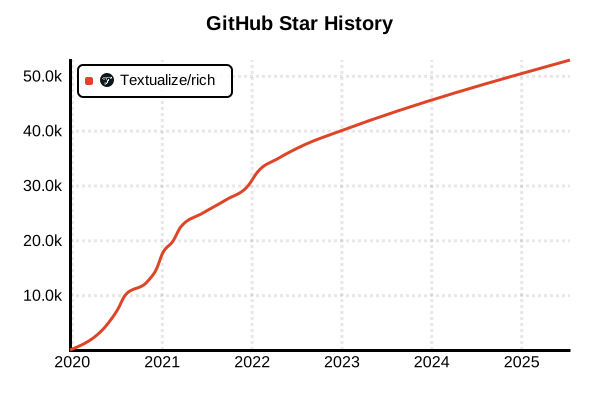
Star History
Library
Rich (Logging)
Overview
Rich goes beyond being a simple logging library, offering a comprehensive text display and user interface library for Python. Its logging functionality is provided through RichHandler, enabling beautiful formatting, syntax highlighting, table displays, progress bars, and many other rich display options. It achieves high-quality output experiences in console applications, dramatically improving developer experience and debugging efficiency. In 2025, Rich is rapidly gaining adoption as the new standard for visual output in the Python ecosystem, making it a standout library worth attention.
Details
Rich 2025 edition is positioned as a revolution in visual output within the Python ecosystem. It provides rich console experiences that clearly distinguish it from traditional plain text logs. It integrates colorful text display, syntax highlighting, tabular data, progress bars, spinners, and traceback displays all in one package. While maintaining full compatibility with the standard library logging, it can be easily integrated into existing code through RichHandler. Intuitive styling through markup notation, emoji support, and hyperlink functionality dramatically enhance the expressiveness of console applications.
Key Features
- Beautiful Log Display: Colorful output and syntax highlighting capabilities
- Rich Rendering: Tables, progress bars, panels, and tree displays
- Standard Library Integration: Full compatibility with Python's standard logging
- Advanced Tracebacks: Detailed error display with syntax highlighting
- Markup Notation: Intuitive text styling
- Adaptive Display: Dynamic layout adjustment according to terminal width
Pros and Cons
Pros
- Dramatically improves visual quality of console applications
- Significantly enhances visibility of complex data structures and log information
- Easy integration into existing code due to standard library compatibility
- Improved user experience through progress bars and spinners
- Detailed traceback display accelerates problem resolution
- Comprehensive documentation and active community support
Cons
- Somewhat higher learning cost due to rich functionality beyond logging
- May be feature-excessive in environments where visual display is unnecessary
- Benefits are limited in terminals that don't support color display
- Performance with high-volume log output is inferior to other lightweight libraries
- Additional customization required for structured log output
- Increases external dependencies
Reference Pages
Usage Examples
Basic Logging Setup
import logging
from rich.logging import RichHandler

# Basic Rich handler configuration
logging.basicConfig(
    level="NOTSET",
    format="%(message)s",
    datefmt="[%X]",
    handlers=[RichHandler()]
)

# Logger acquisition and basic usage
log = logging.getLogger("rich")
log.info("Hello, World!")
log.debug("Displaying debug information")
log.warning("Warning message")
log.error("An error occurred")

# Log with exception information
try:
    result = 1 / 0
except ZeroDivisionError:
    log.exception("Zero division error occurred")

# Structured object logging
data = {
    "user_id": 12345,
    "action": "login",
    "timestamp": "2025-06-24T10:30:00Z",
    "metadata": {"ip": "192.168.1.100", "user_agent": "Mozilla/5.0"}
}
log.info("User action executed", extra={"data": data})

# Log with markup enabled
log.error("[bold red blink]Server is shutting down![/]",
         extra={"markup": True})

# Log with highlighting disabled
log.error("123 will not be highlighted",
         extra={"highlighter": None})
Advanced Rich Handler Configuration
import logging
from rich.logging import RichHandler
from rich.console import Console
from rich.traceback import install

# Install rich traceback globally
install(show_locals=True)

# Custom console configuration
console = Console(stderr=True, style="bold white on blue")

# Advanced Rich handler configuration
rich_handler = RichHandler(
    console=console,
    show_time=True,
    show_level=True,
    show_path=True,
    enable_link_path=True,
    rich_tracebacks=True,
    tracebacks_show_locals=True,
    tracebacks_suppress=["click", "urllib3"],  # Suppress framework frames
    markup=True
)

# Multi-handler integrated configuration
logging.basicConfig(
    level=logging.DEBUG,
    format="%(name)s: %(message)s",
    handlers=[
        rich_handler,
        logging.FileHandler("app.log", encoding="utf-8")  # Also use file output
    ]
)

class ApplicationService:
    def __init__(self):
        self.logger = logging.getLogger(self.__class__.__name__)

    def process_data(self, data):
        self.logger.info(f"Starting data processing: {len(data)} items")

        try:
            # Data processing simulation
            for i, item in enumerate(data):
                if i % 100 == 0:
                    self.logger.debug(f"Processing progress: {i}/{len(data)}")

                if item.get("error"):
                    raise ValueError(f"Data error: {item['error']}")

            self.logger.info("[green]Data processing completed[/]", extra={"markup": True})
            return True

        except Exception as e:
            self.logger.exception("Error occurred during data processing")
            return False

# Usage example
service = ApplicationService()
test_data = [{"id": i, "value": f"data_{i}"} for i in range(500)]
service.process_data(test_data)
Rich Console Integration and Live Display
import logging
import time
from rich.console import Console
from rich.logging import RichHandler
from rich.live import Live
from rich.table import Table
from rich.progress import Progress, SpinnerColumn, TextColumn, BarColumn
from rich.status import Status

# Rich integrated logging configuration
console = Console()
logging.basicConfig(
    level=logging.INFO,
    format="%(message)s",
    handlers=[RichHandler(console=console)]
)
logger = logging.getLogger("app")

class DataProcessor:
    def __init__(self):
        self.console = console
        self.logger = logger

    def process_with_progress(self, total_items=100):
        """Data processing with progress bar"""
        with Progress(
            SpinnerColumn(),
            TextColumn("[progress.description]{task.description}"),
            BarColumn(),
            TextColumn("[progress.percentage]{task.percentage:>3.0f}%"),
            console=self.console
        ) as progress:

            task = progress.add_task("Processing data...", total=total_items)

            for i in range(total_items):
                # Display logs above progress bar
                if i % 20 == 0:
                    progress.console.log(f"[blue]Checkpoint {i}: Memory usage check[/]")

                # Simulate actual processing
                time.sleep(0.02)

                # Error case simulation
                if i == 75:
                    progress.console.log("[yellow]Warning: Temporary connection issue detected[/]")

                progress.advance(task)

            progress.console.log("[green bold]✓ All data processing completed[/]")

    def process_with_live_table(self):
        """Processing with live update table"""

        # Initialize results table
        table = Table()
        table.add_column("Step", style="cyan")
        table.add_column("Status", style="magenta")
        table.add_column("Processing Time", style="green")
        table.add_column("Details", style="yellow")

        steps = [
            "Initialization",
            "Data Validation",
            "Data Transformation",
            "Quality Check",
            "Final Verification"
        ]

        with Live(table, refresh_per_second=4, console=self.console) as live:
            for i, step in enumerate(steps):
                start_time = time.time()

                # Output logs above live display
                live.console.log(f"[blue]Starting: {step}[/]")

                # Processing simulation
                if step == "Data Validation":
                    time.sleep(0.8)
                    status = "[yellow]With warnings[/]"
                    detail = "5 missing values detected"
                    live.console.log("[yellow]⚠ Missing values detected but continuing processing[/]")
                elif step == "Quality Check":
                    time.sleep(0.5)
                    status = "[red]Error[/]"
                    detail = "Quality standards not met"
                    live.console.log("[red]✗ Error occurred in quality check[/]")
                else:
                    time.sleep(0.3)
                    status = "[green]Success[/]"
                    detail = "Normal completion"

                duration = f"{time.time() - start_time:.2f}s"
                table.add_row(step, status, duration, detail)

    def process_with_status(self):
        """Processing with status spinner"""
        tasks = [
            ("Database Connection", "Connecting to database..."),
            ("Schema Validation", "Verifying table structure..."),
            ("Data Synchronization", "Synchronizing latest data..."),
            ("Index Update", "Updating search indexes..."),
            ("Cache Clear", "Clearing old cache...")
        ]

        for task_name, status_msg in tasks:
            with self.console.status(status_msg, spinner="dots"):
                self.logger.info(f"[cyan]{task_name}[/] starting", extra={"markup": True})

                # Randomly vary processing time
                import random
                time.sleep(random.uniform(0.5, 2.0))

                # Simulate success rate
                if random.random() > 0.8:  # 20% error probability
                    self.logger.error(f"[red]{task_name}[/] error occurred", extra={"markup": True})
                    break
                else:
                    self.logger.info(f"[green]✓ {task_name}[/] completed", extra={"markup": True})

# Usage examples
processor = DataProcessor()

# Execute various processing types
print("=== Processing with Progress Bar ===")
processor.process_with_progress(50)

print("\n=== Processing with Live Table ===")
processor.process_with_live_table()

print("\n=== Processing with Status Spinner ===")
processor.process_with_status()
Rich Markup and Styling
import logging
from rich.logging import RichHandler
from rich.console import Console
from rich import print
from rich.table import Table
from rich.tree import Tree
from rich.panel import Panel
from rich.columns import Columns

# Markup-enabled logging configuration
console = Console()
logging.basicConfig(
    handlers=[RichHandler(console=console, markup=True)],
    format="%(message)s",
    level=logging.DEBUG
)
logger = logging.getLogger("markup_demo")

class MarkupLoggingDemo:
    def __init__(self):
        self.logger = logger
        self.console = console

    def basic_markup_logging(self):
        """Basic markup logging"""
        self.logger.info("[bold blue]Application startup[/bold blue]")
        self.logger.info("[green]✓[/green] Configuration file loading completed")
        self.logger.warning("[yellow]⚠[/yellow] Memory usage reached 80% of threshold")
        self.logger.error("[bold red]✗ Database connection error[/bold red]")
        self.logger.info("[link=https://example.com]Detailed information[/link]")

    def emoji_logging(self):
        """Emoji-enhanced logging"""
        self.logger.info(":rocket: Application started")
        self.logger.info(":white_check_mark: User authentication successful")
        self.logger.warning(":warning: Approaching API limits")
        self.logger.error(":x: Critical error occurred")
        self.logger.info(":chart_increasing: Performance improvement: 15%")

    def complex_data_logging(self):
        """Complex data structure log display"""

        # Table format data logging
        table = Table(title="Processing Results Summary", show_header=True, header_style="bold magenta")
        table.add_column("Item", style="cyan")
        table.add_column("Count", justify="right", style="green")
        table.add_column("Success Rate", justify="right", style="yellow")
        table.add_column("Status", style="red")

        table.add_row("User Registration", "1,234", "98.5%", "✓ Normal")
        table.add_row("Data Update", "5,678", "99.2%", "✓ Normal")
        table.add_row("Notification Send", "987", "87.3%", "⚠ Attention")

        self.console.log(table)

        # Tree structure data logging
        tree = Tree("System Status")
        tree.add("[green]API Server[/green]").add("Response time: 45ms").add("Uptime: 99.9%")
        tree.add("[yellow]Database[/yellow]").add("Connections: 234/500").add("Response: 120ms")
        tree.add("[red]Cache Server[/red]").add("Hit rate: 45%").add("Memory usage: 89%")

        self.console.log(tree)

        # Panel for important information logging
        important_info = Panel(
            "[bold red]Emergency Maintenance Notice[/bold red]\n\n"
            "Time: 2025-06-24 02:00-04:00 JST\n"
            "Target: All services\n"
            "Impact: Temporary service interruption\n\n"
            "[blue]Details: https://status.example.com[/blue]",
            title="System Notification",
            border_style="red"
        )
        self.console.log(important_info)

    def performance_logging(self):
        """Performance information logging"""

        # Comparison logging with column display
        before_panel = Panel(
            "[red]Before Improvement[/red]\n\n"
            "API Response Time: 450ms\n"
            "Memory Usage: 2.1GB\n"
            "CPU Usage: 78%\n"
            "Error Rate: 2.3%",
            title="Before",
            border_style="red"
        )

        after_panel = Panel(
            "[green]After Improvement[/green]\n\n"
            "API Response Time: 120ms\n"
            "Memory Usage: 1.4GB\n"
            "CPU Usage: 45%\n"
            "Error Rate: 0.1%",
            title="After",
            border_style="green"
        )

        comparison = Columns([before_panel, after_panel])
        self.console.log(comparison)

    def conditional_markup(self, success_rate):
        """Dynamic markup based on conditions"""
        if success_rate >= 95:
            status_style = "[bold green]"
            icon = ":white_check_mark:"
        elif success_rate >= 80:
            status_style = "[bold yellow]"
            icon = ":warning:"
        else:
            status_style = "[bold red]"
            icon = ":x:"

        self.logger.info(
            f"{icon} Processing Success Rate: {status_style}{success_rate}%[/{status_style.split()[1]}]"
        )

# Usage examples and demo execution
demo = MarkupLoggingDemo()

print("=== Basic Markup Logging ===")
demo.basic_markup_logging()

print("\n=== Emoji Logging ===")
demo.emoji_logging()

print("\n=== Complex Data Structure Logging ===")
demo.complex_data_logging()

print("\n=== Performance Comparison Logging ===")
demo.performance_logging()

print("\n=== Conditional Markup ===")
for rate in [98, 85, 45]:
    demo.conditional_markup(rate)
Traceback and Debugging Features
import logging
from rich.logging import RichHandler
from rich.console import Console
from rich.traceback import install, Traceback
from rich import print
import traceback as tb

# Global rich traceback configuration
install(
    show_locals=True,
    max_frames=10,
    suppress=["click", "urllib3", "requests"]
)

# Debug logging configuration
console = Console()
debug_handler = RichHandler(
    console=console,
    rich_tracebacks=True,
    tracebacks_show_locals=True,
    tracebacks_suppress=["requests", "urllib3"]
)

logging.basicConfig(
    level=logging.DEBUG,
    format="%(name)s: %(message)s",
    handlers=[debug_handler]
)

logger = logging.getLogger("debug_demo")

class DebugLoggingDemo:
    def __init__(self):
        self.logger = logger
        self.console = console
        self.user_data = {
            "id": 12345,
            "name": "John Doe",
            "email": "[email protected]"
        }

    def demonstration_with_locals(self):
        """Debug with local variable display"""
        processing_count = 0
        error_count = 0
        batch_size = 100

        try:
            # Intentional error generation
            data = [1, 2, 3, "invalid", 5]
            for i, item in enumerate(data):
                processing_count += 1
                result = 10 / item  # Error occurs here

        except Exception as e:
            error_count += 1
            # Local variables displayed in traceback
            self.logger.exception("Data processing error occurred")

    def nested_function_debug(self):
        """Nested function debugging"""
        def outer_function(data):
            self.logger.debug("Outer function started")
            processed_data = []

            def inner_function(item):
                self.logger.debug(f"Inner function: processing {item}")
                if isinstance(item, str):
                    raise ValueError(f"Cannot process string: {item}")
                return item * 2

            for item in data:
                processed_data.append(inner_function(item))

            return processed_data

        try:
            test_data = [1, 2, "error", 4, 5]
            result = outer_function(test_data)
            self.logger.info(f"Processing result: {result}")

        except Exception:
            self.logger.exception("Error occurred in nested function")

    def custom_exception_handling(self):
        """Custom exception handling"""
        class CustomBusinessError(Exception):
            def __init__(self, message, error_code, context=None):
                super().__init__(message)
                self.error_code = error_code
                self.context = context or {}

        def risky_business_operation():
            user_input = "invalid_format"
            validation_rules = ["required", "format", "length"]

            if user_input == "invalid_format":
                raise CustomBusinessError(
                    "Invalid input data format",
                    error_code="INVALID_FORMAT",
                    context={
                        "input": user_input,
                        "expected_format": "email",
                        "validation_rules": validation_rules
                    }
                )

        try:
            risky_business_operation()
        except CustomBusinessError as e:
            # Log custom exception details
            self.logger.error(
                f"Business logic error: {e}",
                extra={
                    "error_code": e.error_code,
                    "context": e.context
                }
            )
            self.logger.exception("Detailed traceback")

    def console_debug_utilities(self):
        """Advanced debugging with Console.log"""
        # Complex data structure debugging
        complex_data = {
            "users": [
                {"id": 1, "name": "Alice", "roles": ["admin", "user"]},
                {"id": 2, "name": "Bob", "roles": ["user"]},
            ],
            "settings": {
                "theme": "dark",
                "notifications": True,
                "api_config": {
                    "timeout": 30,
                    "retries": 3,
                    "endpoints": ["api.example.com", "backup.example.com"]
                }
            }
        }

        self.console.log("Complex data structure", complex_data)

        # Local variable debug output
        current_user = "admin"
        session_id = "sess_12345"
        permissions = ["read", "write", "delete"]

        # Display local variables list with log_locals=True
        self.console.log("Debug checkpoint reached", log_locals=True)

        # Detailed logging in JSON format
        from rich.json import JSON
        self.console.log(JSON(str(complex_data).replace("'", '"')))

    def performance_debugging(self):
        """Performance debugging"""
        import time

        def timed_function(name, duration):
            start_time = time.time()
            self.logger.debug(f"[cyan]{name}[/] starting", extra={"markup": True})

            time.sleep(duration)  # Processing simulation

            end_time = time.time()
            execution_time = end_time - start_time

            if execution_time > 1.0:
                self.logger.warning(
                    f"[yellow]{name}[/] taking longer than expected: {execution_time:.3f}s",
                    extra={"markup": True}
                )
            else:
                self.logger.debug(
                    f"[green]{name}[/] completed: {execution_time:.3f}s",
                    extra={"markup": True}
                )

        # Timing measurement for multiple operations
        operations = [
            ("Database Connection", 0.2),
            ("Data Search", 1.5),  # Time-consuming operation
            ("Result Processing", 0.1),
            ("Cache Save", 0.05)
        ]

        for op_name, duration in operations:
            timed_function(op_name, duration)

# Debug feature demo execution
debug_demo = DebugLoggingDemo()

print("=== Debug with Local Variable Display ===")
debug_demo.demonstration_with_locals()

print("\n=== Nested Function Debugging ===")
debug_demo.nested_function_debug()

print("\n=== Custom Exception Handling ===")
debug_demo.custom_exception_handling()

print("\n=== Console Debug Utilities ===")
debug_demo.console_debug_utilities()

print("\n=== Performance Debugging ===")
debug_demo.performance_debugging()