asdf-elixir
GitHub Overview
asdf-vm/asdf-elixir
Elixir plugin for asdf version manager
Topics
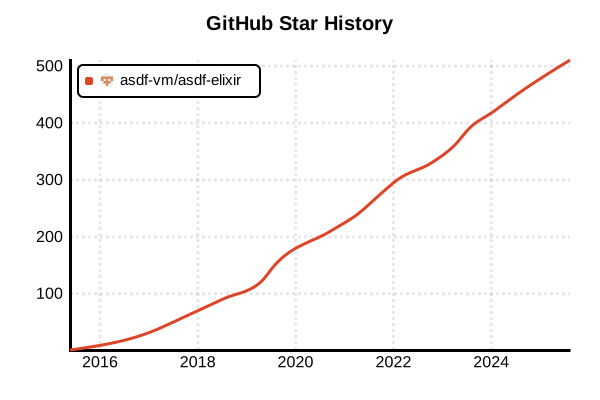
Star History
Language Version Management Tool
asdf-elixir
Overview
asdf-elixir is an Elixir plugin for the asdf version manager. It manages multiple Elixir versions and ensures compatibility with corresponding Erlang/OTP versions. Since Elixir runs on the Erlang VM, it's crucial to accurately select Elixir versions compiled for specific OTP versions, and this plugin simplifies that management. It's a standard version management solution officially recommended by Elixir.
Details
Key Features
- OTP Compatibility Management: Proper combination of Elixir and Erlang/OTP versions
- Precompiled Version Support: Quick installation and setup
- .tool-versions Support: Version pinning per project
- Documentation Integration: Erlang Docs access via IEx (Elixir 1.11+)
- Automatic Mix Commands: Automatic setup after installation
- Concurrent Multi-version Management: Version switching between projects
- Cross-platform: Supports Linux, macOS, WSL
Architecture
asdf-elixir uses asdf's plugin system to manage Elixir binaries. It can select Elixir versions compiled for specific OTP versions, ensuring runtime compatibility. After installation, it can automatically execute additional Mix commands via the .default-mix-commands file.
Importance of OTP Compatibility
Since Elixir runs on the Erlang VM, the Elixir version must be compiled specifically for the version of Erlang in use. If the versions don't match, issues may occur.
Pros and Cons
Pros
- Officially Recommended: Version management method recommended on the official Elixir website
- OTP Compatibility Guarantee: Reliable Elixir/Erlang combination management
- Fast Installation: Quick setup with precompiled versions
- Project Isolation: Project environment isolation with .tool-versions
- Unified Management: Centralized management of Erlang and Elixir with asdf
- Rich Version Support: Wide support from old to latest versions
- Automation Ready: Easy automation in CI/CD and scripts
Cons
- asdf Dependency: Requires asdf installation and configuration
- OTP Knowledge Required: Understanding of Erlang/OTP versions needed
- Complexity: More complex setup than simple Elixir installation
- Initial Learning: Learning cost for asdf usage and OTP compatibility
- Compilation Time: Long compilation time for custom builds
Reference Pages
- asdf-elixir GitHub Repository
- Elixir Official Installation Guide
- asdf Official Documentation
- Thinking Elixir: Install Elixir using asdf
Code Examples
Prerequisites (asdf Installation)
# Install asdf itself (Linux/macOS)
git clone https://github.com/asdf-vm/asdf.git ~/.asdf --branch v0.14.0

# Shell configuration (Bash)
echo '. "$HOME/.asdf/asdf.sh"' >> ~/.bashrc
echo '. "$HOME/.asdf/completions/asdf.bash"' >> ~/.bashrc

# Shell configuration (Zsh)
echo '. "$HOME/.asdf/asdf.sh"' >> ~/.zshrc
echo 'fpath=(${ASDF_DIR}/completions $fpath)' >> ~/.zshrc
echo 'autoload -Uz compinit && compinit' >> ~/.zshrc

# Reload configuration
source ~/.bashrc  # or ~/.zshrc
Plugin Installation
# Add Erlang and Elixir plugins
asdf plugin add erlang https://github.com/asdf-vm/asdf-erlang.git
asdf plugin add elixir https://github.com/asdf-vm/asdf-elixir.git

# Check installed plugins
asdf plugin list

# Update plugins
asdf plugin update erlang
asdf plugin update elixir
Version Checking and Installation
# Check available Erlang versions
asdf list all erlang

# Check available Elixir versions
asdf list all elixir

# Recommended combinations (as of 2025)
# Erlang/OTP 27 with Elixir 1.17 combination
asdf install erlang 27.2
asdf install elixir 1.17.3-otp-27

# Combination with Erlang/OTP 26
asdf install erlang 26.2.5.6
asdf install elixir 1.17.3-otp-26

# Example of older version combination
asdf install erlang 25.3.2.14
asdf install elixir 1.15.8-otp-25
Version Configuration
# Set global versions
asdf global erlang 27.2
asdf global elixir 1.17.3-otp-27

# Set project local versions
cd /path/to/your/project
asdf local erlang 27.2
asdf local elixir 1.17.3-otp-27

# Check current versions
asdf current
asdf current erlang
asdf current elixir

# Check installed versions
asdf list erlang
asdf list elixir
Using .tool-versions File
# Configuration in project directory
cd myproject

# Create .tool-versions file
echo "erlang 27.2" >> .tool-versions
echo "elixir 1.17.3-otp-27" >> .tool-versions

# Check file contents
cat .tool-versions
# erlang 27.2
# elixir 1.17.3-otp-27

# Install versions based on .tool-versions
asdf install

# Verify automatic version configuration
elixir --version
erl -eval 'erlang:system_info(otp_release), halt().'
OTP Version Compatibility Management
# Install Elixir for specific OTP versions
# Format: <elixir-version>-otp-<otp-major-version>

# Elixir 1.17.3 for OTP 27
asdf install elixir 1.17.3-otp-27

# Elixir 1.17.3 for OTP 26
asdf install elixir 1.17.3-otp-26

# Elixir 1.15.8 for OTP 25
asdf install elixir 1.15.8-otp-25

# Verify compatibility
elixir --version
# Elixir 1.17.3 (compiled with Erlang/OTP 27)
Project Environment Switching
# Project 1 (OTP 27 environment)
cd ~/projects/modern-app
asdf local erlang 27.2
asdf local elixir 1.17.3-otp-27
mix --version

# Project 2 (OTP 26 environment)
cd ~/projects/legacy-app
asdf local erlang 26.2.5.6
asdf local elixir 1.17.3-otp-26
mix --version

# Project 3 (older environment)
cd ~/projects/old-app
asdf local erlang 25.3.2.14
asdf local elixir 1.15.8-otp-25
mix --version
Automatic Mix Command Execution Setup
# Create default Mix commands configuration file
echo 'hex' > ~/.default-mix-commands
echo 'phx.new' >> ~/.default-mix-commands
echo 'ecto.sql' >> ~/.default-mix-commands

# Check file contents
cat ~/.default-mix-commands
# hex
# phx.new
# ecto.sql

# Automatically executed when installing new Elixir versions
asdf install elixir 1.17.3-otp-27
# mix archive.install hex --force
# mix archive.install phx.new --force
# mix archive.install ecto.sql --force
Phoenix Project Usage
# Setup Phoenix development environment
asdf local erlang 27.2
asdf local elixir 1.17.3-otp-27

# Install Phoenix archive
mix archive.install hex phx_new

# Create new Phoenix project
mix phx.new my_app --database postgres

cd my_app

# Check project-specific .tool-versions file
cat .tool-versions
# erlang 27.2
# elixir 1.17.3-otp-27

# Install dependencies
mix deps.get

# Create database and run migrations
mix ecto.create
mix ecto.migrate

# Start server
mix phx.server
CI/CD Usage
# GitHub Actions example
name: Elixir CI
on: [push, pull_request]

jobs:
  test:
    runs-on: ubuntu-latest
    strategy:
      matrix:
        elixir: ['1.17.3-otp-27', '1.17.3-otp-26']
        erlang: ['27.2', '26.2.5.6']
        exclude:
          - elixir: '1.17.3-otp-27'
            erlang: '26.2.5.6'
          - elixir: '1.17.3-otp-26'
            erlang: '27.2'

    steps:
    - uses: actions/checkout@v4

    - name: Install asdf
      run: |
        git clone https://github.com/asdf-vm/asdf.git ~/.asdf --branch v0.14.0
        echo ". $HOME/.asdf/asdf.sh" >> $GITHUB_ENV

    - name: Install Erlang and Elixir
      run: |
        export PATH="$HOME/.asdf/bin:$PATH"
        . $HOME/.asdf/asdf.sh
        asdf plugin add erlang
        asdf plugin add elixir
        asdf install erlang ${{ matrix.erlang }}
        asdf install elixir ${{ matrix.elixir }}
        asdf global erlang ${{ matrix.erlang }}
        asdf global elixir ${{ matrix.elixir }}

    - name: Install dependencies
      run: mix deps.get

    - name: Run tests
      run: mix test
Docker Usage
# Dockerfile example
FROM ubuntu:22.04

# Install basic packages
RUN apt-get update && apt-get install -y \
    curl \
    git \
    build-essential \
    autoconf \
    libncurses5-dev \
    libssl-dev \
    && rm -rf /var/lib/apt/lists/*

# Install asdf
RUN git clone https://github.com/asdf-vm/asdf.git ~/.asdf --branch v0.14.0

# Set environment variables
ENV PATH="$HOME/.asdf/bin:$HOME/.asdf/shims:$PATH"

# Install plugins
RUN . ~/.asdf/asdf.sh && \
    asdf plugin add erlang && \
    asdf plugin add elixir

# Install versions
RUN . ~/.asdf/asdf.sh && \
    asdf install erlang 27.2 && \
    asdf install elixir 1.17.3-otp-27 && \
    asdf global erlang 27.2 && \
    asdf global elixir 1.17.3-otp-27

# Set working directory
WORKDIR /app

# Copy project files
COPY . .

# Install dependencies
RUN mix deps.get

# Expose port
EXPOSE 4000

# Start application
CMD ["mix", "phx.server"]
Troubleshooting
# Cleanup after failed installation
asdf uninstall elixir 1.17.3-otp-27
asdf uninstall erlang 27.2

# Clear cache
rm -rf ~/.asdf/downloads/erlang/*
rm -rf ~/.asdf/downloads/elixir/*

# Check dependencies (Ubuntu/Debian)
sudo apt-get update
sudo apt-get install -y \
    build-essential \
    autoconf \
    m4 \
    libncurses5-dev \
    libwxgtk3.0-gtk3-dev \
    libwxgtk-webview3.0-gtk3-dev \
    libgl1-mesa-dev \
    libglu1-mesa-dev \
    libpng-dev \
    libssl-dev \
    libssh-dev \
    unixodbc-dev \
    xsltproc \
    fop \
    libxml2-utils

# Check version compatibility
elixir --version
erl -eval 'erlang:system_info(otp_release), halt().'

# Reinstall Mix
mix archive.install hex phx_new --force

# Resolve plugin issues
asdf plugin remove elixir
asdf plugin add elixir https://github.com/asdf-vm/asdf-elixir.git
Version Upgrade Procedure
# Check current versions
asdf current

# Check available new versions
asdf list all erlang | tail -5
asdf list all elixir | tail -5

# Install new versions
asdf install erlang 27.2
asdf install elixir 1.17.3-otp-27

# Gradual upgrade in project
cd myproject

# Create backup
cp .tool-versions .tool-versions.backup

# Set new versions
asdf local erlang 27.2
asdf local elixir 1.17.3-otp-27

# Update dependencies
mix deps.update --all
mix deps.compile

# Run tests
mix test

# Rollback if issues occur
# cp .tool-versions.backup .tool-versions