asdf-erlang
GitHub Overview
asdf-vm/asdf-erlang
Erlang plugin for asdf version manager
Topics
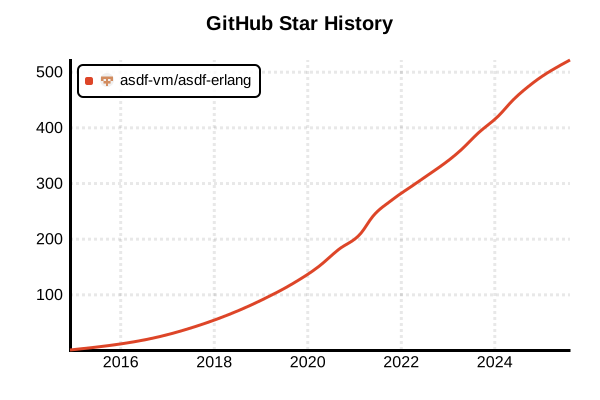
Star History
Language Version Management Tool
asdf-erlang
Overview
asdf-erlang is an Erlang/OTP plugin for the asdf version manager. It uses kerl internally to compile and install Erlang/OTP from source, enabling management of multiple Erlang versions. Recognized as an official third-party tool by Erlang, it provides cross-platform support and extensive build options. For Elixir developers, it serves as the foundation for unified version management when combined with asdf-elixir.
Details
Key Features
- kerl Integration: Source-based builds using kerl internally
- OTP Version Management: Support for all Erlang/OTP versions
- Custom Builds: Extensive configuration options during build
- SSL/TLS Support: Integration with OpenSSL libraries
- Documentation Building: Optional Erlang documentation generation
- asdf Integration: Unified version manager utilization
- Cross-platform: Support for Linux, macOS, and WSL
Architecture
asdf-erlang uses Kerl (Erlang Installation Tool) internally to compile Erlang/OTP from source. Built binaries are placed in ~/.asdf/installs/erlang/ and version switching is achieved through asdf's shim system. Each project can specify versions using .tool-versions files.
Relationship with kerl
kerl is a Bash script tool for building Erlang/OTP from source. asdf-erlang wraps kerl to integrate it into the asdf ecosystem, simplifying configuration and enabling unified management with other languages.
Importance of OTP Compatibility
Erlang is an integrated system including OTP (Open Telecom Platform). Elixir and Erlang-based applications have critical compatibility requirements with specific OTP versions, making precise version management through asdf-erlang key to system stability.
Pros and Cons
Pros
- Officially Recognized: Mentioned in official Erlang documentation for reliability
- Complete Version Control: Wide support from legacy to latest versions
- Custom Builds: Flexible configuration for SSL, GUI, documentation, etc.
- asdf Integration: Unified management with other languages, optimal for team development
- Elixir Compatibility: Perfect combination with asdf-elixir
- Rich Options: Full utilization of kerl's capabilities
- Ongoing Support: Active development and maintenance
Cons
- Long Build Times: Time cost due to source compilation
- Complex Dependencies: System-level development libraries required
- Disk Usage: Concurrent installation of multiple versions
- Initial Setup: Platform-specific dependency configuration
- Memory Usage: High resource consumption during compilation
- Troubleshooting: Difficulty identifying causes of build errors
Reference Pages
- asdf-erlang GitHub Repository
- Erlang Official Downloads
- kerl GitHub Repository
- asdf Official Documentation
Code Examples
Prerequisites (asdf Installation)
# Install asdf itself (Linux/macOS)
git clone https://github.com/asdf-vm/asdf.git ~/.asdf --branch v0.14.0

# Shell configuration (Bash)
echo '. "$HOME/.asdf/asdf.sh"' >> ~/.bashrc
echo '. "$HOME/.asdf/completions/asdf.bash"' >> ~/.bashrc

# Shell configuration (Zsh)
echo '. "$HOME/.asdf/asdf.sh"' >> ~/.zshrc
echo 'fpath=(${ASDF_DIR}/completions $fpath)' >> ~/.zshrc
echo 'autoload -Uz compinit && compinit' >> ~/.zshrc

# Reload configuration
source ~/.bashrc  # or ~/.zshrc
System Dependencies Installation
# Ubuntu/Debian
sudo apt-get update
sudo apt-get install -y \
  build-essential \
  autoconf \
  m4 \
  libncurses5-dev \
  libwxgtk3.0-gtk3-dev \
  libwxgtk-webview3.0-gtk3-dev \
  libgl1-mesa-dev \
  libglu1-mesa-dev \
  libpng-dev \
  libssl-dev \
  libssh-dev \
  unixodbc-dev \
  xsltproc \
  fop \
  libxml2-utils

# CentOS/RHEL/Fedora
sudo yum groupinstall -y "Development Tools"
sudo yum install -y \
  autoconf \
  ncurses-devel \
  openssl-devel \
  wxGTK3-devel \
  libxml2-devel \
  libxslt-devel \
  fop

# macOS (Homebrew)
brew install \
  autoconf \
  [email protected] \
  libyaml \
  readline \
  libxslt \
  fop
Plugin Installation
# Add Erlang plugin
asdf plugin add erlang https://github.com/asdf-vm/asdf-erlang.git

# Check installed plugins
asdf plugin list

# Update plugin
asdf plugin update erlang
Version Checking and Installation
# Check available Erlang versions
asdf list all erlang

# Recommended versions as of 2025
# Latest stable (OTP 27)
asdf install erlang 27.2

# Long-term support (OTP 26)
asdf install erlang 26.2.5.6

# Older version (OTP 25)
asdf install erlang 25.3.2.14

# Development version (latest)
asdf install erlang main
Custom Build Configuration
# SSL configuration (macOS)
export KERL_CONFIGURE_OPTIONS="--with-ssl=$(brew --prefix [email protected])"

# Build with documentation
export KERL_BUILD_DOCS=yes

# Disable GUI (server environment)
export KERL_CONFIGURE_OPTIONS="--without-wx --without-observer --without-debugger --without-et"

# Disable debug (production)
export KERL_CONFIGURE_OPTIONS="--disable-debug --without-javac"

# Install with custom configuration
asdf install erlang 27.2
Version Configuration
# Set global version
asdf global erlang 27.2

# Set project local version
cd /path/to/your/project
asdf local erlang 27.2

# Check current version
asdf current erlang
erl -eval 'erlang:system_info(otp_release), halt().'

# Check installed versions
asdf list erlang
Using .tool-versions File
# Configuration in project directory
cd myproject

# Create .tool-versions file
echo "erlang 27.2" >> .tool-versions

# Combination with Elixir and Erlang
echo "erlang 27.2" > .tool-versions
echo "elixir 1.17.3-otp-27" >> .tool-versions

# Check file contents
cat .tool-versions
# erlang 27.2
# elixir 1.17.3-otp-27

# Install versions based on .tool-versions
asdf install
Project Environment Switching
# Project 1 (latest environment)
cd ~/projects/modern-app
asdf local erlang 27.2
erl -version

# Project 2 (stable environment)
cd ~/projects/stable-app
asdf local erlang 26.2.5.6
erl -version

# Project 3 (legacy environment)
cd ~/projects/legacy-app
asdf local erlang 25.3.2.14
erl -version
Erlang Application Development
# Setup Erlang development environment
asdf local erlang 27.2

# Start Erlang REPL
erl

# Compile and run Erlang code
# hello.erl
echo '-module(hello).
-export([hello_world/0]).

hello_world() ->
    io:format("Hello, World!~n").
' > hello.erl

# Compile and execute
erlc hello.erl
erl -noshell -s hello hello_world -s init stop

# Create project with Rebar
rebar3 new app myapp
cd myapp
rebar3 compile
rebar3 shell
CI/CD Usage
# GitHub Actions example
name: Erlang CI
on: [push, pull_request]

jobs:
  test:
    runs-on: ubuntu-latest
    strategy:
      matrix:
        erlang: ['27.2', '26.2.5.6', '25.3.2.14']

    steps:
    - uses: actions/checkout@v4

    - name: Install system dependencies
      run: |
        sudo apt-get update
        sudo apt-get install -y \
          build-essential \
          autoconf \
          libncurses5-dev \
          libssl-dev

    - name: Install asdf
      run: |
        git clone https://github.com/asdf-vm/asdf.git ~/.asdf --branch v0.14.0
        echo ". $HOME/.asdf/asdf.sh" >> $GITHUB_ENV

    - name: Install Erlang
      run: |
        export PATH="$HOME/.asdf/bin:$PATH"
        . $HOME/.asdf/asdf.sh
        asdf plugin add erlang
        asdf install erlang ${{ matrix.erlang }}
        asdf global erlang ${{ matrix.erlang }}

    - name: Run tests
      run: |
        erl -version
        rebar3 compile
        rebar3 eunit
        rebar3 ct
Docker Integration
# Dockerfile example
FROM ubuntu:22.04

# Install system dependencies
RUN apt-get update && apt-get install -y \
    curl \
    git \
    build-essential \
    autoconf \
    libncurses5-dev \
    libssl-dev \
    && rm -rf /var/lib/apt/lists/*

# Install asdf
RUN git clone https://github.com/asdf-vm/asdf.git ~/.asdf --branch v0.14.0

# Set environment variables
ENV PATH="$HOME/.asdf/bin:$HOME/.asdf/shims:$PATH"

# Install Erlang plugin
RUN . ~/.asdf/asdf.sh && \
    asdf plugin add erlang

# Install Erlang (no docs, no GUI)
ENV KERL_CONFIGURE_OPTIONS="--without-wx --without-observer --without-debugger --without-et --disable-debug"
RUN . ~/.asdf/asdf.sh && \
    asdf install erlang 27.2 && \
    asdf global erlang 27.2

# Set working directory
WORKDIR /app

# Copy project files
COPY . .

# Configure rebar3
RUN . ~/.asdf/asdf.sh && \
    rebar3 compile

# Start application
CMD ["./_build/default/rel/myapp/bin/myapp", "foreground"]
Performance Optimization
# Enable parallel builds
export MAKEFLAGS="-j$(nproc)"

# Fast build configuration
export KERL_CONFIGURE_OPTIONS="--disable-debug --without-javac --without-wx"

# Memory-constrained build
export KERL_CONFIGURE_OPTIONS="--enable-kernel-poll --enable-hipe"

# Cross-compilation configuration
export KERL_CONFIGURE_OPTIONS="--host=x86_64-linux-gnu"
Troubleshooting
# Cleanup after failed build
asdf uninstall erlang 27.2

# Clear kerl cache
rm -rf ~/.kerl/builds/*
rm -rf ~/.kerl/archives/*

# Recheck dependencies (Ubuntu)
sudo apt-get update
sudo apt-get install --reinstall \
  build-essential \
  autoconf \
  libncurses5-dev \
  libssl-dev

# Resolve SSL issues on macOS
export KERL_CONFIGURE_OPTIONS="--with-ssl=$(brew --prefix [email protected])"
export LDFLAGS="-L$(brew --prefix [email protected])/lib"
export CPPFLAGS="-I$(brew --prefix [email protected])/include"

# Check build logs
cat ~/.asdf/plugins/erlang/kerl-home/builds/asdf_27.2/otp_build_27.2.log

# Direct kerl execution (debug)
$HOME/.asdf/plugins/erlang/bin/kerl list installations
$HOME/.asdf/plugins/erlang/bin/kerl build 27.2 asdf_27.2
Version Upgrade Procedure
# Check current version
asdf current erlang

# Check available new versions
asdf list all erlang | tail -5

# Install new version
asdf install erlang 27.2

# Gradual upgrade in project
cd myproject

# Create backup
cp .tool-versions .tool-versions.backup

# Set new version
asdf local erlang 27.2

# Check dependencies and run tests
rebar3 compile
rebar3 eunit

# Rollback if issues occur
# cp .tool-versions.backup .tool-versions
Release Management and Deployment
# Create release build
export KERL_CONFIGURE_OPTIONS="--disable-debug --enable-kernel-poll"
asdf install erlang 27.2

# Production compilation
rebar3 as prod release

# Check release
ls -la _build/prod/rel/*/bin/

# Lightweight build for Docker
export KERL_CONFIGURE_OPTIONS="--without-wx --without-observer --without-debugger --without-et"
asdf install erlang 27.2-minimal