kerl
GitHub Overview
kerl/kerl
Easy building and installing of Erlang/OTP instances
Topics
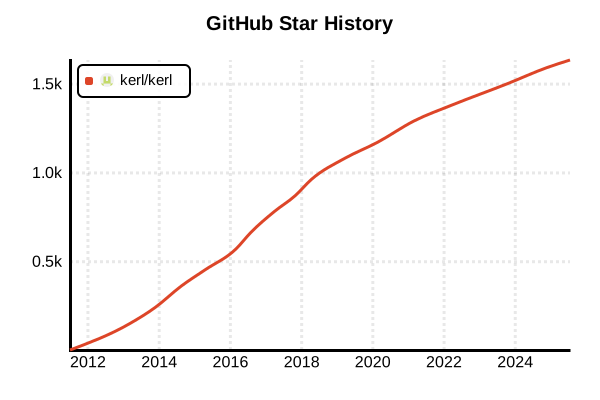
Star History
Language Version Management Tool
kerl
Overview
kerl is an established tool that enables easy building and installing of Erlang/OTP instances. Designed as a shell-agnostic POSIX shell script, it requires no special dependencies beyond curl and git. It manages downloaded, built, and installed releases, enabling easy installation to new destinations without complete rebuilding and seamless switching between Erlang/OTP installations. Recognized by the official Erlang community, it has been trusted by many developers for years.
Details
Key Features
- Established Track Record: Trusted reliability within the Erlang/OTP community for years
- Shell-Agnostic: Runs in POSIX shell, environment-independent
- Minimal Dependencies: Lightweight tool requiring only curl and git
- Rich Build Options: Detailed customization during configure
- Named Builds: Managing builds with different configurations for the same version
- Installation Reuse: Deploying pre-built versions to multiple locations
- GitHub Builds: Direct building from specific commits or branches
Architecture
kerl is implemented as a single Bash script that manages the entire process of downloading, compiling, and installing Erlang/OTP source code. Each build is managed independently, with environment switching through activate scripts.
Build Management System
kerl adopts a design that separates "builds" from "installations". Once a version is built, it can be installed to multiple locations, enabling efficient environment management for team development and multiple projects.
Pros and Cons
Pros
- Proven Stability: Reliability through years of operational experience
- Simple Design: Understandable architecture with a single script
- High Flexibility: Rich build configuration options
- Lightweight: Minimal dependencies and resource usage
- Reusability: Efficient deployment of pre-built binaries
- Official Support: Recommended in official Erlang documentation
- Wide Compatibility: Guaranteed operation on various UNIX-like systems
Cons
- Long Build Times: Time cost due to compilation from source
- Manual Operations: Additional scripting required for automation
- No Windows Support: Limited to UNIX-like environments
- Learning Curve: Need to familiarize with command structure
- Environment Dependent: Manual management of system dependencies
- Single-Purpose: No unified management of multiple languages
Reference Pages
- kerl GitHub Repository
- Erlang.mk Guide - kerl Section
- Erlang Official Installation Guide
- Erlang Official Downloads
Code Examples
Installation
# Direct download (recommended)
curl -O https://raw.githubusercontent.com/kerl/kerl/master/kerl
chmod a+x kerl
sudo mv kerl /usr/local/bin/

# Using Homebrew on macOS
brew install kerl

# Using apt on Ubuntu/Debian
sudo apt-get install kerl

# Using pacman on Arch Linux
sudo pacman -S kerl

# Check version
kerl version
System Dependencies Installation
# Ubuntu/Debian
sudo apt-get update
sudo apt-get install -y \
  build-essential \
  autoconf \
  m4 \
  libncurses5-dev \
  libwxgtk3.0-gtk3-dev \
  libgl1-mesa-dev \
  libglu1-mesa-dev \
  libpng-dev \
  libssl-dev \
  libssh-dev \
  unixodbc-dev \
  xsltproc \
  fop \
  libxml2-utils

# CentOS/RHEL/Fedora
sudo yum groupinstall -y "Development Tools"
sudo yum install -y \
  autoconf \
  ncurses-devel \
  openssl-devel \
  wxGTK3-devel \
  libxml2-devel \
  libxslt-devel \
  fop

# macOS
xcode-select --install
brew install autoconf [email protected] readline libxslt fop
Basic Usage
# Update and display available releases
kerl update releases
kerl list releases

# Build specific version
kerl build 27.2 erlang-27.2

# Check build progress
kerl status

# List builds
kerl list builds

# Install
kerl install erlang-27.2 ~/erlang/27.2

# List installations
kerl list installations
Custom Build Configuration
# Build with documentation
export KERL_BUILD_DOCS=yes
kerl build 27.2 erlang-27.2-docs

# SSL configuration (macOS)
export KERL_CONFIGURE_OPTIONS="--with-ssl=$(brew --prefix [email protected])"
kerl build 27.2 erlang-27.2-ssl

# Disable GUI (for servers)
export KERL_CONFIGURE_OPTIONS="--without-wx --without-observer --without-debugger --without-et"
kerl build 27.2 erlang-27.2-server

# Performance optimization
export KERL_CONFIGURE_OPTIONS="--enable-kernel-poll --enable-hipe --disable-debug"
kerl build 27.2 erlang-27.2-optimized

# Multiple options combination
export KERL_CONFIGURE_OPTIONS="--with-ssl=$(brew --prefix [email protected]) --without-wx --enable-kernel-poll"
kerl build 27.2 erlang-27.2-custom
Environment Switching
# Activate Erlang environment
. ~/erlang/27.2/activate

# Check current active environment
kerl active

# Show active environment details
kerl status

# Deactivate environment
kerl_deactivate

# Switch to different version
. ~/erlang/26.2/activate
Build and Installation Management
# Build and install in one command
kerl build-install 27.2 erlang-27.2 ~/erlang/27.2

# Install existing build to different location
kerl install erlang-27.2 ~/projects/myapp/erlang

# Remove installation
kerl delete installation ~/erlang/27.2

# Remove build
kerl delete build erlang-27.2

# List all installations
kerl list installations

# Get path of specific installation
kerl path erlang-27.2
Direct Building from Git
# Build from latest main branch
kerl build git https://github.com/erlang/otp.git main otp-main

# Build from specific tag
kerl build git https://github.com/erlang/otp.git OTP-27.2 otp-27.2-git

# Build from specific commit
kerl build git https://github.com/erlang/otp.git abc1234 otp-commit

# Build from local repository
kerl build git /path/to/local/otp.git main local-otp
Project Usage
# Project setup script
#!/bin/bash
# setup-erlang.sh

PROJECT_ROOT=$(pwd)
ERLANG_DIR="$PROJECT_ROOT/.erlang"

# Project-specific Erlang installation
if [ ! -d "$ERLANG_DIR" ]; then
    echo "Installing Erlang 27.2 for this project..."
    kerl build 27.2 project-erlang-27.2 2>/dev/null || true
    kerl install project-erlang-27.2 "$ERLANG_DIR"
fi

# Activate environment
. "$ERLANG_DIR/activate"

echo "Erlang environment ready: $(erl -eval 'erlang:system_info(otp_release), halt().')"
Automation Scripts
# Automatic Erlang version installation
#!/bin/bash
# auto-install-erlang.sh

VERSIONS=(
    "27.2"
    "26.2.5.6"
    "25.3.2.14"
)

for VERSION in "${VERSIONS[@]}"; do
    BUILD_NAME="erlang-$VERSION"
    INSTALL_PATH="$HOME/erlang/$VERSION"

    if [ ! -d "$INSTALL_PATH" ]; then
        echo "Building and installing Erlang $VERSION..."
        kerl build-install "$VERSION" "$BUILD_NAME" "$INSTALL_PATH"
    else
        echo "Erlang $VERSION already installed at $INSTALL_PATH"
    fi
done

echo "All Erlang versions installed successfully!"
CI/CD Usage
# GitHub Actions example
name: Erlang CI with kerl
on: [push, pull_request]

jobs:
  test:
    runs-on: ubuntu-latest
    strategy:
      matrix:
        erlang: ['27.2', '26.2.5.6', '25.3.2.14']

    steps:
    - uses: actions/checkout@v4

    - name: Install system dependencies
      run: |
        sudo apt-get update
        sudo apt-get install -y \
          build-essential \
          autoconf \
          libncurses5-dev \
          libssl-dev \
          curl

    - name: Install kerl
      run: |
        curl -O https://raw.githubusercontent.com/kerl/kerl/master/kerl
        chmod a+x kerl
        sudo mv kerl /usr/local/bin/

    - name: Build and install Erlang
      run: |
        kerl update releases
        kerl build-install ${{ matrix.erlang }} erlang-${{ matrix.erlang }} ~/erlang/${{ matrix.erlang }}
        . ~/erlang/${{ matrix.erlang }}/activate
        erl -eval 'erlang:system_info(otp_release), halt().'

    - name: Run tests
      run: |
        . ~/erlang/${{ matrix.erlang }}/activate
        rebar3 compile
        rebar3 eunit
Docker Integration
# Dockerfile example
FROM ubuntu:22.04

# Install system dependencies
RUN apt-get update && apt-get install -y \
    curl \
    git \
    build-essential \
    autoconf \
    libncurses5-dev \
    libssl-dev \
    && rm -rf /var/lib/apt/lists/*

# Install kerl
RUN curl -O https://raw.githubusercontent.com/kerl/kerl/master/kerl && \
    chmod a+x kerl && \
    mv kerl /usr/local/bin/

# Build and install Erlang
ENV KERL_CONFIGURE_OPTIONS="--without-wx --without-observer --disable-debug"
RUN kerl update releases && \
    kerl build-install 27.2 erlang-27.2 /opt/erlang/27.2

# Set environment variables
ENV PATH="/opt/erlang/27.2/bin:$PATH"

# Set working directory
WORKDIR /app

# Copy project files
COPY . .

# Build application
RUN . /opt/erlang/27.2/activate && \
    rebar3 compile

# Start application
CMD ["/opt/erlang/27.2/bin/erl", "-noshell", "-s", "myapp", "start"]
Advanced Configuration and Troubleshooting
# Set default values in configuration file
# ~/.kerlrc
KERL_CONFIGURE_OPTIONS="--enable-kernel-poll --enable-hipe"
KERL_BUILD_DOCS=yes
KERL_INSTALL_MANPAGES=yes

# Configure parallel builds
export MAKEFLAGS="-j$(nproc)"

# Debug build errors
kerl build --verbose 27.2 debug-build

# Check build logs
cat ~/.kerl/builds/erlang-27.2/otp_build_27.2.log

# Clear cache
rm -rf ~/.kerl/builds/*
rm -rf ~/.kerl/archives/*

# Repair installation
kerl install --force erlang-27.2 ~/erlang/27.2

# Check for upgrades
kerl upgrade
Multi-Project Management Patterns
# Project A (latest)
cd ~/projects/project-a
kerl install erlang-27.2 .erlang
echo '. ./.erlang/activate' > activate.sh

# Project B (stable)
cd ~/projects/project-b
kerl install erlang-26.2 .erlang
echo '. ./.erlang/activate' > activate.sh

# Project C (legacy)
cd ~/projects/project-c
kerl install erlang-25.3 .erlang
echo '. ./.erlang/activate' > activate.sh

# Start each project
# cd ~/projects/project-a && source activate.sh
Benchmarking and Performance Testing
# Performance optimized build
export KERL_CONFIGURE_OPTIONS="--enable-kernel-poll --enable-hipe --enable-smp-support --enable-threads --disable-debug"
kerl build 27.2 erlang-27.2-performance

# Benchmark script
#!/bin/bash
# benchmark.sh
VERSIONS=("25.3.2.14" "26.2.5.6" "27.2")

for VERSION in "${VERSIONS[@]}"; do
    echo "Testing Erlang $VERSION..."
    . ~/erlang/$VERSION/activate

    time erl -noshell -eval '
        lists:seq(1, 1000000),
        halt().
    '

    kerl_deactivate
done