fvm
GitHub Overview
leoafarias/fvm
Flutter Version Management: A simple CLI to manage Flutter SDK versions.
Repository:https://github.com/leoafarias/fvm
Homepage:https://fvm.app
Stars5,093
Watchers28
Forks260
Created:February 22, 2019
Language:Dart
License:MIT License
Topics
clidartflutterflutter-releasesflutter-sdk-versionsfvmsdk
Star History
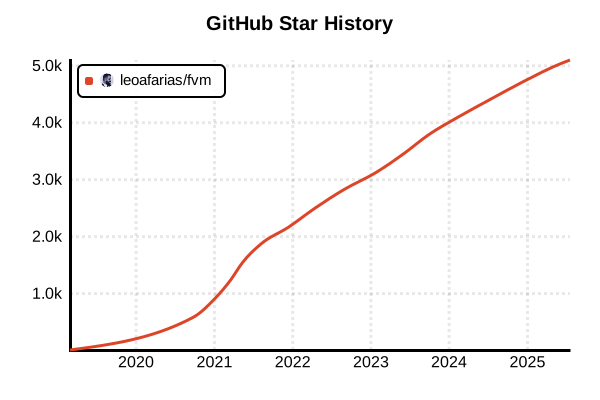
Data as of: 7/20/2025, 03:50 AM
Language Version Management Tool
fvm
Overview
FVM (Flutter Version Management) is a simple CLI tool for managing Flutter SDK versions. It enables using different Flutter SDKs per project, facilitating environment consistency in team development and testing of new features. Widely adopted by the Flutter community, it contributes to improved development efficiency and solving "works on my machine" problems. It achieves stability through version pinning and smooth SDK switching.
Details
Key Features
- Project-specific Management: Project-scoped SDK management via .fvm directory
- Team Development: All members can use identical Flutter SDK
- IDE Integration: Complete integration with VS Code, Android Studio, and IntelliJ
- Global Configuration: System-wide default Flutter SDK settings
- Cache System: Efficient reuse of downloaded SDKs
- Flavor Support: Environment-specific (dev, staging, prod) SDK management
- Symbolic Links: Lightweight reference system for space savings
How It Works
FVM caches Flutter SDKs in the ~/.fvm/versions directory and references appropriate versions through the project's .fvm/flutter_sdk symbolic link. IDEs use project-specific SDKs through this symbolic link.
Project Structure
project/
├── .fvm/
│   ├── flutter_sdk -> ~/.fvm/versions/3.16.5
│   └── fvm_config.json
├── lib/
├── pubspec.yaml
└── README.md
Pros and Cons
Pros
- Environment Consistency: Consistent Flutter SDK usage across entire team
- Efficient Switching: Instant SDK version switching between projects
- Stability Assurance: Projects locked to specific SDK versions
- Space Savings: SDK sharing across multiple projects
- CI/CD Support: Reliable version specification in automation environments
- New Feature Testing: Safe testing of beta and dev channels
- IDE Integration: Code completion and debugging with appropriate SDK
Cons
- Initial Setup: Project-specific initial setup required
- Storage Usage: Local storage of multiple Flutter SDKs required
- Learning Curve: Additional concept for Flutter developers
- Tool Dependency: Dependency on FVM tool itself
- Path Management: Proper IDE configuration required
Reference Pages
- FVM Official Site
- FVM GitHub Repository
- FVM Official Documentation
- Flutter Official Site
- Dart Official Site
Usage Examples
Installation
# Standalone installation (recommended)
# macOS/Linux
curl -fsSL https://fvm.app/install.sh | bash

# Homebrew (macOS)
brew tap leoafarias/fvm
brew install fvm

# Chocolatey (Windows)
choco install fvm

# Via Dart pub (not recommended)
dart pub global activate fvm

# Verify installation
fvm --version
Basic Usage
# Check available Flutter versions
fvm releases

# Install specific versions
fvm install 3.16.5
fvm install 3.19.0

# Check installed versions
fvm list

# Set Flutter version for project
cd my-flutter-project
fvm use 3.16.5

# .fvm/fvm_config.json is created
cat .fvm/fvm_config.json
Project Management
# Start new Flutter project
mkdir my-app && cd my-app

# Set Flutter version for project
fvm use 3.16.5

# Execute Flutter commands via FVM
fvm flutter create .
fvm flutter pub get
fvm flutter run

# Update dependencies
fvm flutter pub upgrade

# Build
fvm flutter build apk
fvm flutter build ios
IDE Configuration
VS Code Configuration
// .vscode/settings.json
{
  "dart.flutterSdkPath": ".fvm/flutter_sdk",
  "search.exclude": {
    "**/.fvm": true
  },
  "files.watcherExclude": {
    "**/.fvm": true
  }
}
Android Studio/IntelliJ Configuration
# Configure Flutter SDK path
# Languages & Frameworks > Flutter
# Flutter SDK path: /absolute/path/to/project/.fvm/flutter_sdk

# Check absolute path
pwd && echo "/.fvm/flutter_sdk"
Team Development Usage
# Clone project
git clone https://github.com/company/flutter-app.git
cd flutter-app

# Auto-install Flutter version from .fvm configuration
fvm install

# Or manually install from configuration file
cat .fvm/fvm_config.json
fvm install 3.16.5
fvm use 3.16.5

# Start project
fvm flutter pub get
fvm flutter run
Flavor Management
# Development environment configuration
fvm flavor development --flutter-version 3.19.0

# Staging environment configuration
fvm flavor staging --flutter-version 3.16.5

# Production environment configuration
fvm flavor production --flutter-version 3.16.5

# Execute commands with specific flavor
fvm flavor development flutter run
fvm flavor production flutter build apk
Large Project Management
# Manage multiple projects
mkdir flutter-projects && cd flutter-projects

# Project 1 (latest stable)
mkdir project1 && cd project1
fvm use 3.19.0
fvm flutter create .
cd ..

# Project 2 (LTS version)
mkdir project2 && cd project2
fvm use 3.16.5
fvm flutter create .
cd ..

# Project 3 (beta testing)
mkdir project3 && cd project3
fvm install beta
fvm use beta
fvm flutter create .
CI/CD Environment Usage
# GitHub Actions example
name: Flutter CI
on: [push, pull_request]

jobs:
  test:
    runs-on: ubuntu-latest
    steps:
    - uses: actions/checkout@v4

    - name: Install FVM
      run: |
        curl -fsSL https://fvm.app/install.sh | bash
        echo "$HOME/.fvm/default/bin" >> $GITHUB_PATH

    - name: Install Flutter SDK
      run: |
        fvm install
        fvm use $(fvm list | head -n1 | cut -d' ' -f1)

    - name: Get dependencies
      run: fvm flutter pub get

    - name: Run tests
      run: fvm flutter test

    - name: Build APK
      run: fvm flutter build apk
Global Configuration and Maintenance
# Set global Flutter version
fvm global 3.16.5

# Use Flutter system-wide
flutter --version  # Uses FVM-managed version

# Remove old versions
fvm remove 3.13.0

# Cache cleanup
fvm doctor  # Health check

# Check FVM configuration
fvm config

# Reset global configuration
fvm config --reset
Advanced Usage Examples
# Custom cache directory
export FVM_CACHE_PATH=/custom/path/fvm
fvm install 3.16.5

# Usage in proxy environment
export HTTP_PROXY=http://proxy.company.com:8080
export HTTPS_PROXY=http://proxy.company.com:8080
fvm install 3.16.5

# Parallel installation
fvm install 3.16.5 &
fvm install 3.19.0 &
wait

# Automation with batch script
#!/bin/bash
FLUTTER_PROJECTS=(
  "project1:3.16.5"
  "project2:3.19.0"
  "project3:beta"
)

for project_info in "${FLUTTER_PROJECTS[@]}"; do
  IFS=':' read -r project version <<< "$project_info"
  cd "$project"
  fvm use "$version"
  fvm flutter pub get
  cd ..
done
Troubleshooting
# Check FVM status
fvm doctor

# Resolve permission issues
sudo chown -R $(whoami) ~/.fvm

# Repair symbolic links
cd my-flutter-project
rm -rf .fvm
fvm use 3.16.5

# Check PATH environment variable
echo $PATH | grep fvm

# Complete FVM reinstallation
rm -rf ~/.fvm
curl -fsSL https://fvm.app/install.sh | bash