g
GitHub Overview
Stars953
Watchers16
Forks54
Created:April 8, 2018
Language:Shell
License:MIT License
Topics
bashclidependency-managerenvironmentfishgluten-freegogolanginstallerlinuxmacosportableversion-managerzsh
Star History
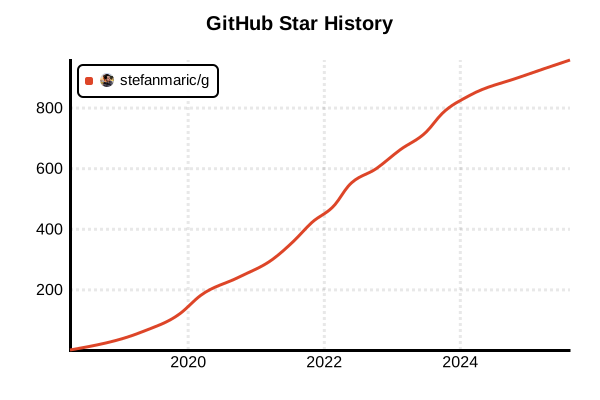
Data as of: 7/20/2025, 03:00 AM
Language Version Management Tool
g
Overview
g is a simple and lightweight Go version management tool developed by Stefan Maric. With its "gluten-free" motto, it eliminates unnecessary features and focuses on minimal essential functionality, achieving intuitive and fast operation. Implemented as a shell script, it has almost no additional dependencies.
Details
Key Features
- Ultra-lightweight: Works with just a single shell script file
- Simple commands: Easy-to-remember short command syntax
- Cross-platform: Supports macOS, Linux, BSD, and WSL (Windows)
- Automatic setup: Automatically configures environment variables during installation
- Self-upgrade: Easy updates of g itself
- Minimal dependencies: Requires only curl or wget
How It Works
g downloads and manages official Go binaries, using symbolic links to switch between currently active versions. It works independently of $GOPATH and implements version management by adding $GOROOT/bin to PATH.
Design Philosophy
- Lean design: No complex features or package sets
- UNIX tool philosophy: Do one thing well
- Minimize dependencies: Minimal reliance on external tools
- Transparency: Simple shell script that's easy to understand
Advantages and Disadvantages
Advantages
- Overwhelming simplicity: Almost zero learning curve
- Fast operation: Lightweight execution with shell script
- Easy installation: One-liner setup completion
- Maintenance-free: Stable operation with simple implementation
- Transparency: Readable code that's easy to understand
- Flexibility: Easy to customize the script
Disadvantages
- Limited features: No package sets or project-specific configurations
- No auto-switching: No automatic version switching on directory change
- No Windows support: Doesn't work on native Windows (WSL is supported)
- Lacks enterprise features: No features for large teams
- No plugins: No support for extensions
Reference Pages
Usage Examples
Installation
# One-liner installation (recommended)
curl -sSL https://git.io/g-install | sh -s

# Or using wget
wget -qO- https://git.io/g-install | sh -s

# Manual installation
# 1. Download the script
curl -sSL https://raw.githubusercontent.com/stefanmaric/g/master/bin/g -o ~/bin/g

# 2. Grant execution permissions
chmod +x ~/bin/g

# 3. Add to shell configuration (e.g., ~/.bashrc)
export PATH="$HOME/bin:$PATH"
export GOPATH="$HOME/go"
export PATH="$GOPATH/bin:$PATH"
Basic Usage
# Show available versions
g list

# Install and use latest stable version
g install latest
g use latest

# Install specific versions
g install 1.21.5
g install 1.20.12

# Show installed versions
g list installed

# Switch versions
g use 1.21.5
g use 1.20.12

# Check current version
g --version
go version
Version Management Operations
# Install beta or rc versions
g install 1.22rc1
g install 1.21beta1

# Uninstall versions
g uninstall 1.20.12
g uninstall 1.19.13

# Remove all versions (except currently used)
g prune

# Pin version (create symbolic link)
g use 1.21.5
# Now 'go' command refers to 1.21.5
Managing g Tool Itself
# Update g itself
g self-upgrade

# Check g version
g --version

# Display help
g help
g --help

# Check environment variables
echo $GOROOT
echo $GOPATH
echo $PATH | grep -o '[^:]*go[^:]*'
Development Workflow
# Set up new project
mkdir my-project && cd my-project

# Use Go 1.21
g use 1.21.5

# Initialize go.mod
go mod init github.com/user/my-project

# Install dependencies
go get -u ./...

# Build and test
go build
go test ./...
Using in CI/CD Environments
# GitHub Actions example
# - name: Install g
#   run: curl -sSL https://git.io/g-install | sh -s
#
# - name: Install Go
#   run: |
#     g install 1.21.5
#     g use 1.21.5
#
# - name: Build
#   run: go build ./...

# Dockerfile example
# FROM ubuntu:latest
# RUN apt-get update && apt-get install -y curl
# RUN curl -sSL https://git.io/g-install | sh -s
# ENV PATH="/root/bin:${PATH}"
# RUN g install latest && g use latest
Troubleshooting
# Check installation paths
which g
which go

# Verify g operation
g run env GOROOT
g run env GOPATH

# Clear cache
rm -rf ~/.g/cache

# Manually remove Go binaries
rm -rf ~/.g/versions

# Reset environment variables
unset GOROOT
source ~/.bashrc  # or ~/.zshrc

# Run in debug mode
DEBUG=1 g install 1.21.5