gobrew
GitHub Overview
kevincobain2000/gobrew
Go version manager, written in Go. Super simple tool to install and manage Go versions. Install go without root. Gobrew doesn't require shell rehash.
Stars396
Watchers7
Forks29
Created:February 15, 2021
Language:Go
License:MIT License
Topics
envgogoenvgolanggolang-cligolang-packagegolang-toolsinstallmanagement
Star History
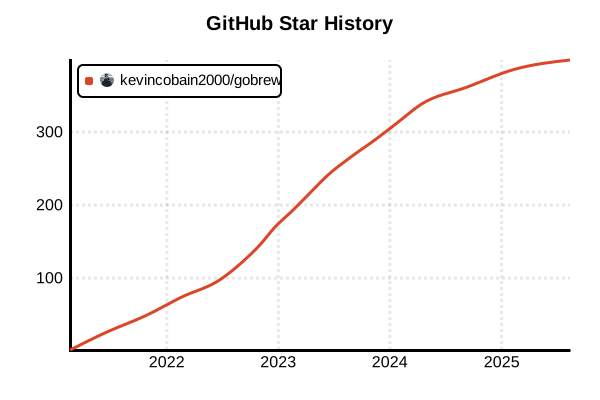
Data as of: 7/20/2025, 03:00 AM
Language Version Management Tool
gobrew
Overview
gobrew is a fast and simple Go version management tool implemented in Go. Developed by kevincobain2000 and inspired by nodebrew's design, it can be installed without root privileges and doesn't require shell rehash. It natively supports Windows, macOS, Linux, and even ARM architectures.
Details
Key Features
- Go implementation: Fast and stable operation
- Cross-platform: Full support for Windows, macOS, Linux, and ARM
- Automatic version detection: Automatically recognizes version from go.mod file
- Smart version selection: Specify latest, dev-latest, or latest of specific major version
- Cache functionality: Fast reuse of downloaded binaries
- Self-update: Easy updates of gobrew itself
- Simple commands: Intuitive and easy-to-remember command syntax
Architecture
- Installation location: Placed in ~/.gobrew by default
- Binary management: Stores each version in versions/ directory
- Current version: Managed via current/ symbolic link
- Environment variables: Customizable via GOBREW_ROOT
Distinctive Features
- mod file integration: Auto-configure from go.mod with
gobrew use mod - Flexible version specification: Specify like 1.21@latest, 1.20@dev-latest
- Prune functionality: Bulk delete unused versions
- TTL cache: Set expiration for download cache
Advantages and Disadvantages
Advantages
- Outstanding speed: Fast operation due to Go implementation
- Full Windows support: Native operation in PowerShell
- Zero configuration: Ready to use immediately after installation
- Intuitive: Simple and easy-to-understand commands
- Latest version tracking: Automatically supports new Go releases
- Lightweight: Minimal disk usage
- ARM support: Works on M1/M2 Macs and Raspberry Pi
Disadvantages
- No package set feature: No support for project-specific dependency management
- Customizability: Few advanced configuration options
- Community: Smaller user base compared to gvm or g
- No plugins: No extension ecosystem
- No auto-switching: No automatic version switching on directory change
Reference Pages
Usage Examples
Installation
# Linux/macOS (recommended method)
curl -sLk https://raw.githubusercontent.com/kevincobain2000/gobrew/master/git.io.sh | sh

# Windows PowerShell
Set-ExecutionPolicy Bypass -Scope Process -Force
[System.Net.ServicePointManager]::SecurityProtocol = [System.Net.ServicePointManager]::SecurityProtocol -bor 3072
iex ((New-Object System.Net.WebClient).DownloadString('https://raw.githubusercontent.com/kevincobain2000/gobrew/master/git.io.ps1'))

# Set environment variables (~/.bashrc or ~/.zshrc)
export PATH="$HOME/.gobrew/current/bin:$HOME/.gobrew/bin:$PATH"

# Custom installation location
export GOBREW_ROOT=/opt/gobrew
curl -sLk https://raw.githubusercontent.com/kevincobain2000/gobrew/master/git.io.sh | sh
Basic Usage
# Show available versions
gobrew ls-remote

# Show including RC/Beta versions
gobrew ls-remote --include-rc

# Install and use latest stable version
gobrew use latest

# Install specific versions
gobrew use 1.21.5
gobrew use 1.20.12

# Show installed versions
gobrew list

# Check current version in use
gobrew current
go version
Advanced Version Management
# Set version from go.mod
gobrew use mod

# Install latest development version
gobrew use dev-latest

# Latest of specific major version
gobrew use 1.21@latest
gobrew use 1.20@dev-latest

# Install version only (no switch)
gobrew install 1.21.5
gobrew install 1.22rc1

# Uninstall version
gobrew uninstall 1.19.13

# Remove all except current
gobrew prune
Project Usage
# Work in project directory
cd ~/projects/my-app

# Check go.mod file
cat go.mod
# module example.com/my-app
# go 1.21

# Auto-configure based on go.mod
gobrew use mod

# Development work
go build
go test ./...

# Move to another project
cd ~/projects/legacy-app
# If go.mod specifies 1.20
gobrew use mod  # Automatically installs and uses 1.20.x
Cache and Performance
# Install using cache (default)
gobrew use 1.21.5

# Clear cache
gobrew --clear-cache use 1.21.5
gobrew -c use 1.21.5

# Disable cache
gobrew --disable-cache use 1.21.5
gobrew -d use 1.21.5

# Set cache TTL (default 20m)
gobrew --ttl=30m use 1.21.5
gobrew -t 30m use 1.21.5
Managing gobrew
# Update gobrew itself
gobrew self-update

# Check version
gobrew version

# Display help
gobrew help
gobrew -h

# Uninstall
# Linux/macOS
rm -rf ~/.gobrew
# Also remove environment variable settings

# Windows
Remove-Item -Recurse -Force "$env:USERPROFILE\.gobrew"
Using in CI/CD Environments
# GitHub Actions
# - name: Install gobrew
#   run: |
#     curl -sLk https://raw.githubusercontent.com/kevincobain2000/gobrew/master/git.io.sh | sh
#     echo "$HOME/.gobrew/current/bin:$HOME/.gobrew/bin" >> $GITHUB_PATH
#
# - name: Install Go
#   run: gobrew use mod  # Auto-configure from go.mod

# Dockerfile
# FROM ubuntu:latest
# RUN apt-get update && apt-get install -y curl
# RUN curl -sLk https://raw.githubusercontent.com/kevincobain2000/gobrew/master/git.io.sh | sh
# ENV PATH="/root/.gobrew/current/bin:/root/.gobrew/bin:${PATH}"
# COPY go.mod .
# RUN gobrew use mod
Troubleshooting
# Check installation paths
which gobrew
which go
echo $GOBREW_ROOT

# Check environment variables
gobrew env

# Display detailed logs
GOBREW_DEBUG=1 gobrew use 1.21.5

# Resolve permission errors
chmod -R 755 ~/.gobrew

# Handle network errors
# Proxy settings
export HTTP_PROXY=http://proxy.example.com:8080
export HTTPS_PROXY=http://proxy.example.com:8080

# Manually place binaries
mkdir -p ~/.gobrew/versions/1.21.5
# Place binaries downloaded from official site