GVM
GitHub Overview
moovweb/gvm
Go Version Manager
Repository:https://github.com/moovweb/gvm
Homepage:http://github.com/moovweb/gvm
Stars11,096
Watchers149
Forks563
Created:December 3, 2011
Language:Shell
License:MIT License
Topics
dependency-managergolang
Star History
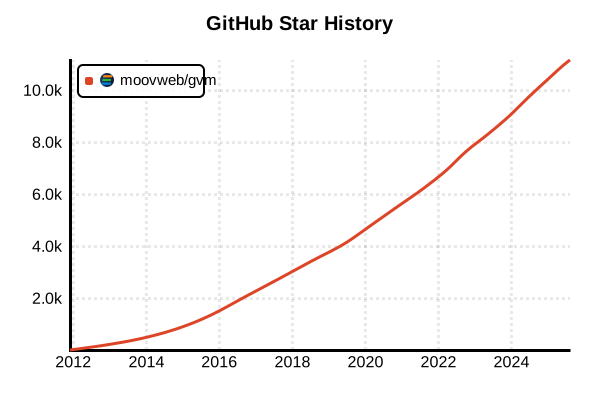
Data as of: 7/20/2025, 03:00 AM
Language Version Management Tool
GVM
Overview
GVM (Go Version Manager) is an open-source tool for managing Go environments. It supports installing and managing multiple Go versions, and particularly through its "pkgset" feature, it enables building independent package environments for each project. Influenced by Ruby's RVM design, it achieves separation of dependencies between projects.
Details
Key Features
- pkgset functionality: Manages independent GOPATH environments per project
- Multiple version management: Easy switching between different Go versions
- Source build support: Can build from source, not just official binaries
- Environment isolation: Prevents dependency conflicts between projects
- Cross-compilation: Supports building for different platforms
- Rich commands: Enables detailed environment management
How pkgset Works
GVM's most distinctive feature, pkgset, creates independent GOPATHs for each project, completely separating package dependencies. This allows using different package versions across different projects.
Architecture
- Version management: Stores Go versions in ~/.gvm/gos/
- pkgset management: Stores project-specific environments in ~/.gvm/pkgsets/
- Environment variable control: Dynamically updates environment variables through shell functions
- Hook functionality: Extensible through custom scripts
Advantages and Disadvantages
Advantages
- Complete environment isolation: Independence between projects through pkgset
- Flexibility: Fine-grained environment configuration and customization
- Maturity: Stability and rich features from years of development
- Source builds: Support for latest development versions and custom builds
- Team development: High environment reproducibility
- Compatibility: High compatibility with existing Go projects
Disadvantages
- Complexity: Steep learning curve for beginners
- Configuration complexity: Many configuration options due to rich features
- Performance: Can be slow as it's shell script-based
- No Windows support: Doesn't work on native Windows
- Maintenance: Requires regular updates
- Disk usage: Consumes space for each pkgset
Reference Pages
Usage Examples
Installation
# Official installation script (recommended)
bash < <(curl -s -S -L https://raw.githubusercontent.com/moovweb/gvm/master/binscripts/gvm-installer)

# Manual installation
# 1. Clone repository
git clone https://github.com/moovweb/gvm.git ~/.gvm

# 2. Add to shell configuration (~/.bashrc or ~/.zshrc)
[[ -s "$HOME/.gvm/scripts/gvm" ]] && source "$HOME/.gvm/scripts/gvm"

# 3. Reload configuration
source ~/.bashrc  # or source ~/.zshrc

# Verify installation
gvm version
Basic Usage
# Show available Go versions
gvm listall

# Install Go 1.21.5
gvm install go1.21.5

# Install in binary mode (fast)
gvm install go1.21.5 -B

# Build from source
gvm install go1.21.5 -s

# Show installed versions
gvm list

# Switch versions
gvm use go1.21.5

# Set default version
gvm use go1.21.5 --default
Using pkgset
# Check current Go version
gvm list

# Use Go 1.21.5
gvm use go1.21.5

# Create new pkgset
gvm pkgset create myproject

# Use pkgset
gvm pkgset use myproject

# List pkgsets
gvm pkgset list

# Return to global pkgset
gvm pkgset use global

# Delete pkgset
gvm pkgset delete myproject
Project Usage
# Work in project directory
cd ~/projects/webapp

# Create project-specific environment
gvm use go1.21.5
gvm pkgset create webapp
gvm pkgset use webapp

# Install dependencies
go get github.com/gin-gonic/gin
go get gorm.io/gorm

# Check environment
echo $GOPATH
gvm pkgenv webapp

# Move to another project
cd ~/projects/cli-tool
gvm use go1.20.12
gvm pkgset create cli-tool
gvm pkgset use cli-tool
Advanced Usage
# Set up cross-compilation environment
gvm cross linux amd64
gvm cross darwin arm64
gvm cross windows amd64

# Check environment variables
gvm env

# Edit GVM configuration
gvm config

# Uninstall
gvm uninstall go1.19.13

# Clear cache
gvm clear-cache

# Install development version
gvm install tip
gvm install go1.22rc1
Team Development Usage
# Create .gvmrc file (project root)
echo "go1.21.5" > .gvmrc
echo "webapp" >> .gvmrc

# Team member environment setup
# 1. Clone project
git clone https://github.com/team/project.git
cd project

# 2. Auto-configure environment with GVM
gvm install from-binary go1.21.5
gvm use go1.21.5
gvm pkgset create webapp
gvm pkgset use webapp

# 3. Install dependencies
go mod download
Troubleshooting
# If GVM doesn't work
# Restart shell
exec $SHELL

# Check environment variables
echo $GVM_ROOT
echo $gvm_go_name
echo $gvm_pkgset_name

# Check logs
gvm debug

# Force environment reset
gvm implode  # Warning: Deletes all GVM environments
bash < <(curl -s -S -L https://raw.githubusercontent.com/moovweb/gvm/master/binscripts/gvm-installer)

# Repair pkgset
cd $GVM_ROOT/pkgsets
ls -la
# Manually delete corrupted pkgset