Jabba
GitHub Overview
Stars3,226
Watchers26
Forks214
Created:March 24, 2016
Language:Go
License:-
Topics
None
Star History
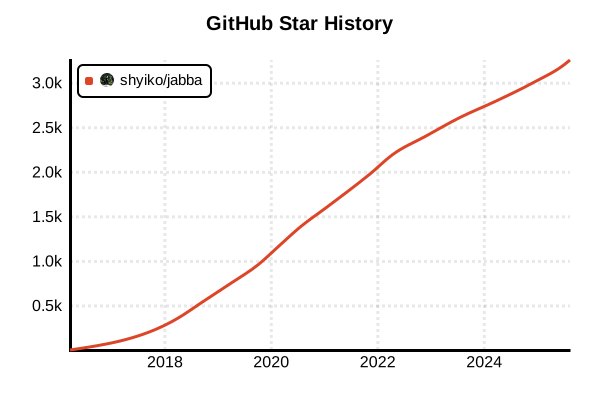
Data as of: 7/20/2025, 02:59 AM
Language Version Management Tool
Jabba
Overview
Jabba is a cross-platform Java version manager written in Go. It works seamlessly on Windows, macOS, and Linux, allowing easy installation and switching between multiple JDK versions. Inspired by nvm, Jabba supports over 100 JDK distributions and enables project-specific version management through .jabbarc files, making it ideal for team development.
Details
Key Features
- Full Cross-platform Support: Works on Windows, macOS, Linux (x86/x64/ARM)
- Extensive JDK Support: Oracle, OpenJDK, Amazon Corretto, Azul Zulu, GraalVM, and 100+ others
- .jabbarc Files: Automatic project-specific Java version configuration
- Alias Feature: Set short names for frequently used versions
- Link Feature: Manage existing system JDKs with Jabba
- High Performance: Lightweight and fast operation with Go implementation
Supported JDK Distributions
- Oracle JDK / Server JRE
- Adopt OpenJDK (Hotspot / Eclipse OpenJ9)
- Amazon Corretto
- Azul Zulu OpenJDK
- BellSoft Liberica JDK
- SAP SapMachine
- GraalVM CE
- IBM SDK Java Technology Edition
- OpenJDK
- OpenJDK with Shenandoah GC
Architecture
Jabba downloads and extracts JDKs to the ~/.jabba directory and dynamically updates JAVA_HOME and PATH environment variables through shell integration. It employs a semantic versioning system supporting version ranges (e.g., >=1.8.0 <1.9.0) and shortcuts (e.g., ~1.8.73).
Advantages and Disadvantages
Advantages
- Full Windows Support: Native PowerShell operation (no WSL required)
- Lightweight and Fast: Low memory usage with Go implementation
- Intuitive Commands: Familiar design for nvm users
- Flexible Version Specification: Semantic versioning support
- Docker Integration: Easy to use in Dockerfiles
- Custom URL Support: Install JDKs from any archive URL
Disadvantages
- JVM Only: Cannot manage other languages like Node.js or Python
- Community Size: Smaller user base compared to SDKMAN!
- No Plugin System: Difficult to add extensions
- Update Frequency: Irregular maintenance
- Documentation: Limited official documentation
Reference Pages
Usage Examples
Installation
# Linux/macOS
curl -sL https://github.com/shyiko/jabba/raw/master/install.sh | bash && . ~/.jabba/jabba.sh

# macOS (using Homebrew)
brew install jabba

# Windows (PowerShell - run as Administrator)
[Net.ServicePointManager]::SecurityProtocol = [Net.SecurityProtocolType]::Tls12
Invoke-Expression (
  Invoke-WebRequest https://github.com/shyiko/jabba/raw/master/install.ps1 -UseBasicParsing
).Content

# Skip shell configuration
curl -sL https://github.com/shyiko/jabba/raw/master/install.sh | bash -s -- --skip-rc && . ~/.jabba/jabba.sh

# Verify installation
jabba --version
Basic Usage
# List available Java versions
jabba ls-remote

# Install latest version
jabba install [email protected]
jabba install [email protected]

# Install specific distributions
jabba install [email protected]      # Azul Zulu
jabba install [email protected]    # Amazon Corretto
jabba install [email protected]     # GraalVM
jabba install [email protected]    # BellSoft Liberica

# Install Oracle JDK
jabba install oracle@21

# List installed versions
jabba ls
Version Switching
# Temporary switch (current shell only)
jabba use openjdk@21
jabba use [email protected]

# Check current version
jabba current

# Execute command with specific version
jabba use adopt@11 -- java -version
jabba use zulu@8 -- javac MyApp.java
Alias and Link Management
# Create aliases
jabba alias default openjdk@21
jabba alias lts [email protected]
jabba alias java8 [email protected]

# Use aliases
jabba use default
jabba use lts

# Delete alias
jabba unalias java8

# Link system JDK
jabba link system@17 /usr/lib/jvm/java-17-openjdk
jabba link custom@21 /opt/jdk-21

# Use linked JDK
jabba use system@17

# Remove link
jabba unlink custom@21
Project-specific Configuration (.jabbarc)
# Navigate to project directory
cd /path/to/my-project

# Create .jabbarc file (simple format)
echo "[email protected]" > .jabbarc

# YAML format
cat > .jabbarc << EOF
jdk: [email protected]
EOF

# Specify version range
cat > .jabbarc << EOF
jdk: ">=11 <17"
EOF

# Install and use based on .jabbarc
jabba install
jabba use

# Save current version to .jabbarc
jabba current > .jabbarc
Installing from Custom URLs
# Install from custom URL
jabba install custom@11 https://example.com/jdk-11.tar.gz

# Install from local file
jabba install local@17 file:///path/to/jdk-17.zip

# Architecture-specific installation
jabba install adopt@11-linux-arm64 \
  https://github.com/adoptium/temurin11-binaries/releases/download/jdk-11.0.21%2B9/OpenJDK11U-jdk_aarch64_linux_hotspot_11.0.21_9.tar.gz
Environment Variables and Path Management
# Check JAVA_HOME
echo $JAVA_HOME

# Check installation path
jabba which openjdk@21
jabba which default  # Works with aliases too

# Reset environment (restore original state)
jabba deactivate
CI/CD Environment Usage
# GitHub Actions example
- name: Setup Jabba
  run: |
    curl -sL https://github.com/shyiko/jabba/raw/master/install.sh | bash
    echo "$HOME/.jabba/bin" >> $GITHUB_PATH

- name: Install Java
  run: |
    source ~/.jabba/jabba.sh
    jabba install [email protected]
    jabba use [email protected]

# GitLab CI example
before_script:
  - curl -sL https://github.com/shyiko/jabba/raw/master/install.sh | bash
  - source ~/.jabba/jabba.sh
  - jabba install
  - jabba use
Docker Usage
# Dockerfile example
FROM ubuntu:22.04

# Install Jabba
RUN apt-get update && apt-get install -y curl
RUN curl -sL https://github.com/shyiko/jabba/raw/master/install.sh | \
    JABBA_COMMAND="install [email protected] -o /jdk" bash

# Set environment variables
ENV JAVA_HOME /jdk
ENV PATH $JAVA_HOME/bin:$PATH

# Alternative: Multi-stage build
FROM buildpack-deps:bullseye-curl AS jabba
RUN curl -sL https://github.com/shyiko/jabba/raw/master/install.sh | \
    JABBA_COMMAND="install openjdk@21 -o /jdk" bash

FROM ubuntu:22.04
COPY --from=jabba /jdk /opt/java
ENV JAVA_HOME=/opt/java
ENV PATH=$JAVA_HOME/bin:$PATH
Uninstall and Troubleshooting
# Uninstall specific versions
jabba uninstall openjdk@17
jabba uninstall [email protected]

# Clear cache
rm -rf ~/.jabba/cache

# Enable detailed logging
JABBA_DEBUG=1 jabba install openjdk@21

# Uninstall Jabba itself
rm -rf ~/.jabba
# Remove the following lines from ~/.bashrc, ~/.zshrc, etc.:
# [ -s "$JABBA_HOME/jabba.sh" ] && source "$JABBA_HOME/jabba.sh"