jenv
GitHub Overview
jenv/jenv
Manage your Java environment
Repository:https://github.com/jenv/jenv
Homepage:http://www.jenv.be
Stars6,277
Watchers69
Forks392
Created:January 24, 2013
Language:Shell
License:MIT License
Topics
None
Star History
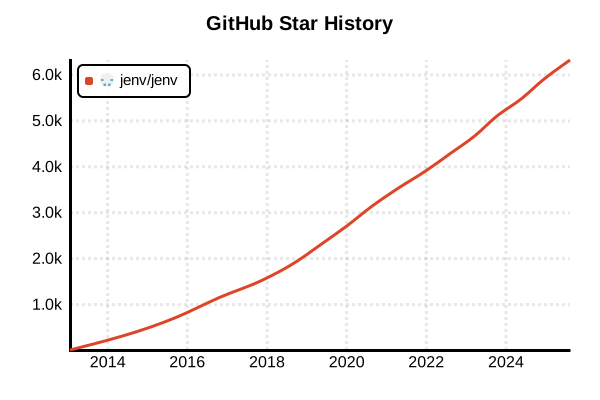
Data as of: 7/20/2025, 02:59 AM
Language Version Management Tool
jenv
Overview
jenv is a command-line tool for managing multiple Java versions. Inspired by rbenv, it allows using different JDK versions for each project. It automatically manages the JAVA_HOME environment variable and integrates seamlessly with build tools like Maven and Gradle.
Details
Key Features
- Automatic JAVA_HOME Management: Automatically sets and updates environment variables
- Per-Project Management: Automatic switching via .java-version files
- Build Tool Integration: Full compatibility with Maven, Gradle, and Ant
- Multiple JDK Coexistence: Oracle JDK, OpenJDK, AdoptOpenJDK, etc.
- Plugin System: Extensible functionality
- Shell Integration: Supports bash, zsh, and fish
How It Works
jenv adds a shim directory to PATH and intercepts java commands. At runtime, it determines the appropriate JDK version, sets JAVA_HOME, and then executes the actual Java command.
Important Note
jenv does not install JDKs. You need to install JDKs beforehand and register them with jenv. This differs from pyenv and rbenv.
Advantages and Disadvantages
Advantages
- Lightweight: Simple design focused only on JDK management
- Flexibility: Utilizes existing JDK installations
- Project Isolation: Independent Java environment for each project
- IDE Support: Integration with IntelliJ IDEA and Eclipse
- Standard Behavior: JAVA_HOME-based, compatible with existing tools
- Multi-Vendor Support: Works with various JDK distributions
Disadvantages
- No JDK Installation: Requires separate JDK installation
- No Windows Support: Only supports UNIX-like OS
- Complex Initial Setup: Requires manual JDK registration
- Update Overhead: New JDK versions must be added manually
- Development Stagnation: Few recent updates
Reference Pages
Usage Examples
Installation (Linux/macOS)
# Install via Git clone
git clone https://github.com/jenv/jenv.git ~/.jenv

# On macOS, Homebrew is also available
brew install jenv

# Linux (LinuxBrew)
brew install jenv
Shell Configuration (Add to .bashrc or .zshrc)
# Set jenv path
export PATH="$HOME/.jenv/bin:$PATH"

# Initialize jenv
eval "$(jenv init -)"

# Enable automatic JAVA_HOME setting (important)
eval "$(jenv enable-plugin export)"

# Apply configuration
source ~/.bashrc  # or source ~/.zshrc
Installing and Registering JDKs
# Install JDK (Example: macOS with Homebrew)
brew install openjdk@17
brew install openjdk@11
brew install openjdk@8

# Install JDK (Example: Ubuntu)
sudo apt update
sudo apt install openjdk-17-jdk
sudo apt install openjdk-11-jdk
sudo apt install openjdk-8-jdk

# Register installed JDKs with jenv
jenv add /usr/lib/jvm/java-17-openjdk-amd64
jenv add /usr/lib/jvm/java-11-openjdk-amd64
jenv add /usr/lib/jvm/java-8-openjdk-amd64

# Registration example for macOS
jenv add /Library/Java/JavaVirtualMachines/openjdk-17.jdk/Contents/Home
jenv add $(/usr/libexec/java_home -v 17)
Basic Usage
# Check registered JDK versions
jenv versions

# Show available JDKs in detail
jenv versions --bare

# Set global version
jenv global 17.0

# Check current version
jenv version
java -version

# Check JAVA_HOME
echo $JAVA_HOME
Per-Project Management
# Navigate to project directory
cd /path/to/my-java-project

# Set Java version for this project
jenv local 11.0

# .java-version file is created
cat .java-version
# 11.0

# Use different version in another project
cd /path/to/legacy-project
jenv local 1.8
java -version  # Java 8 is used
Temporary Version Switching
# Change version only for current shell session
jenv shell 17.0

# Revert back
jenv shell --unset
Plugin Management
# Check available plugins
jenv plugins

# Enable export plugin (automatic JAVA_HOME setting)
jenv enable-plugin export

# Enable Maven plugin
jenv enable-plugin maven

# Enable Gradle plugin
jenv enable-plugin gradle

# Disable plugin
jenv disable-plugin maven
JDK Management
# Add new JDK
jenv add /path/to/new/jdk

# Create alias
jenv alias oracle64-17.0.2 oracle-17

# Remove JDK
jenv remove 11.0.2

# Show detailed path for specific version
jenv which java
jenv which javac
Integration with Maven and Gradle
# Use with Maven project
cd /path/to/maven-project
jenv local 11.0
mvn --version  # Java 11 is used

# Use with Gradle project
cd /path/to/gradle-project
jenv local 17.0
gradle --version  # Java 17 is used

# Works with project's pom.xml or build.gradle
# No additional configuration needed as JAVA_HOME is set automatically
Troubleshooting
# Reinitialize jenv
jenv rehash

# Check configuration
jenv doctor

# Check JDK path
jenv which java

# Check environment variables
env | grep JAVA

# Update jenv
cd ~/.jenv
git pull