fnm
GitHub Overview
Schniz/fnm
🚀 Fast and simple Node.js version manager, built in Rust
Repository:https://github.com/Schniz/fnm
Homepage:https://fnm.vercel.app
Stars21,519
Watchers62
Forks560
Created:January 16, 2019
Language:Rust
License:GNU General Public License v3.0
Topics
hacktoberfestjavascriptnodejsnvmreasonmlversion
Star History
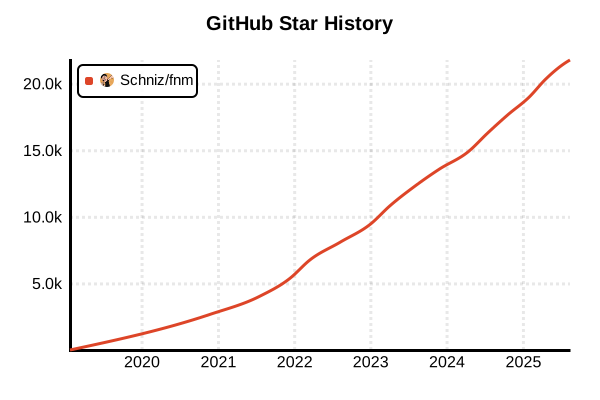
Data as of: 7/20/2025, 02:18 AM
Language Version Management Tool
fnm (Fast Node Manager)
Overview
fnm is a fast Node.js version management tool implemented in Rust. While maintaining compatibility with nvm, it achieves faster operation and cross-platform support. Provided as a simple binary file, it's easy to install and use.
Details
Key Features
- Ultra-Fast: Fast startup and version switching with Rust implementation
- Cross-Platform: Works on Windows, macOS, and Linux
- .nvmrc/.node-version Support: Compatibility with nvm
- Simple Binary: Operates as a single executable file
- Auto-Install: Automatically fetches uninstalled versions with use command
- Parallel Downloads: Fast version installation
Architecture
fnm is written in Rust and optimizes performance by using system calls directly. Each Node.js version is stored in an independent directory and managed with symbolic links.
Supported Shells
- Bash: Full support
- Zsh: Full support
- Fish: Full support
- PowerShell: Full support in Windows environment
- Windows Command Prompt: Basic support
Advantages and Disadvantages
Advantages
- Outstanding Speed: 10x faster startup compared to nvm
- Windows Support: Works in native Windows environment
- Memory Efficiency: Minimal memory usage
- Easy Installation: Simple setup via package managers
- nvm Compatible: Existing .nvmrc files work as-is
- Modern Implementation: Safe and efficient code with Rust
Disadvantages
- Limited Features: Some advanced nvm features not implemented
- Shorter History: Less proven track record compared to nvm
- Customizability: Fewer flexible configuration options than nvm
- Community: Smaller user base compared to nvm
- No Plugins: No extension system available
Reference Pages
Usage Examples
Installation
# macOS/Linux (using Homebrew)
brew install fnm

# macOS/Linux (installation script)
curl -fsSL https://fnm.vercel.app/install | bash

# Windows (Scoop)
scoop install fnm

# Windows (Chocolatey)
choco install fnm

# Using Cargo (Rust)
cargo install fnm

# Arch Linux
pacman -S fnm
Shell Configuration
# Bash (add to .bashrc)
eval "$(fnm env --use-on-cd)"

# Zsh (add to .zshrc)
eval "$(fnm env --use-on-cd)"

# Fish (add to ~/.config/fish/config.fish)
fnm env --use-on-cd | source

# PowerShell (add to profile)
fnm env --use-on-cd | Out-String | Invoke-Expression

# Apply configuration
source ~/.bashrc  # or relevant shell config file
Basic Usage
# List available Node.js versions
fnm list-remote

# Show only LTS versions
fnm list-remote --lts

# Install latest version
fnm install --latest

# Install LTS version
fnm install --lts

# Install specific version
fnm install 20.11.0
fnm install 18.19.0

# Check installed versions
fnm list

# Check current version
fnm current
node --version
Version Switching
# Switch to specific version
fnm use 20.11.0

# Switch to system Node.js
fnm use system

# Set default version
fnm default 20.11.0

# Install and use simultaneously
fnm use 18.19.0 --install-if-missing
Per-Project Management
# Navigate to project directory
cd /path/to/my-project

# Create .nvmrc file (nvm compatible)
echo "20.11.0" > .nvmrc

# Or create .node-version file
echo "20.11.0" > .node-version

# Automatically switches version (with --use-on-cd setting)
cd /path/to/my-project
# Using Node.js v20.11.0

# Manually use .nvmrc version
fnm use
Advanced Usage
# Install multiple Node.js versions simultaneously
fnm install 18 19 20

# Create aliases
fnm alias 20.11.0 lts-iron
fnm alias 18.19.0 production

# Use alias
fnm use lts-iron

# Remove alias
fnm unalias lts-iron

# Uninstall Node.js version
fnm uninstall 16.20.2

# Show all versions (including aliases)
fnm list --all
Environment Variables and Options
# Set log level
export FNM_LOGLEVEL=debug

# Set Node.js download mirror
export FNM_NODE_DIST_MIRROR=https://nodejs.org/dist

# Change installation directory
export FNM_DIR="$HOME/.fnm-custom"

# Auto-enable Corepack
export FNM_COREPACK_ENABLED=true

# Suppress output on version switch
export FNM_VERSION_FILE_STRATEGY=local
Performance Comparison
# Measure fnm startup time
time fnm --version

# Compare with nvm (if nvm is installed)
time nvm --version

# Compare version switching speed
time fnm use 20.11.0
time nvm use 20.11.0
Troubleshooting
# Check configuration
fnm env

# Show current configuration path
fnm list --show-path

# Clear cache
rm -rf $(fnm env | grep FNM_DIR | cut -d'"' -f2)/node-versions

# Force reinstall
fnm install --force 20.11.0