nvm
GitHub Overview
nvm-sh/nvm
Node Version Manager - POSIX-compliant bash script to manage multiple active node.js versions
Repository:https://github.com/nvm-sh/nvm
Stars85,917
Watchers1,032
Forks9,045
Created:April 15, 2010
Language:Shell
License:MIT License
Topics
bashinstallltsnodenode-jsnodejsnvmnvmrcposixposix-compliantshellversion-managerzsh
Star History
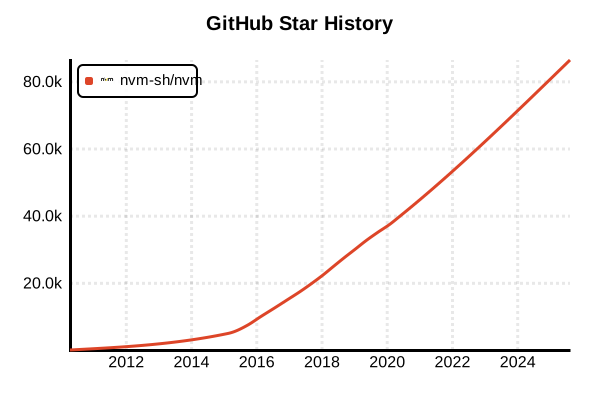
Data as of: 7/20/2025, 02:18 AM
Language Version Management Tool
nvm (Node Version Manager)
Overview
nvm is the most popular tool for managing multiple Node.js versions. It allows using different Node.js versions for each project, with npm being managed simultaneously. Implemented in shell scripts, it works with POSIX-compliant shells.
Details
Key Features
- Easy Version Switching: Switch Node.js versions with a single command
- Automatic npm Management: npm is automatically managed alongside Node.js
- .nvmrc File: Automatic version configuration per project
- LTS Support: Easy installation of LTS (Long Term Support) versions
- Alias Feature: Assign friendly names to versions
- Upgrade Assistance: Package migration between Node.js versions
How It Works
nvm dynamically modifies the PATH environment variable to switch the Node.js version in use. Each version is installed independently in the ~/.nvm/versions/node/ directory.
Supported Environments
- Linux: All major distributions
- macOS: Full support
- Windows: WSL (Windows Subsystem for Linux) or use nvm-windows
- Shells: bash, zsh, fish (with plugin)
Advantages and Disadvantages
Advantages
- Industry Standard: Most widely used among Node.js developers
- Rich Features: Convenient features like aliases and auto-switching
- Active Development: Continuous updates and maintenance
- Easy to Use: Intuitive command structure
- Complete Isolation: Independent npm environment for each version
- Fast Installation: Uses precompiled binaries
Disadvantages
- Shell Dependency: May cause shell startup delay
- No Windows Support: Requires separate tool (nvm-windows) for native Windows
- Memory Usage: Disk space consumption with multiple version installations
- Initial Setup: Requires editing shell configuration files
- Performance: May be slower compared to newer tools like fnm
Reference Pages
- nvm Official Repository
- nvm-windows (Windows Version)
- Node.js Official Site
- nvm Official Documentation
Usage Examples
Installation (Linux/macOS)
# Run installation script
curl -o- https://raw.githubusercontent.com/nvm-sh/nvm/v0.39.0/install.sh | bash

# Or use wget
wget -qO- https://raw.githubusercontent.com/nvm-sh/nvm/v0.39.0/install.sh | bash

# Homebrew is also available on macOS (not recommended)
# brew install nvm
Shell Configuration (Automatically added to .bashrc or .zshrc)
# nvm configuration (usually added automatically)
export NVM_DIR="$HOME/.nvm"
[ -s "$NVM_DIR/nvm.sh" ] && \. "$NVM_DIR/nvm.sh"
[ -s "$NVM_DIR/bash_completion" ] && \. "$NVM_DIR/bash_completion"

# Apply configuration
source ~/.bashrc  # or source ~/.zshrc
Basic Usage
# List available Node.js versions
nvm ls-remote

# Show only LTS versions
nvm ls-remote --lts

# Install latest LTS version
nvm install --lts

# Install specific version
nvm install 20.11.0
nvm install 18.19.0
nvm install 16.20.2

# Check installed versions
nvm ls

# Check current version
nvm current
node --version
Version Switching
# Switch to specific version
nvm use 20.11.0

# Switch to latest LTS
nvm use --lts

# Set default version
nvm alias default 20.11.0

# Temporarily use different version
nvm exec 18.19.0 node app.js
Per-Project Management
# Navigate to project directory
cd /path/to/my-project

# Create .nvmrc file
echo "20.11.0" > .nvmrc

# Use version based on .nvmrc
nvm use
# Found '/path/to/my-project/.nvmrc' with version <20.11.0>

# Install and use .nvmrc version
nvm install
Alias Management
# Create aliases
nvm alias production 20.11.0
nvm alias development 21.6.1

# Use alias
nvm use production

# List aliases
nvm alias

# Remove alias
nvm unalias production
Package Migration
# Migrate packages from old to new version
nvm install 20.11.0 --reinstall-packages-from=18.19.0

# Migrate only global packages
nvm install 20.11.0 --reinstall-packages-from=18.19.0 --global

# List global packages for current version
npm ls -g --depth=0
Useful Settings and Commands
# Auto-load .nvmrc configuration (add to .bashrc)
cd() {
  builtin cd "$@"
  if [[ -f .nvmrc ]]; then
    nvm use
  fi
}

# Uninstall Node.js version
nvm uninstall 16.20.2

# Clear cache
nvm cache clear

# Update nvm
cd ~/.nvm
git fetch --tags origin
git checkout `git describe --abbrev=0 --tags --match "v[0-9]*" $(git rev-list --tags --max-count=1)`

# Install specific npm version
nvm install-latest-npm
Troubleshooting
# If nvm command not found
source ~/.bashrc

# Check PATH
echo $PATH | grep nvm

# Reinstall nvm
rm -rf ~/.nvm
# Run installation script again