Volta
GitHub Overview
volta-cli/volta
Volta: JS Toolchains as Code. ⚡
Repository:https://github.com/volta-cli/volta
Homepage:https://volta.sh
Stars12,185
Watchers51
Forks295
Created:September 25, 2017
Language:Rust
License:Other
Topics
hacktoberfestnodenodejspackage-manager
Star History
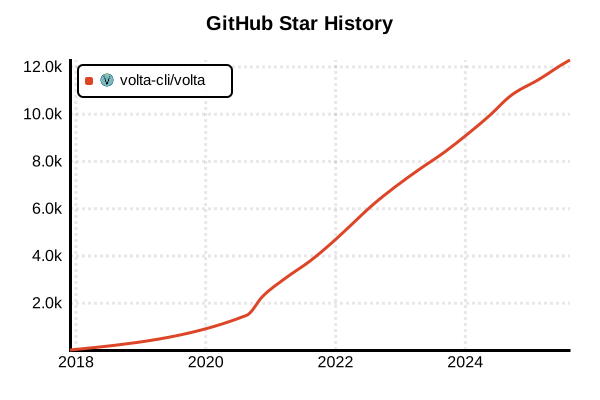
Data as of: 7/20/2025, 02:46 AM
Language Version Management Tool
Volta
Overview
Volta is a fast, cross-platform JavaScript toolchain manager built with Rust. It automatically manages versions of Node.js, npm, Yarn, pnpm, and other JavaScript tools. With package.json-based configuration, it makes it easy to maintain consistent development environments across entire teams.
Details
Key Features
- Automatic Version Switching: Automatically switches to the appropriate version in project directories
- Blazing Fast: Approximately 40x faster than nvm due to Rust implementation
- package.json Integration: Stores version information directly in package.json
- Cross-platform: Native support for Windows, macOS, and Linux
- Tool Persistence: Global tools are pinned to specific Node.js versions
- Extensible: Customization through hook system
How It Works
Volta uses a sophisticated shim system to automatically route tool calls to the appropriate versions. It doesn't rely on OS-specific features or shell-specific hooks, ensuring stable operation in any environment.
Team Development Advantages
- Reproducible Environments: Share exact versions through package.json
- Zero Configuration: New developers can start without additional setup
- CI/CD Integration: Automatically uses the same versions in production
- Dependency Consistency: Manages versions across the entire toolchain
Advantages and Disadvantages
Advantages
- Outstanding Speed: Instant version switching with Rust implementation
- Full Windows Support: Native operation without WSL
- Automation: No need for .nvmrc or similar configuration files
- Stability: Tools are locked to specific Node.js versions
- Simple Usage: Intuitive command structure
- Error Reduction: Prevents version mismatch errors
Disadvantages
- Community Size: Smaller user base compared to nvm
- Configuration Flexibility: Fewer granular configuration options than nvm
- Learning Curve: Need to adapt to package.json-based management
- Legacy Compatibility: Requires workarounds for older projects
- Plugin Ecosystem: Still developing compared to mature alternatives
Reference Pages
Usage Examples
Installation
# macOS/Linux (recommended method)
curl https://get.volta.sh | bash

# Windows (winget - recommended)
winget install Volta.Volta

# Windows (installer)
# Download from https://github.com/volta-cli/volta/releases

# Homebrew (macOS)
brew install volta

# RPM-based Linux (RHEL, CentOS, Fedora)
yum install volta

# Verify installation
volta --version
Basic Usage
# Install Node.js (latest LTS)
volta install node

# Install specific version
volta install [email protected]
volta install [email protected]

# Install npm
volta install npm@latest
volta install [email protected]

# Install Yarn
volta install yarn@latest
volta install [email protected]

# Install pnpm
volta install pnpm@latest
Pinning Versions in Projects
# Navigate to project directory
cd /path/to/my-project

# Pin Node.js version
volta pin [email protected]

# Pin npm version
volta pin [email protected]

# Configuration saved to package.json
# {
#   "volta": {
#     "node": "18.17.0",
#     "npm": "9.8.1"
#   }
# }

# For Yarn projects
volta pin [email protected]

# For pnpm projects
volta pin [email protected]
Managing Global Tools
# Install TypeScript globally
volta install typescript

# Install ESLint
volta install eslint

# Install Create React App
volta install create-react-app

# List installed tools
volta list

# Show currently active tools
volta list --current

# Show all tools with details
volta list all --format=plain
Tool Locations and Execution
# Check tool execution paths
volta which node
volta which npm
volta which tsc

# Run commands with specific versions
volta run --node 16.20.0 npm test
volta run --node 18 --npm 8 npm install

# Uninstall tools
volta uninstall typescript
volta uninstall eslint
Pre-fetching Versions
# Save versions to local cache
volta fetch [email protected]
volta fetch [email protected]
volta fetch [email protected]

# Fetch multiple versions at once
volta fetch node@16 node@18 node@20
Team Development Workflow
# Setting up a new project
git clone https://github.com/team/project.git
cd project
# Volta automatically reads versions from package.json

# CI/CD setup
# .github/workflows/ci.yml
# - name: Setup Volta
#   uses: volta-cli/action@v4
# - name: Install dependencies
#   run: npm ci  # Volta automatically uses correct versions

# Developer README example
# ## Environment Setup
# 1. Install Volta: https://volta.sh
# 2. Clone repository
# 3. Run `npm install`
# (Volta automatically sets up correct Node.js/npm versions)
Troubleshooting
# Verify Volta configuration
volta setup

# Check environment variables
echo $VOLTA_HOME

# Clear cache
rm -rf ~/.volta/cache

# Enable detailed logging
VOLTA_LOGLEVEL=debug volta install node