asdf
GitHub Overview
asdf-vm/asdf
Extendable version manager with support for Ruby, Node.js, Elixir, Erlang & more
Repository:https://github.com/asdf-vm/asdf
Homepage:https://asdf-vm.com/
Stars24,478
Watchers121
Forks902
Created:November 29, 2014
Language:Go
License:MIT License
Topics
asdf-vmbashclielixirelvisherlangfishgolangmultiple-languagesnodenushellpowershellpythonrubyshellversion-managerzsh
Star History
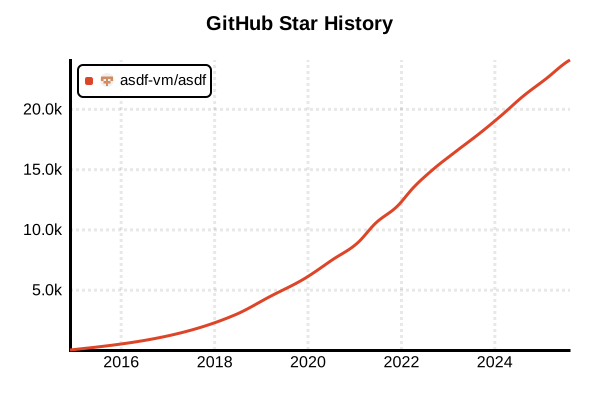
Data as of: 10/22/2025, 04:10 AM
Language Version Management Tool
asdf
Overview
asdf is a universal version manager that can centrally manage versions of multiple programming languages and tools. Through its plugin system, it supports over 300 tools including Python, Node.js, Ruby, Go, and Elixir. It's ideal for team development as you can manage all language versions with a single tool.
Details
Key Features
- Multi-Language Support: Supports over 300 tools and languages
- Unified Interface: Same command structure for all languages
- Plugin Architecture: Easy to add new languages
- .tool-versions: Centralized version management per project
- Global/Local Settings: Flexible version management
- Existing Tool Compatibility: Supports .nvmrc, .ruby-version, etc.
How It Works
asdf adds a shim directory to PATH and intercepts commands for each language. It reads .tool-versions files or legacy version files and executes the appropriate version's binary.
Plugin System
Each language or tool is implemented as a plugin and can be easily installed from GitHub. Plugins abstract language-specific installation methods and version management.
Advantages and Disadvantages
Advantages
- Centralized Management: Manage all languages with one tool
- Reduced Learning Curve: Unified command structure
- Ideal for Teams: Share environments via .tool-versions
- Rich Ecosystem: Over 300 official plugins
- Active Development: Continuous updates and support
- Easy Migration: Compatibility with existing .*-version files
Disadvantages
- Complex Initial Setup: Requires individual plugin installation
- Performance: May be slightly slower than language-specific tools
- Plugin Dependency: Variable plugin quality
- No Windows Support: Requires WSL environment
- Memory Usage: Disk space with multiple languages
Reference Pages
Usage Examples
Installation (Linux/macOS)
# Install via Git clone
git clone https://github.com/asdf-vm/asdf.git ~/.asdf --branch v0.14.0

# On macOS, Homebrew is also available
brew install asdf

# Linux (via package manager)
# Ubuntu/Debian
apt install asdf

# Arch Linux
pacman -S asdf-vm
Shell Configuration
# Bash (add to .bashrc)
. "$HOME/.asdf/asdf.sh"
. "$HOME/.asdf/completions/asdf.bash"

# Zsh (add to .zshrc)
. "$HOME/.asdf/asdf.sh"
fpath=(${ASDF_DIR}/completions $fpath)
autoload -Uz compinit && compinit

# Fish (add to ~/.config/fish/config.fish)
source ~/.asdf/asdf.fish
mkdir -p ~/.config/fish/completions
ln -s ~/.asdf/completions/asdf.fish ~/.config/fish/completions

# Apply configuration
source ~/.bashrc  # or relevant shell config file
Installing Plugins
# List all plugins
asdf plugin list all

# Install plugins for each language
asdf plugin add python
asdf plugin add nodejs
asdf plugin add ruby
asdf plugin add golang
asdf plugin add java
asdf plugin add elixir

# Install plugin with URL
asdf plugin add kotlin https://github.com/asdf-community/asdf-kotlin.git
Basic Usage
# Show installable versions
asdf list all python
asdf list all nodejs

# Install specific version
asdf install python 3.12.0
asdf install nodejs 20.11.0
asdf install ruby 3.3.0

# Install latest version
asdf install python latest
asdf install nodejs latest:18  # Latest 18.x

# Check installed versions
asdf list python
asdf list nodejs
Setting Global Versions
# Set global versions
asdf global python 3.12.0
asdf global nodejs 20.11.0

# Set multiple tools at once
asdf global python 3.12.0 nodejs 20.11.0

# Check current versions
asdf current
asdf current python
Per-Project Management
# Navigate to project directory
cd /path/to/my-project

# Create .tool-versions file
asdf local python 3.11.7
asdf local nodejs 18.19.0
asdf local ruby 3.2.3

# .tool-versions content
cat .tool-versions
# python 3.11.7
# nodejs 18.19.0
# ruby 3.2.3

# Can also manually edit .tool-versions
echo "golang 1.21.5" >> .tool-versions
Legacy Version File Support
# Enable legacy version file support
echo 'legacy_version_file = yes' >> ~/.asdfrc

# Existing version files can be used
# .nvmrc (Node.js)
# .ruby-version (Ruby)
# .python-version (Python)
# .java-version (Java)
Installing Dependencies
# For Node.js, configure for global npm packages
asdf reshim nodejs

# For Python, upgrade pip
python -m pip install --upgrade pip

# For Ruby, install Bundler
gem install bundler
asdf reshim ruby
Using System Versions
# Use system-installed versions
asdf local python system
asdf global nodejs system

# Temporarily use system version
asdf shell ruby system
Useful Commands
# Update plugins
asdf plugin update --all
asdf plugin update python

# Uninstall unused versions
asdf uninstall python 3.10.0

# Show current tool path
asdf which python
asdf where python

# Check environment settings
asdf info

# Remove plugin
asdf plugin remove java
Team Development Usage
# Project setup script
#!/bin/bash
# setup.sh

# Install required plugins
while IFS= read -r line; do
  plugin=$(echo $line | cut -d' ' -f1)
  asdf plugin add $plugin 2>/dev/null || true
done < .tool-versions

# Install versions specified in .tool-versions
asdf install

# Usage example
chmod +x setup.sh
./setup.sh