mise
GitHub Overview
jdx/mise
dev tools, env vars, task runner
Topics
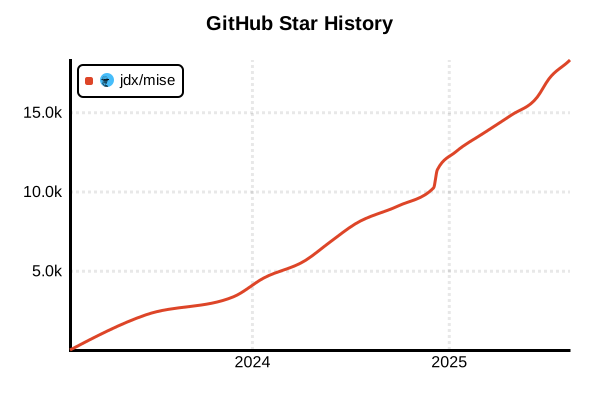
Star History
Language Version Management Tool
mise (formerly rtx)
Overview
mise is a next-generation multi-language version management tool written in Rust. While maintaining asdf compatibility, it's approximately 10x faster and integrates environment variable management and task runner functionality. Supporting over 600 tools including programming languages, frameworks, and CLI tools, it automatically manages different versions per project. It's a tool that significantly improves developer productivity by combining modern UX with high performance.
Details
Key Features
- Blazing Fast: Approximately 10x faster than asdf (direct PATH updates without shims)
- 600+ Tool Support: Unified management of programming languages, frameworks, and CLI tools
- Environment Variable Management: Built-in direnv-like environment variable management
- Task Runner: Integrated make-like task execution functionality
- asdf Plugin Compatible: Use existing asdf plugins as-is
- Configuration File Based: Managed via
.mise.tomlor.tool-versions - Modern CLI: Intuitive command structure with fuzzy matching support
- Cross-platform: Works on Windows, macOS, and Linux
Architecture and Performance Optimization
The secret to mise's speed is not using asdf's shim system. While asdf incurs about 120ms overhead per tool invocation, mise directly updates the PATH environment variable, resulting in zero overhead during tool execution. The mise hook-env execution during directory changes is also very fast at about 10ms (4ms if no changes).
Enhanced Security
- Reduced asdf Plugins: Gradually reducing shell script-based plugins
- Secure Backends: Prioritizes safer backends like aqua and ubi
- Signature Verification: GPG verification (Node.js), cosign/slsa-verify check support
- mise-plugins Organization: Improved reliability through centralized plugin management
Integrated Development Environment Features
- Environment Variable Management: Automatic environment variable switching per project directory
- Task Management: Define and execute tasks for build, test, deploy, etc.
- CI/CD Support: Works with the same configuration in CI environments like GitHub Actions
- Lock Files: Team development consistency through exact version pinning
Advantages and Disadvantages
Advantages
- Ultra Fast: No tool invocation overhead due to shim-free architecture
- All-in-One: Integrates version management, environment variables, and task execution
- Excellent UX: Easy to use with intuitive commands and fuzzy matching
- Windows Support: Non-asdf backend tools work on Windows
- Easy Migration: Can use
.tool-versionsfiles as-is - Secure: Improved plugin safety and signature verification features
- Single Binary: Easy installation with a single Rust executable
Disadvantages
- Relatively New: Smaller community compared to asdf
- Windows Limitations: Tools using asdf plugins don't support Windows
- Learning Curve: Need to learn environment variable management and task features
- Plugin Migration: Some tools still depend on asdf plugins
- Configuration Complexity: Can become complex when using advanced features
Reference Pages
- mise Official Site
- mise Documentation
- mise GitHub Repository
- mise vs asdf Comparison
- mise Plugin Registry
Usage Examples
Installation
# macOS/Linux (recommended method)
curl https://mise.run | sh

# macOS (Homebrew)
brew install mise

# Windows (Scoop)
scoop install mise

# Windows (WinGet)
winget install jdx.mise

# Cargo (if Rust environment available)
cargo install mise

# Verify installation
mise --version
Shell Integration Setup
# Bash (add to ~/.bashrc)
eval "$(mise activate bash)"

# Zsh (add to ~/.zshrc)
eval "$(mise activate zsh)"

# Fish (add to ~/.config/fish/config.fish)
mise activate fish | source

# PowerShell (add to $PROFILE)
mise activate pwsh | Out-String | Invoke-Expression

# Verify configuration
mise doctor
Basic Usage
# Install and configure tools (single command)
mise use node@20
mise use [email protected]
mise use go@latest

# Install specific versions
mise install [email protected]
mise install [email protected]

# Install global tools
mise use -g ripgrep@14
mise use -g npm:prettier@3
mise use -g cargo:tokei

# Check current configuration
mise list
mise current
Project Version Management
# Execute in project directory
cd /path/to/my-project

# Manage with .mise.toml (recommended)
mise use node@20
mise use [email protected]
mise use rust@stable

# Generated .mise.toml
# [tools]
# node = "20"
# python = "3.12"
# rust = "stable"

# .tool-versions compatibility (for asdf migration)
echo "node 20.10.0" >> .tool-versions
echo "python 3.12.0" >> .tool-versions

# Install all tools
mise install
Environment Variable Management
# Define environment variables in .mise.toml
cat << EOF > .mise.toml
[env]
NODE_ENV = "development"
DATABASE_URL = "postgres://localhost/myapp"

[tools]
node = "20"
postgres = "16"
EOF

# Environment variables are automatically set when entering directory
cd /path/to/project
echo $NODE_ENV  # development

# Environment-specific configuration
cat << EOF > .mise.production.toml
[env]
NODE_ENV = "production"
DATABASE_URL = "postgres://prod-server/myapp"
EOF

# Switch with MISE_ENV environment variable
MISE_ENV=production mise exec -- node app.js
Task Runner Functionality
# Define tasks in .mise.toml
cat << EOF >> .mise.toml
[tasks.build]
run = "npm run build"
description = "Build the project"

[tasks.test]
run = "npm test"
description = "Run tests"

[tasks.dev]
run = "npm run dev"
description = "Start development server"

[tasks.deploy]
run = ["npm run build", "npm run deploy"]
depends = ["test"]
description = "Deploy to production"
EOF

# Execute tasks
mise run build
mise run test
mise run deploy

# Check available tasks
mise tasks
CI/CD Environment Usage
# GitHub Actions example
name: CI
on: [push]

jobs:
  test:
    runs-on: ubuntu-latest
    steps:
      - uses: actions/checkout@v4

      - name: Install mise
        run: |
          curl https://mise.run | sh
          echo "$HOME/.local/bin" >> $GITHUB_PATH

      - name: Install tools
        run: mise install

      - name: Run tests
        run: mise run test
Advanced Configuration
# Change cache directory
export MISE_DATA_DIR="$HOME/.cache/mise"

# Paranoid mode (security-focused)
mise settings paranoid=true

# Disable asdf plugins (improved security)
mise settings disable_backends=asdf

# Display detailed logs
MISE_LOG_LEVEL=debug mise install node

# Trust level configuration
mise trust
mise trust --untrust
Migration Guide
# Migration from asdf
# 1. Uninstall asdf
# 2. Install mise
# 3. Existing .tool-versions can be used as-is

# Migrate global settings
cp ~/.tool-versions ~/.config/mise/config.toml
# Manually convert format

# Project migration
cd /path/to/project
mise install  # Automatically reads from .tool-versions