proto
GitHub Overview
moonrepo/proto
A pluggable multi-language version manager.
Topics
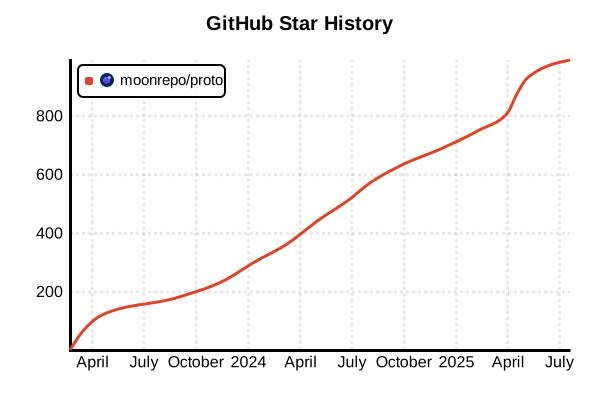
Star History
Language Version Management Tool
proto
Overview
proto is a next-generation universal toolchain manager developed by moonrepo. Utilizing a WASM plugin architecture, it achieves secure and fast environment management. Supporting major languages like Bun, Deno, Node.js, Python, Rust, Go, plus over 800 tools, it manages versions of multiple languages and tools through a single interface. It easily enables automatic version switching per project and unified environments for team development.
Details
Key Features
- WASM Plugin Architecture: Safe and extensible plugin system based on Extism
- High Performance: Fast download, installation, and execution with Rust implementation
- Universal Toolchain: Manage multiple languages and tools with a single interface
- Automatic Version Detection: Auto-detects runtime versions from ecosystems
- Granular Configuration: Configure per directory, project, or user
- Environment Aware: Supports environment-specific tools, versions, and environment variables
- Cross-platform: Works on Windows, macOS, Linux, and WSL
Innovation of WASM Plugin System
proto's standout feature is its WebAssembly (WASM) based plugin system. Unlike traditional shell script-based plugins:
- Language Agnostic: Can be written in any language that compiles to WASM (Rust, Go, TypeScript, C/C++, etc.)
- Sandboxed Execution: Safe execution environment via WASI
- Advanced Features: Supports file system access, child process execution, HTTP communication, etc.
- Host Functions: Powerful APIs like
exec_command,send_request,host_log
Security Design
- Sandboxed Environment: Isolated execution through WASM runtime
- Virtual Paths: Limited access to host file system
- Signature Verification: Integrity checks when downloading tools
- Trusted Sources: Distribution from official repositories and GitHub releases
Integration with moon Toolchain
proto was developed as the core technology powering moon build system's toolchain. It's available both as part of moon's integrated development environment and as a standalone tool.
Advantages and Disadvantages
Advantages
- Ultra Fast: Outstanding performance with Rust implementation
- Secure: Safe execution environment with WASM sandbox
- Extensible: Develop plugins in any language
- Unified Interface: Consistent command structure across all tools
- Automation: Automatic version switching based on context
- Modern Design: Leverages latest 2024 technology stack
- Configuration-driven: Intuitive YAML-based configuration management
Disadvantages
- New Tool: Launched in 2024 with growing community
- Plugin Count: Fewer native plugins compared to asdf
- WASM Learning Curve: Requires WASM knowledge for plugin development
- Documentation: Primarily English documentation
- Ecosystem: Tool-specific config file support still developing
Reference Pages
Usage Examples
Installation
# macOS/Linux/WSL (recommended method)
curl -fsSL https://moonrepo.dev/install/proto.sh | bash

# Windows PowerShell
irm https://moonrepo.dev/install/proto.ps1 | iex

# Homebrew (macOS/Linux)
brew install moonrepo/tap/proto

# Scoop (Windows)
scoop bucket add moonrepo https://github.com/moonrepo/scoop-bucket
scoop install proto

# Verify installation
proto --version
Basic Usage
# Install tools
proto install node 20
proto install python 3.12
proto install go 1.21

# Install latest versions
proto install rust latest
proto install deno latest

# Check version list
proto list node
proto list --all

# Check installed tools
proto list-remote node
Project Version Management
# Execute in project directory
cd /path/to/my-project

# Create .prototools configuration file
proto use node 20.10.0
proto use python 3.12.0
proto use go 1.21.5

# Generated .prototools
# node = "20.10.0"
# python = "3.12.0"
# go = "1.21.5"

# Automatic version switching when entering project
cd ..
node --version  # System default
cd my-project
node --version  # 20.10.0
Global Configuration
# Set global versions
proto install node 20 --global
proto install python 3.12 --global

# Check global configuration
cat ~/.proto/.prototools

# Install global tools
proto install npm:prettier --global
proto install npm:eslint --global
Environment Variables and Shell Integration
# Bash/Zsh setup (~/.bashrc or ~/.zshrc)
eval "$(proto activate bash)"
# or
eval "$(proto activate zsh)"

# Fish setup (~/.config/fish/config.fish)
proto activate fish | source

# PowerShell setup ($PROFILE)
Invoke-Expression (proto activate pwsh)

# Check environment variables
proto env
Using WASM Plugins
# Search for plugins
proto plugin search python

# Install third-party plugins
proto plugin add python source:https://github.com/moonrepo/python-plugin/releases/latest/download/python_plugin.wasm

# Plugin from GitHub releases
proto plugin add mytool github://username/mytool-plugin

# Use local plugin
proto plugin add customtool file://./path/to/plugin.wasm

# List plugins
proto plugin list
Advanced Configuration (.prototools)
# Project root .prototools
[env]
NODE_ENV = "development"

[tools]
node = "20.10.0"
npm = "10.2.0"
python = "3.12.0"

[tools.node]
bundled = true  # Install npm together

[plugins]
python = "source:https://github.com/moonrepo/python-plugin/releases/latest/download/python_plugin.wasm"
CI/CD Environment Usage
# GitHub Actions example
name: CI
on: [push]

jobs:
  test:
    runs-on: ubuntu-latest
    steps:
      - uses: actions/checkout@v4

      - name: Setup proto
        run: |
          curl -fsSL https://moonrepo.dev/install/proto.sh | bash
          echo "$HOME/.proto/bin" >> $GITHUB_PATH

      - name: Install tools
        run: |
          proto use node 20
          proto use python 3.12

      - name: Run tests
        run: |
          npm test
          python -m pytest
Team Development Workflow
# Commit .prototools to repository
git add .prototools
git commit -m "Add proto configuration"

# New developer setup
git clone https://github.com/team/project
cd project
proto install  # Automatically installs tools from .prototools

# Pin versions (lock file)
proto install --save-exact
# Generates .prototools.lock
Troubleshooting
# Display diagnostic information
proto diagnose

# Clear cache
proto clean

# Reinstall specific tool
proto uninstall node 20.10.0
proto install node 20.10.0

# Debug mode
PROTO_LOG=debug proto install node

# Update plugins
proto plugin update python