vfox
GitHub Overview
version-fox/vfox
A cross-platform and extendable version manager with support for Java, Node.js, Flutter, .Net & more
Repository:https://github.com/version-fox/vfox
Homepage:https://vfox.dev
Stars3,445
Watchers15
Forks131
Created:December 9, 2023
Language:Go
License:Apache License 2.0
Topics
asdfbashclicmdcross-platformdevelopment-toolsgolanglinuxluamacosnodejsplugin-managerpowershellsdktoolsversion-managerwindowszsh
Star History
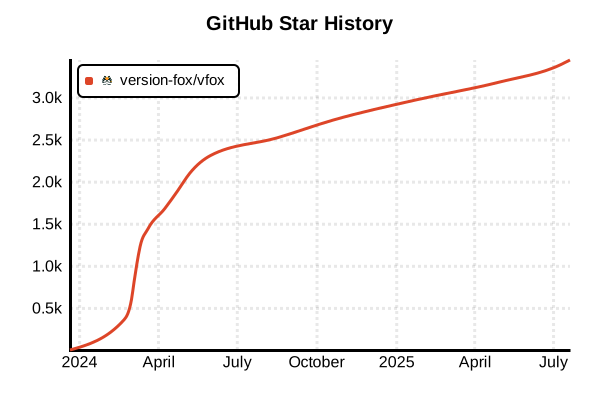
Data as of: 7/20/2025, 03:55 AM
Language Version Management Tool
vfox (version fox)
Overview
vfox is a multi-language version manager focused on cross-platform support. Designed with particular emphasis on Windows environment usability, it achieves true cross-platform unification including native Windows support. Implemented in Go with an extensible plugin system using Lua scripts, it supports major languages and frameworks including Java, Node.js, Flutter, .NET, Python, Erlang/Elixir, and provides a simple and fast command-line interface.
Details
Key Features
- True Cross-platform: Native operation on Windows, macOS, Linux, and WSL
- Windows Optimization: PowerShell integration, Windows-specific environment variable management
- Lua Plugin System: Simple and highly extensible plugin mechanism
- Unified Command Interface: Consistent operation across all platforms
- Automatic Version Switching: Auto-detection via
.tool-versionsfiles - Legacy Config Compatibility: Supports
.nvmrc,.node-version,.sdkmanrc, etc. - High Performance: Lightweight and fast operation with Go implementation
- Shell Integration: Works with Bash, Zsh, PowerShell, Fish, Nushell, and Clink
Architecture Design
vfox architecture consists of the following main components:
- CLI Interface: Handles user command processing
- SDK Manager: Manages runtime installation and usage
- Environment Manager: Manages environment variables and shell integration
- Configuration Manager: Handles user settings
- Plugin System: Extension functionality via Lua scripts
Windows Environment Advantages
- Native Support: Works directly on Windows without WSL
- Registry Integration: Manages Windows environment variables via registry
- Symbolic Links: Creates directory junctions using
mklink /jcommand - PowerShell Integration: Automatic environment switching by modifying prompt function
- Windows Plugins: Rich Windows-compatible plugins for Erlang/OTP, Elixir, etc.
Plugin Ecosystem
- Lua Scripts: Simple and easy-to-learn plugin development
- Plugin Templates: Support for multi-file plugin development
- Global Registry: Unified distribution point like NPM or Scoop (in development)
- Rich Language Support: Covers most major programming languages
Advantages and Disadvantages
Advantages
- Full Windows Support: Excellent usability in native Windows environment
- Cross-platform Consistency: Same operation experience across all OS
- Simple Commands: More intuitive command structure than asdf
- Fast Performance: Lightweight and fast with Go implementation
- Extensibility: Easy customization with Lua plugins
- Legacy Compatibility: Use existing configuration files as-is
- Active Development: Windows-compatible plugins added in 2024
Disadvantages
- Community Size: Smaller compared to asdf and mise
- Plugin Count: Still developing ecosystem
- Documentation: Mainly English and Chinese documentation
- Recognition: Lower awareness compared to other tools
- Feature Limitations: Limited environment variable management and task features
Reference Pages
Usage Examples
Installation
# macOS/Linux (recommended method)
curl -sSL https://raw.githubusercontent.com/version-fox/vfox/main/install.sh | bash

# Windows (Scoop)
scoop install vfox

# Windows (WinGet)
winget install vfox

# macOS (Homebrew)
brew install vfox

# Manual installation (all platforms)
# Download latest version from GitHub releases page
# https://github.com/version-fox/vfox/releases

# Verify installation
vfox --version
Shell Integration Setup
# Bash (add to ~/.bashrc)
eval "$(vfox activate bash)"

# Zsh (add to ~/.zshrc)
eval "$(vfox activate zsh)"

# PowerShell (add to $PROFILE)
if (-not (Test-Path -Path $PROFILE)) {
    New-Item -Type File -Path $PROFILE -Force
}
Add-Content -Path $PROFILE -Value 'Invoke-Expression "$(vfox activate pwsh)"'

# Fish (add to ~/.config/fish/config.fish)
vfox activate fish | source

# Clink (Windows)
vfox activate clink > %LOCALAPPDATA%\clink\vfox.lua
Basic Usage
# List available plugins
vfox available

# Add plugins
vfox add nodejs
vfox add python
vfox add java

# Search versions
vfox search nodejs
vfox search python

# Install specific versions
vfox install [email protected]
vfox install [email protected]
vfox install java@21

# Install latest versions
vfox install nodejs@latest
vfox install erlang@latest
Project Version Management
# Execute in project directory
cd /path/to/my-project

# Set local versions
vfox use [email protected]
vfox use [email protected]

# Generates .tool-versions file
# nodejs 20.10.0
# python 3.12.0

# Automatic version switching when entering project
cd ..
node --version  # System default
cd my-project
node --version  # 20.10.0
Global Configuration
# Set global versions
vfox use -g [email protected]
vfox use -g [email protected]

# Check global configuration
cat ~/.version-fox/.tool-versions

# Check current versions
vfox current
vfox current nodejs
Windows Environment Usage
# PowerShell configuration example
# Install Erlang/OTP (Windows support)
vfox add erlang
vfox install [email protected]
vfox use [email protected]

# Install Elixir (Windows support)
vfox add elixir
vfox install [email protected]
vfox use [email protected]

# Install .NET
vfox add dotnet
vfox install [email protected]
vfox use [email protected]

# Check environment variables
vfox env
Legacy Configuration File Support
# Projects using .nvmrc
echo "20.10.0" > .nvmrc
vfox install  # Automatically reads .nvmrc

# Projects using .node-version
echo "20.10.0" > .node-version
vfox install

# Projects using .python-version
echo "3.12.0" > .python-version
vfox install
Plugin Management
# Check installed plugins
vfox list

# Update plugins
vfox update nodejs

# Remove plugins
vfox remove nodejs

# Add custom plugins
vfox add --source https://github.com/version-fox/vfox-nodejs/releases/download/latest/vfox-nodejs.zip nodejs
CI/CD Environment Usage
# GitHub Actions example
name: CI
on: [push]

jobs:
  test:
    runs-on: windows-latest  # Also works on Windows
    steps:
      - uses: actions/checkout@v4

      - name: Install vfox
        run: |
          irm https://raw.githubusercontent.com/version-fox/vfox/main/install.ps1 | iex

      - name: Setup tools
        run: |
          vfox add nodejs
          vfox install nodejs@20
          vfox use nodejs@20

      - name: Run tests
        run: npm test
Environment Switching and Management
# Temporary version usage
vfox use [email protected] --session

# Project-specific configuration
vfox use [email protected] --project

# Display environment information
vfox info nodejs

# Clear cache
vfox cache clean

# Uninstall
vfox uninstall [email protected]
Troubleshooting
# Debug mode
VFOX_DEBUG=1 vfox install nodejs

# Check configuration
vfox config list

# Health check
vfox doctor

# Check logs
cat ~/.version-fox/logs/vfox.log

# Complete reinstallation
vfox remove nodejs
vfox add nodejs
vfox install nodejs@latest