perlbrew
GitHub Overview
gugod/App-perlbrew
Manage perl installations in your $HOME
Topics
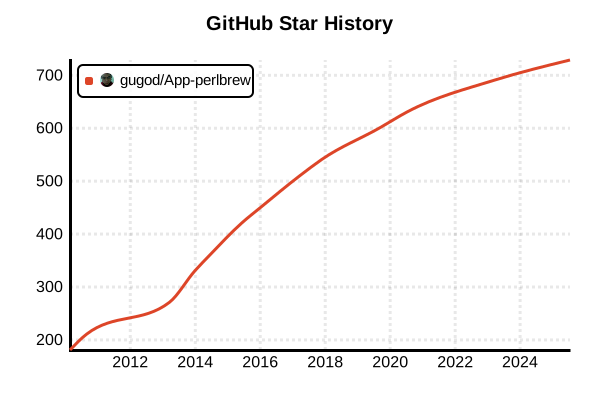
Star History
Language Version Management Tool
perlbrew
Overview
perlbrew is an admin-free Perl installation management tool that manages multiple Perl versions in the user's home directory. It provides completely isolated Perl environments that are independent of system Perl and other installations, with no relationships between them. Through cpanm integration, CPAN module management is simplified, and it includes local::lib library management functionality. As a standard tool in the Perl community for many years, it is essential for developers and system administrators.
Details
Key Features
- Admin-Free: Complete Perl management in user directories without root privileges
- Complete Isolation: Independence guaranteed between system Perl and other versions
- cpanm Integration: Seamless integration with CPAN Minus
- local::lib Support: Project-specific library environment management
- Version Switching: Temporary and permanent environment switching
- Clone Functionality: Module replication from existing environments
- Minimal Requirements: Guaranteed operation on Perl 5.8.0 and above
Architecture
perlbrew installs each Perl version independently under ~/perl5/perlbrew/ and achieves version switching through shell environment variable manipulation. Auxiliary tools like cpanm and patchperl are placed in a common bin directory and are available to all Perl environments.
CPAN Integration Benefits
perlbrew emphasizes modern CPAN module management and provides tight integration with cpanminus (cpanm). It adopts a "Just works" approach that operates without the configuration requirements of traditional CPAN shell and without question-and-answer sessions.
Pros and Cons
Pros
- Standard Status: De facto standard tool in the Perl community
- Admin-Free: Complete user environment without sudo requirements
- Environment Isolation: Complete dependency separation between projects
- Easy Switching: Intuitive version switching commands
- cpanm Integration: Modern CPAN module management
- Proven Stability: Years of operational track record
- Rich Features: Module replication functionality between versions
Cons
- Unix-Only: No native Windows support, requires WSL
- Initial Setup: Manual editing of shell configuration files required
- Perl-Specific: No unified management with other languages
- Disk Usage: Concurrent storage of multiple versions
- Compilation Time: Waiting time due to builds from source
- PATH Management: Understanding complex PATH configurations required
Reference Pages
Code Examples
Installation
# Quick installation (recommended)
curl -L https://install.perlbrew.pl | bash

# Manual download
curl -L https://cpanmin.us | perl - App::perlbrew
~/perl5/perlbrew/bin/perlbrew install

# Via package manager (some OS)
# Ubuntu/Debian
sudo apt-get install perlbrew

# macOS (Homebrew)
brew install perlbrew
Environment Setup
# For Bash (add to ~/.bashrc)
echo 'source ~/perl5/perlbrew/etc/bashrc' >> ~/.bashrc
source ~/.bashrc

# For Zsh (add to ~/.zshrc)
echo 'source ~/perl5/perlbrew/etc/bashrc' >> ~/.zshrc
source ~/.zshrc

# Verify configuration
perlbrew version

# Initialize
perlbrew init
Basic Usage
# Show available Perl versions
perlbrew available

# Install latest stable release
perlbrew install perl-5.38.2

# Install development version
perlbrew install perl-5.39.5

# Install specific version with threads
perlbrew install perl-5.38.2 -Dusethreads

# Show installed versions
perlbrew list

# Permanently switch version
perlbrew switch perl-5.38.2

# Temporarily use version (current session only)
perlbrew use perl-5.38.2

# Return to system Perl
perlbrew off
perlbrew switch-off
cpanm Integration
# Install cpanm
perlbrew install-cpanm

# Install modules with cpanm
cpanm DBI
cpanm Mojolicious
cpanm Plack

# Batch install multiple modules
cpanm DBI DBD::SQLite Mojolicious Dancer2

# Install from requirements file
cpanm --installdeps .

# Install including development dependencies
cpanm --with-develop --installdeps .

# Force install (ignore dependency errors)
cpanm --force problematic-module

# Install from local file
cpanm ./local-module-1.0.tar.gz
local::lib Library Management
# Create library environment
perlbrew lib create perl-5.38.2@myproject
perlbrew lib create perl-5.38.2@testing

# List library environments
perlbrew lib list

# Switch to library environment
perlbrew switch perl-5.38.2@myproject

# Temporarily use library environment
perlbrew use perl-5.38.2@testing

# Delete library environment
perlbrew lib delete perl-5.38.2@testing

# Check current environment
perlbrew list
Module Cloning Between Versions
# Clone modules from existing version to new version
perlbrew clone-modules perl-5.36.3 perl-5.38.2

# Reinstall specific module list to another version
perlbrew list-modules | perlbrew exec --with perl-5.38.2 cpanm

# Clone between library environments
perlbrew clone-modules perl-5.38.2@source perl-5.38.2@target
Custom Build Options
# Build with thread support
perlbrew install perl-5.38.2 -Dusethreads

# Build with debug symbols
perlbrew install perl-5.38.2 -DDEBUGGING

# 64-bit integer support
perlbrew install perl-5.38.2 -Duse64bitint

# Custom prefix
perlbrew install perl-5.38.2 -Dprefix=/custom/path

# Multiple options combination
perlbrew install perl-5.38.2 -Dusethreads -Duse64bitall -DDEBUGGING

# Check build progress
perlbrew install-progress
Project Usage
# Project setup script
#!/bin/bash
# setup-perl.sh

PROJECT_NAME="myapp"
PERL_VERSION="perl-5.38.2"
LIB_NAME="${PERL_VERSION}@${PROJECT_NAME}"

# Create project-specific Perl environment
if ! perlbrew lib list | grep -q "$LIB_NAME"; then
    echo "Creating Perl library: $LIB_NAME"
    perlbrew lib create "$LIB_NAME"
fi

# Switch environment
perlbrew switch "$LIB_NAME"

# Install dependencies
if [ -f "cpanfile" ]; then
    echo "Installing dependencies from cpanfile..."
    cpanm --installdeps .
fi

echo "Perl environment ready: $(perl -v | head -2 | tail -1)"
echo "Library: $LIB_NAME"
Dependency Management with cpanfile
# cpanfile
requires 'Mojolicious', '9.36';
requires 'DBI', '1.643';
requires 'DBD::SQLite', '1.72';

on 'develop' => sub {
    requires 'Test::More', '1.302194';
    requires 'Test::Exception', '0.43';
    requires 'Perl::Tidy', '20230309';
};

on 'test' => sub {
    requires 'Test::Pod', '1.52';
    requires 'Test::Pod::Coverage', '1.10';
};
# Install dependencies using cpanfile
cpanm --installdeps .                    # Basic dependencies
cpanm --installdeps --with-develop .     # Including development dependencies
cpanm --installdeps --with-all-features . # All features included
CI/CD Usage
# GitHub Actions example
name: Perl CI
on: [push, pull_request]

jobs:
  test:
    runs-on: ubuntu-latest
    strategy:
      matrix:
        perl: ['5.36.3', '5.38.2', '5.39.5']

    steps:
    - uses: actions/checkout@v4

    - name: Install perlbrew
      run: |
        curl -L https://install.perlbrew.pl | bash
        source ~/perl5/perlbrew/etc/bashrc
        echo 'source ~/perl5/perlbrew/etc/bashrc' >> $GITHUB_ENV

    - name: Install Perl
      run: |
        source ~/perl5/perlbrew/etc/bashrc
        perlbrew install perl-${{ matrix.perl }} --notest
        perlbrew switch perl-${{ matrix.perl }}
        perlbrew install-cpanm

    - name: Install dependencies
      run: |
        source ~/perl5/perlbrew/etc/bashrc
        perlbrew use perl-${{ matrix.perl }}
        cpanm --installdeps --with-develop .

    - name: Run tests
      run: |
        source ~/perl5/perlbrew/etc/bashrc
        perlbrew use perl-${{ matrix.perl }}
        prove -l t/
Docker Integration
# Dockerfile example
FROM ubuntu:22.04

# Install system dependencies
RUN apt-get update && apt-get install -y \
    curl \
    build-essential \
    && rm -rf /var/lib/apt/lists/*

# Create user
RUN useradd -m perluser
USER perluser
WORKDIR /home/perluser

# Install perlbrew
RUN curl -L https://install.perlbrew.pl | bash
RUN echo 'source ~/perl5/perlbrew/etc/bashrc' >> ~/.bashrc

# Install Perl
RUN /bin/bash -c "source ~/perl5/perlbrew/etc/bashrc && \
    perlbrew install perl-5.38.2 --notest && \
    perlbrew switch perl-5.38.2 && \
    perlbrew install-cpanm"

# Set working directory
WORKDIR /app

# Copy project files
COPY --chown=perluser:perluser . .

# Install dependencies
RUN /bin/bash -c "source ~/perl5/perlbrew/etc/bashrc && \
    perlbrew use perl-5.38.2 && \
    cpanm --installdeps ."

# Start application
CMD ["/bin/bash", "-c", "source ~/perl5/perlbrew/etc/bashrc && perlbrew use perl-5.38.2 && perl app.pl"]
Debugging and Troubleshooting
# Check installation details
perlbrew info

# Show current environment variables
perlbrew env

# Execute command with specific version
perlbrew exec --with perl-5.38.2 perl -v

# Execute command with all versions
perlbrew exec perl -E 'say $^V'

# Check build error logs
cat ~/perl5/perlbrew/build.log

# Initialize configuration
perlbrew self-upgrade
perlbrew clean

# Complete environment reset
rm -rf ~/perl5/perlbrew
curl -L https://install.perlbrew.pl | bash
Advanced Usage Examples
# Enable parallel builds
export PERLBREW_CONFIGURE_FLAGS='-j 8'
perlbrew install perl-5.38.2

# Custom installation directory
export PERLBREW_ROOT=$HOME/custom-perl
curl -L https://install.perlbrew.pl | bash

# Usage in proxy environment
export http_proxy=http://proxy.company.com:8080
export https_proxy=http://proxy.company.com:8080
perlbrew install perl-5.38.2

# Specify mirror server
export PERLBREW_CPAN_MIRROR=http://cpan.cpantesters.org/
perlbrew install perl-5.38.2
Automation and Script Usage
# Version management automation script
#!/bin/bash
# perl-env-manager.sh

VERSIONS=("5.36.3" "5.38.2" "5.39.5")
COMMON_MODULES=("DBI" "Mojolicious" "Plack" "Test::More")

for VERSION in "${VERSIONS[@]}"; do
    PERL_NAME="perl-$VERSION"

    if ! perlbrew list | grep -q "$PERL_NAME"; then
        echo "Installing $PERL_NAME..."
        perlbrew install "$PERL_NAME" --notest
    fi

    echo "Setting up common modules for $PERL_NAME..."
    perlbrew use "$PERL_NAME"

    for MODULE in "${COMMON_MODULES[@]}"; do
        cpanm "$MODULE"
    done
done

echo "All Perl versions and modules installed successfully!"
Legacy Perl Support
# Old Perl versions (5.8.x series)
perlbrew install perl-5.8.9

# Handle limitations with old Perl
perlbrew use perl-5.8.9
cpanm --notest Module::Build  # Skip tests when necessary

# Install fixed versions of old CPAN modules
cpanm Module::[email protected]       # Specify particular version