phpbrew
GitHub Overview
phpbrew/phpbrew
Brew & manage PHP versions in pure PHP at HOME
Repository:https://github.com/phpbrew/phpbrew
Homepage:https://phpbrew.github.io/phpbrew
Stars5,489
Watchers127
Forks370
Created:September 27, 2011
Language:Makefile
License:MIT License
Topics
php-versionsphpbrew
Star History
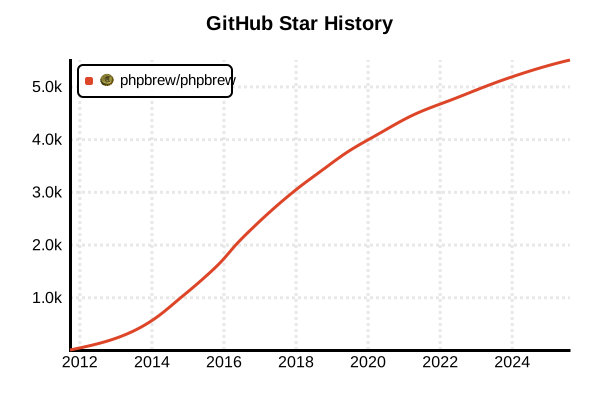
Data as of: 7/20/2025, 03:05 AM
Language Version Management Tool
phpbrew
Overview
phpbrew is a tool that builds and installs multiple PHP versions in your home directory for easy management. Written in pure PHP, it simplifies PHP compilation options as "variants" and provides integrated management of extensions. It's ideal for developers working with projects that require different PHP versions in their development environment.
Details
Key Features
- Variant system: Simplifies complex configure options
- Extension management: Integrated installation and management with PECL
- Apache module support: Manages multiple versions of mod_php
- Home directory installation: No root permissions required
- Shell integration: Automatic version switching in bash/zsh
- Automatic feature detection: Path optimization for Homebrew and MacPorts
How It Works
phpbrew downloads PHP source code and compiles/installs it based on specified variants. Each version is stored independently under ~/.phpbrew/php/, and the PATH is dynamically switched through shell initialization scripts.
Variant Types
- default: Basic set needed for general development
- +mysql +pdo: Database connectivity features
- +sqlite: SQLite support
- +debug: Build with debug symbols
- +fpm: FastCGI Process Manager
- +opcache: Enable OPcache
Pros and Cons
Pros
- Complete control: Fine-grained compilation options
- Extension flexibility: Different extension sets per PHP version
- Latest version support: Build new PHP versions immediately
- Development optimization: Easy debug builds and special configurations
- Multiple SAPI support: Manage CLI, FPM, and Apache modules simultaneously
- Environment isolation: No impact on system PHP
Cons
- Build time: Compilation from source takes time
- Dependency complexity: Requires pre-installation of development libraries
- Disk usage: Each version maintains a complete PHP environment
- Initial setup effort: Shell configuration and build environment preparation needed
- No Windows support: Only Unix-like OS supported
- Troubleshooting: Requires knowledge to resolve build errors
Reference Pages
Example Usage
Installation
# Download and install phpbrew
curl -L -O https://github.com/phpbrew/phpbrew/releases/latest/download/phpbrew.phar
chmod +x phpbrew.phar
sudo mv phpbrew.phar /usr/local/bin/phpbrew

# Initialize
phpbrew init

# Shell configuration (add to .bashrc or .zshrc)
echo '[[ -e ~/.phpbrew/bashrc ]] && source ~/.phpbrew/bashrc' >> ~/.bashrc
source ~/.bashrc

# Install dependencies on macOS
brew install automake autoconf curl pcre re2c mhash libtool icu4c gettext jpeg libxml2 mcrypt gmp libevent
brew link icu4c --force

# Install dependencies on Ubuntu
sudo apt-get update
sudo apt-get install -y php build-essential libxml2-dev libssl-dev libbz2-dev \
libcurl4-openssl-dev libjpeg-dev libpng-dev libmcrypt-dev libreadline-dev \
libtidy-dev libxslt-dev libzip-dev
Installing PHP Versions
# Check available versions
phpbrew known
phpbrew known --old  # Show older versions too

# Basic installation
phpbrew install 8.3.0 +default
phpbrew install 8.2.13 +default +fpm

# Install with database support
phpbrew install 8.1.26 +default +mysql +pdo +pgsql

# Development full set
phpbrew install 8.3.0 +default +mysql +pdo +pgsql +sqlite \
  +curl +gd +intl +mbstring +opcache +openssl +xml +zip +fpm +debug

# Thread-safe version (ZTS)
phpbrew install 8.2.13 +default +zts

# Specify custom configure options
phpbrew install 8.3.0 +default -- \
  --with-config-file-path=/etc/php/8.3 \
  --with-config-file-scan-dir=/etc/php/8.3/conf.d
Version Switching
# List installed versions
phpbrew list

# Temporary switch (current shell only)
phpbrew use 8.3.0
phpbrew use php-8.2.13

# Permanent switch (default setting)
phpbrew switch 8.3.0

# Return to system PHP
phpbrew off

# Check current status
phpbrew info
php -v
Extension Management
# Search for extensions
phpbrew ext search redis
phpbrew ext search xdebug

# Install extensions
phpbrew ext install redis
phpbrew ext install xdebug 3.3.0
phpbrew ext install imagick -- --with-imagick=/usr/local

# Auto-select stable version
phpbrew ext install redis stable
phpbrew ext install mongodb latest

# Check installed extensions
phpbrew ext list
phpbrew ext show

# Enable/disable extensions
phpbrew ext enable redis
phpbrew ext disable xdebug

# Uninstall extension
phpbrew ext uninstall redis
PHP-FPM Management
# Install PHP with FPM
phpbrew install 8.3.0 +default +fpm

# Start FPM
phpbrew fpm start

# Stop FPM
phpbrew fpm stop

# Restart FPM
phpbrew fpm restart

# FPM configuration file location
phpbrew config fpm

# Start FPM with custom port
phpbrew fpm start --port 9001
Apache Module Management
# Install with Apache support
phpbrew install 8.2.13 +default +apxs2=/usr/bin/apxs2

# Check module after installation
ls ~/.phpbrew/php/php-8.2.13/modules/

# Apache configuration example
sudo ln -s ~/.phpbrew/php/php-8.2.13/modules/libphp.so /usr/lib/apache2/modules/libphp8.2.so
Configuration and Customization
# Edit php.ini
phpbrew config

# Edit php.ini for specific version
phpbrew config php-8.3.0

# Check variant list
phpbrew variants

# Check build logs
phpbrew build-dir

# Clear cache
phpbrew purge
Project Usage Example
# In project directory
cd /path/to/my-project

# Create .phpbrewrc file
echo "8.2.13" > .phpbrewrc

# Version switches automatically
cd ..
cd my-project  # Auto-switches to 8.2.13

# Use with Composer
phpbrew use 8.2.13
composer install
Troubleshooting
# Check logs on build errors
phpbrew build-dir
tail -f ~/.phpbrew/build/php-8.3.0/build.log

# Handle OpenSSL errors (macOS)
export PKG_CONFIG_PATH="/usr/local/opt/openssl/lib/pkgconfig"
phpbrew install 8.3.0 +default +openssl

# Handle memory shortage errors
export PHPBREW_MAKE_JOBS=1  # Disable parallel builds
phpbrew install 8.3.0 +default

# Rebuild
phpbrew clean php-8.3.0
phpbrew install 8.3.0 +default