conda
GitHub Overview
conda/conda
A system-level, binary package and environment manager running on all major operating systems and platforms.
Repository:https://github.com/conda/conda
Stars6,997
Watchers186
Forks1,856
Created:October 15, 2012
Language:Python
License:Other
Topics
condapackage-managementpython
Star History
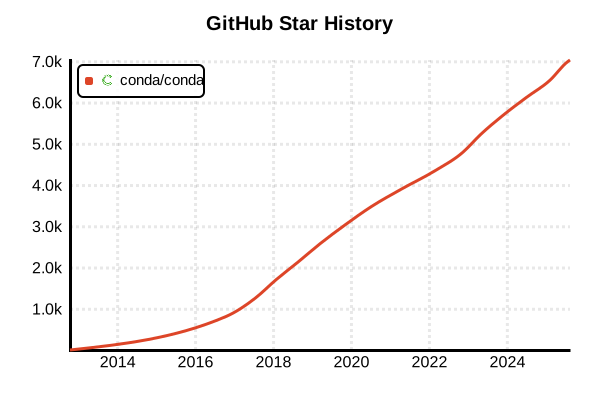
Data as of: 7/20/2025, 02:54 AM
Language Version Management Tool
conda
Overview
conda is an open-source package management system and environment management system for managing Python environments and packages. Specialized for data science, it supports multiple languages including Python, R, Scala, Java, and C/C++. It easily manages complex scientific computing libraries and machine learning frameworks, enabling reproducible cross-platform environment construction.
Details
Key Features
- Multi-language Support: Supports Python, R, Scala, Java, C/C++, and more
- Binary Packages: Pre-compiled packages for fast installation
- Complex Dependency Resolution: Advanced dependency management using SAT-solver
- Cross-platform: Windows, macOS, and Linux support
- Virtual Environments: Independent package management in isolated environments
- Channel System: Specialized channels like conda-forge and bioconda
- Data Science Focus: Standard support for NumPy, SciPy, Pandas, TensorFlow, etc.
Architecture
conda creates independent directory structures for each environment and manages package dependencies through metadata. Powerful dependency resolution via libsolver minimizes version conflicts.
Package Sources
- defaults: Official channels provided by Anaconda Inc.
- conda-forge: Largest community-driven channel
- bioconda: Dedicated channel for bioinformatics
- pytorch: Official PyTorch channel
- nvidia: NVIDIA CUDA-related packages
Pros and Cons
Pros
- Easy Scientific Computing: NumPy, SciPy, TensorFlow with one-command installation
- Binary Packages: No compilation required, fast installation
- Powerful Dependency Resolution: Automatic resolution of complex dependencies
- Reproducibility: Complete environment reproduction via environment.yaml
- Cross-platform: Same configuration for Windows, Mac, and Linux
- Data Science Ecosystem: Jupyter, matplotlib, seaborn pre-integrated
- Enterprise Support: Commercial support from Anaconda Inc.
Cons
- Heavy Weight: Full installation requires several GB of space
- Large Package Sizes: Individual packages tend to be large
- Resolution Time: Complex dependency resolution can be time-consuming
- High Learning Curve: More feature-rich but complex than pip/venv
- Update Delays: Latest package versions may be delayed
- Licensing: Commercial use restrictions for Anaconda
Reference Pages
Usage Examples
Installation
# Miniconda installation (recommended lightweight version)
# Linux/macOS
curl -L https://repo.anaconda.com/miniconda/Miniconda3-latest-Linux-x86_64.sh -o miniconda.sh
bash miniconda.sh

# macOS (also available via Homebrew)
brew install --cask miniconda

# Windows (also available via Chocolatey)
choco install miniconda3

# Verify installation
conda --version
conda info
Basic Environment Management
# Create new environment
conda create -n myproject python=3.11

# Activate environment
conda activate myproject

# Check current environment
conda info --envs

# List all environments
conda env list

# Deactivate environment
conda deactivate
Package Management
# Install packages
conda install numpy pandas matplotlib

# Install from specific channel
conda install -c conda-forge scikit-learn
conda install -c pytorch pytorch torchvision

# Specify versions
conda install python=3.11.5 numpy=1.24.3

# Install multiple packages simultaneously
conda install "numpy>=1.20" "pandas>=1.5" jupyter

# List installed packages
conda list

# Update packages
conda update numpy
conda update --all
Data Science Environment Setup
# Create data science environment
conda create -n datascience python=3.11 \
  numpy pandas matplotlib seaborn jupyter \
  scikit-learn scipy statsmodels

# Machine learning specialized environment
conda create -n ml-env python=3.11
conda activate ml-env
conda install -c conda-forge \
  numpy pandas matplotlib scikit-learn \
  tensorflow keras pytorch torchvision

# Geospatial data analysis environment
conda create -n geo-env python=3.11
conda activate geo-env
conda install -c conda-forge \
  geopandas folium rasterio shapely fiona

# Bioinformatics environment
conda create -n bio-env python=3.11
conda activate bio-env
conda install -c bioconda biopython blast samtools
Environment Export and Restoration
# Export environment to YAML file
conda env export > environment.yaml

# Export minimal configuration (manual installs only)
conda env export --from-history > environment.yaml

# Custom YAML file creation example
cat << EOF > environment.yaml
name: myproject
channels:
  - conda-forge
  - defaults
dependencies:
  - python=3.11
  - numpy
  - pandas
  - matplotlib
  - jupyter
  - pip
  - pip:
    - requests
    - beautifulsoup4
EOF

# Create environment from YAML file
conda env create -f environment.yaml

# Update existing environment
conda env update -f environment.yaml
Leveraging conda-forge
# Set conda-forge as default channel
conda config --add channels conda-forge
conda config --set channel_priority strict

# Use Miniforge from conda-forge (recommended)
curl -L https://github.com/conda-forge/miniforge/releases/latest/download/Miniforge3-Linux-x86_64.sh -o miniforge.sh
bash miniforge.sh

# Search conda-forge packages
conda search -c conda-forge scipy

# Install specialized packages from conda-forge
conda install -c conda-forge \
  xarray dask intake holoviz
Large Project Management
# Multi-environment project setup
mkdir myproject && cd myproject

# Development environment
conda create -n myproject-dev python=3.11 \
  pytest black flake8 mypy jupyter

# Production environment
conda create -n myproject-prod python=3.11 \
  --file requirements.txt

# Testing environment
conda create -n myproject-test python=3.11 \
  pytest coverage pytest-cov

# Clone environment
conda create -n myproject-backup --clone myproject-dev

# Remove environment
conda env remove -n myproject-test
CI/CD Environment Usage
# GitHub Actions example
name: Conda Tests
on: [push, pull_request]

jobs:
  test:
    runs-on: ${{ matrix.os }}
    strategy:
      matrix:
        os: [ubuntu-latest, windows-latest, macos-latest]
        python-version: [3.9, 3.10, 3.11]

    steps:
    - uses: actions/checkout@v4
    - uses: conda-incubator/setup-miniconda@v2
      with:
        auto-update-conda: true
        python-version: ${{ matrix.python-version }}
        environment-file: environment.yaml
        activate-environment: test-env

    - name: Install dependencies
      shell: bash -l {0}
      run: |
        conda info
        conda list

    - name: Run tests
      shell: bash -l {0}
      run: |
        pytest tests/
Performance Optimization
# Use mamba for fast package resolution
conda install -c conda-forge mamba

# Install packages with mamba (faster)
mamba install numpy pandas matplotlib

# Configure parallel downloads
conda config --set remote_max_retries 3
conda config --set remote_connect_timeout_secs 30

# Cache management
conda clean --all
conda clean --packages --tarballs

# Optimize channel priority
conda config --show channels
conda config --set channel_priority strict