Pipenv
GitHub Overview
pypa/pipenv
Python Development Workflow for Humans.
Repository:https://github.com/pypa/pipenv
Homepage:https://pipenv.pypa.io
Stars25,080
Watchers360
Forks1,876
Created:January 20, 2017
Language:Python
License:MIT License
Topics
packagingpippipfilepythonvirtualenv
Star History
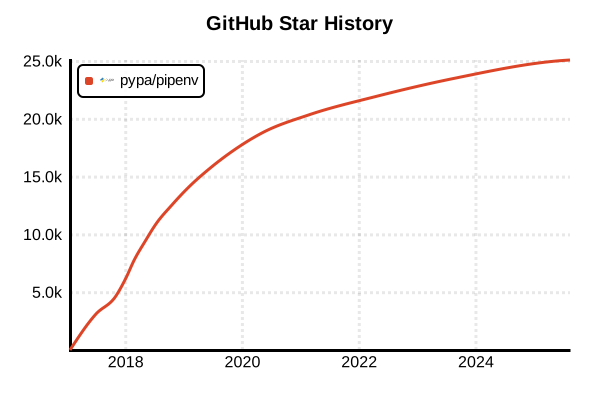
Data as of: 7/20/2025, 02:54 AM
Language Version Management Tool
Pipenv
Overview
Pipenv is a tool that integrates dependency management and virtual environments for Python projects. It provides an NPM/Yarn-like workflow featuring deterministic dependency management with Pipfile and Pipfile.lock, built-in security scanning, and automatic virtual environment management. It unifies the functionality of pip, virtualenv, pipfile, and requirements.txt to deliver a modern Python development experience.
Details
Key Features
- Integrated Workflow: Centralized dependency management and virtual environments
- Pipfile/Pipfile.lock: Intuitive configuration files and deterministic locking
- Security Scanning: Built-in vulnerability checking with PyUp.io integration
- Automatic Virtual Environments: Auto-creation of environments per project directory
- Custom Categories: Separate dependencies for development, testing, and documentation
- VCS Integration: Direct package installation from GitHub and other repositories
- Cryptographic Hashes: Prevention of supply chain attacks
Architecture
Pipenv centers configuration around the Pipfile, generating Pipfile.lock during installation. It automatically creates virtual environments for each project and isolates dependencies. Integration with the safety package enables vulnerability database checking.
Comparison with Other Tools
- vs pip/virtualenv: Higher-level abstraction and integrated experience
- vs Poetry: Simpler and lighter, npm-like workflow
- vs conda: Python-focused and lighter, optimal for general development
Pros and Cons
Pros
- NPM-like Experience: Familiar to developers from JavaScript ecosystem
- Security-First: Built-in vulnerability scanning functionality
- Deterministic Builds: Reproducible environments with Pipfile.lock
- Simple Workflow: Intuitive command structure
- Hash Verification: Package integrity assurance
- Automatic Environment Management: Transparent virtual environment creation/management
- Production Ready: Production deployment with --deploy flag
Cons
- Performance: Dependency resolution can be slow for large projects
- Complex Dependencies: Difficulty resolving complex dependency trees
- Memory Usage: High memory consumption during dependency resolution
- Error Messages: Sometimes unclear error messages
- Maturity: Less active development community compared to Poetry
Reference Pages
- Pipenv Official Documentation
- Pipenv GitHub Repository
- PyPI Pipenv
- Python.org Package Management Guide
Code Examples
Installation
# Install with pip
pip install pipenv

# On macOS, Homebrew is also available
brew install pipenv

# Install with pipx (recommended)
pipx install pipenv

# Verify installation
pipenv --version
Project Initialization and Virtual Environment Creation
# New project directory
mkdir myproject && cd myproject

# Initialize Pipfile (interactive)
pipenv --python 3.11

# Create virtual environment (if no Pipfile exists)
pipenv install

# Specify Python version
pipenv --python 3.11.7
pipenv --python /usr/bin/python3.11

# Migrate from existing requirements.txt
pipenv install -r requirements.txt
Package Management
# Install packages
pipenv install requests
pipenv install django==4.2.0
pipenv install "requests>=2.20"

# Install development dependencies
pipenv install pytest --dev
pipenv install black --dev
pipenv install mypy --dev

# Install with custom categories
pipenv install sphinx --categories docs
pipenv install coverage --categories test

# Install multiple packages simultaneously
pipenv install requests django flask

# Install from VCS (Git)
pipenv install git+https://github.com/user/repo.git
pipenv install git+https://github.com/user/[email protected]
pipenv install git+https://github.com/user/repo.git#egg=package&subdirectory=path
Virtual Environment Operations
# Start virtual environment shell
pipenv shell

# Execute commands in virtual environment
pipenv run python app.py
pipenv run pytest
pipenv run python -m pip list

# Display virtual environment information
pipenv --venv
pipenv --py

# Display dependencies in graph format
pipenv graph

# Remove virtual environment
pipenv --rm
Dependency Updates and Management
# Update all dependencies
pipenv update

# Update specific packages only (2025 new feature)
pipenv upgrade requests
pipenv upgrade requests django

# Update development dependencies only
pipenv update --dev

# Regenerate lock file
pipenv lock

# Install dependencies for production environment
pipenv install --deploy

# Install excluding development dependencies
pipenv install --ignore-pipfile

# Check synchronization with Pipfile.lock
pipenv verify
Security Scanning (2025 Updates)
# New scan command (recommended)
pipenv scan

# Scan with PyUp.io API key
pipenv scan --key YOUR_PYUP_API_KEY

# Legacy check command (unsupported after June 2025)
pipenv check

# Detailed security report
pipenv scan --full-report

# JSON format output
pipenv scan --json
Configuration Management
# Display pipenv configuration
pipenv --support

# Set environment variables (.env file)
echo "DEBUG=True" > .env
echo "SECRET_KEY=your-secret-key" >> .env
echo "DATABASE_URL=sqlite:///db.sqlite3" >> .env

# Automatic .env file loading
pipenv shell  # .env file is automatically loaded

# Configure virtual environment in project
export PIPENV_VENV_IN_PROJECT=1
pipenv install

# Configure private index
pipenv install --index https://private.pypi.org/simple/ private_package
Pipfile Example
[[source]]
url = "https://pypi.org/simple"
verify_ssl = true
name = "pypi"

[[source]]
url = "https://private.pypi.org/simple"
verify_ssl = true
name = "private"

[packages]
requests = "*"
django = ">=4.0,<5.0"
psycopg2-binary = "~=2.9.0"
private-package = {version = "*", index = "private"}
git-package = {git = "https://github.com/user/repo.git", ref = "v1.0.0"}

[dev-packages]
pytest = "*"
black = "*"
flake8 = "*"
mypy = "*"

[docs]
sphinx = "*"
sphinx-rtd-theme = "*"

[test]
coverage = "*"
pytest-cov = "*"

[requires]
python_version = "3.11"

[scripts]
start = "python manage.py runserver"
test = "pytest tests/"
format = "black ."
lint = "flake8 ."
CI/CD Usage
# GitHub Actions example
name: CI
on: [push, pull_request]

jobs:
  test:
    runs-on: ubuntu-latest
    strategy:
      matrix:
        python-version: [3.9, 3.10, 3.11, 3.12]

    steps:
    - uses: actions/checkout@v4

    - name: Set up Python
      uses: actions/setup-python@v4
      with:
        python-version: ${{ matrix.python-version }}

    - name: Install pipenv
      run: |
        python -m pip install --upgrade pip
        pip install pipenv

    - name: Install dependencies
      run: |
        pipenv install --dev --deploy

    - name: Security scan
      run: pipenv scan

    - name: Run tests
      run: |
        pipenv run pytest
        pipenv run black --check .
        pipenv run flake8 .

    - name: Generate requirements.txt for deployment
      run: pipenv requirements > requirements.txt
Docker Integration
# Dockerfile example
FROM python:3.11-slim

# Install pipenv
RUN pip install pipenv

# Set working directory
WORKDIR /app

# Copy Pipfile and lock file
COPY Pipfile Pipfile.lock ./

# Install production dependencies
RUN pipenv install --deploy --system

# Copy application
COPY . .

# Set environment variables
ENV PYTHONPATH=/app
ENV DJANGO_SETTINGS_MODULE=myproject.settings

CMD ["python", "manage.py", "runserver", "0.0.0.0:8000"]
Environment-Specific Management
# Development environment setup
pipenv install --dev

# Staging environment setup
pipenv install

# Production environment setup
pipenv install --deploy --ignore-pipfile

# Generate requirements.txt (for deployment)
pipenv requirements > requirements.txt
pipenv requirements --dev > dev-requirements.txt

# Environment-specific Pipfile management
cp Pipfile Pipfile.development
cp Pipfile Pipfile.production
Troubleshooting
# Diagnose dependency issues
pipenv graph
pipenv check --system

# Clear cache
pipenv --clear

# Complete virtual environment recreation
pipenv --rm
pipenv install

# Run in debug mode
pipenv --verbose install package_name

# Resolve lock file issues
rm Pipfile.lock
pipenv lock

# Resolve conflicts with system packages
pipenv install --skip-lock package_name
pipenv lock

# Check environment variables
pipenv --support
Performance Optimization
# Faster dependency resolution
export PIPENV_RESOLVER="backtracking"

# Enable parallel installation
export PIPENV_MAX_DEPTH=1

# Use index mirrors
pipenv install --index https://pypi.douban.com/simple/ package_name

# Optimize cache
export PIPENV_CACHE_DIR=/fast/disk/cache
Script Functionality Usage
# Scripts section in Pipfile
[scripts]
dev = "python manage.py runserver"
test = "pytest tests/ -v"
coverage = "pytest tests/ --cov=myproject"
format = "black . && isort ."
lint = "flake8 . && mypy ."
deploy = "python manage.py migrate && python manage.py collectstatic --noinput"
# Execute scripts
pipenv run dev
pipenv run test
pipenv run coverage
pipenv run format
pipenv run lint