Poetry
GitHub Overview
python-poetry/poetry
Python packaging and dependency management made easy
Repository:https://github.com/python-poetry/poetry
Homepage:https://python-poetry.org
Stars33,458
Watchers190
Forks2,353
Created:February 28, 2018
Language:Python
License:MIT License
Topics
dependency-managerpackage-managerpackagingpoetrypython
Star History
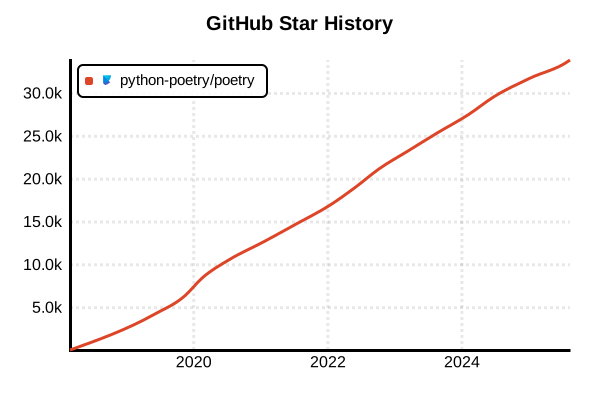
Data as of: 7/20/2025, 02:54 AM
Language Version Management Tool
Poetry
Overview
Poetry is a modern tool that integrates dependency management, packaging, and virtual environment management for Python projects. It provides reproducible Python development environments through pyproject.toml-based configuration management and deterministic dependency resolution with poetry.lock files. Inspired by NPM and Yarn, it enables a contemporary Python development workflow.
Details
Key Features
- Integrated Dependency Management: Centralized package installation, updates, and removal
- Deterministic Builds: Reproducible environments through poetry.lock files
- Automatic Virtual Environment Management: Auto-creation of isolated environments per project
- pyproject.toml Standard: Modern configuration management compliant with PEP 518/621
- Intelligent Dependency Resolution: Automatic resolution of version conflicts
- Built-in Packaging: Wheel and sdist creation capabilities
- PyPI Integration: Package publishing and private repository support
Architecture
Poetry centers configuration around the pyproject.toml file in the project root, recording specific versions in the poetry.lock file. Virtual environments are automatically created per project and completely isolated from system Python.
Comparison with Other Tools
- vs pip: Higher-level dependency management and project structure
- vs pipenv: Faster dependency resolution and built-in packaging
- vs conda: Python-focused and lighter, optimal for non-scientific computing
Pros and Cons
Pros
- Enhanced Developer Experience: Integrated workflow completed with a single tool
- Reproducibility: Complete environment reproduction through lock files
- Team Development: Environment sharing via pyproject.toml and lock files
- Modern Standards: Future-proof design compliant with PEPs
- Fast Operations: Optimized dependency resolution algorithms
- Flexible Configuration: Grouped dependency management
- Plugin System: Extensible architecture
Cons
- Learning Curve: Different workflow from traditional pip/virtualenv
- Memory Usage: Load during dependency resolution for large projects
- Ecosystem: Compatibility issues with some legacy tools
- Windows Limitations: POSIX environments recommended for some features
- Storage: Disk usage from per-project virtual environments
Reference Pages
Code Examples
Installation (Recommended Method)
# Using pipx (recommended)
pipx install poetry

# Or using the official installer
curl -sSL https://install.python-poetry.org | python3 -

# On macOS, Homebrew is also available
brew install poetry

# Verify installation
poetry --version
Basic Project Creation
# Create a new project
poetry new my-project
cd my-project

# Initialize Poetry in an existing project
poetry init

# Check project structure
tree my-project
# my-project/
# ├── pyproject.toml
# ├── README.md
# ├── my_project/
# │   └── __init__.py
# └── tests/
#     └── __init__.py
Dependency Management
# Add packages
poetry add requests
poetry add fastapi
poetry add "django>=4.0,<5.0"

# Add development dependencies
poetry add pytest --group dev
poetry add black --group dev
poetry add mypy --group dev

# Add optional groups
poetry add sphinx --group docs
poetry add --group docs mkdocs

# Add with specific Python version
poetry add "numpy; python_version >= '3.8'"

# Add from GitHub repository
poetry add git+https://github.com/user/repo.git
poetry add git+https://github.com/user/repo.git@branch-name
Virtual Environment Management
# Display virtual environment information
poetry env info

# Display virtual environment path
poetry env info --path

# List available virtual environments
poetry env list

# Use specific Python version
poetry env use python3.11
poetry env use /usr/bin/python3.11

# Remove virtual environment
poetry env remove python3.11

# Virtual environment configuration
poetry config virtualenvs.in-project true  # Create .venv in project
poetry config virtualenvs.create false     # Disable auto-creation
Project Installation and Execution
# Install dependencies
poetry install

# Production install (excluding dev dependencies)
poetry install --only main

# Install only specific groups
poetry install --only dev
poetry install --with docs

# Exclude specific groups
poetry install --without dev,test

# Execute commands in virtual environment
poetry run python app.py
poetry run pytest
poetry run black .

# Start virtual environment shell
poetry shell
Dependency Updates and Management
# Update all dependencies
poetry update

# Update specific packages only
poetry update requests

# Regenerate lock file (without installation)
poetry lock

# Sync with old lock file
poetry install --sync

# Check dependencies
poetry show
poetry show --tree
poetry show requests

# Check for vulnerable packages
poetry audit
Package Publishing
# Build project
poetry build

# Login to PyPI (API token recommended)
poetry config pypi-token.pypi your-api-token

# Publish to Test PyPI
poetry config repositories.testpypi https://test.pypi.org/legacy/
poetry publish -r testpypi

# Publish to PyPI
poetry publish

# Test with dry run
poetry publish --dry-run
Configuration Management
# Check Poetry configuration
poetry config --list

# Set cache directory
poetry config cache-dir /path/to/cache

# Configure private repository
poetry config repositories.private-repo https://repo.company.com/simple/
poetry config http-basic.private-repo username password

# Certificate configuration
poetry config certificates.private-repo.cert /path/to/cert.pem

# Proxy configuration
poetry config http-basic.proxy.url http://proxy.company.com:8080
CI/CD Usage
# GitHub Actions example
name: CI
on: [push, pull_request]

jobs:
  test:
    runs-on: ubuntu-latest
    strategy:
      matrix:
        python-version: [3.9, 3.10, 3.11, 3.12]

    steps:
    - uses: actions/checkout@v4

    - name: Set up Python
      uses: actions/setup-python@v4
      with:
        python-version: ${{ matrix.python-version }}

    - name: Install Poetry
      run: |
        curl -sSL https://install.python-poetry.org | python3 -
        echo "$HOME/.local/bin" >> $GITHUB_PATH

    - name: Configure Poetry
      run: |
        poetry config virtualenvs.create true
        poetry config virtualenvs.in-project true

    - name: Cache dependencies
      uses: actions/cache@v3
      with:
        path: .venv
        key: poetry-${{ hashFiles('poetry.lock') }}

    - name: Install dependencies
      run: poetry install

    - name: Run tests
      run: |
        poetry run pytest
        poetry run black --check .
        poetry run mypy .
Project Template Usage
# Use custom template
poetry new my-project --src  # src/ layout

# Disable package mode (for application development)
# Add to pyproject.toml
[tool.poetry]
package-mode = false
Poetry Plugin Usage
# Install plugins
poetry self add poetry-plugin-export
poetry self add poetry-plugin-bundle

# Generate requirements.txt
poetry export -f requirements.txt --output requirements.txt
poetry export --only dev -f requirements.txt --output dev-requirements.txt

# Manage plugins
poetry self show plugins
poetry self remove poetry-plugin-export
Troubleshooting
# Clear cache
poetry cache clear pypi --all

# Update Poetry
poetry self update

# Reset configuration
poetry config --unset virtualenvs.in-project

# Display debug information
poetry debug info
poetry debug resolve

# Complete environment reset
poetry env remove --all
poetry cache clear --all pypi