pyenv
GitHub Overview
Stars42,652
Watchers392
Forks3,193
Created:August 31, 2012
Language:Roff
License:MIT License
Topics
pythonshell
Star History
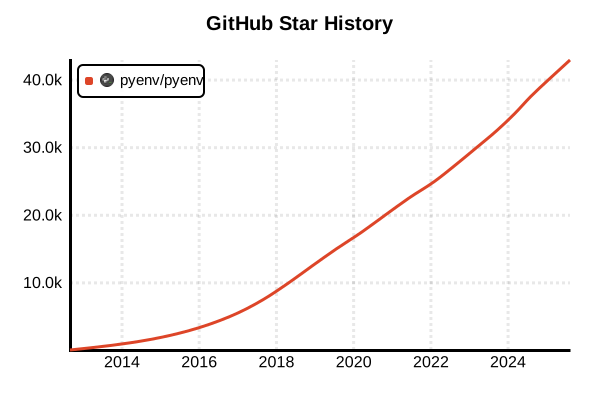
Data as of: 7/20/2025, 02:54 AM
Language Version Management Tool
pyenv
Overview
pyenv is a command-line tool that allows you to easily manage multiple Python versions. It enables using different Python versions for each project without polluting the global environment. Implemented in pure shell scripts, it avoids the bootstrap problem of Python itself.
Details
Key Features
- Version Switching: Manage Python versions at global, local, and shell levels
- Multiple Version Coexistence: Install and manage different Python versions simultaneously
- Per-Project Management: Automatic version switching via .python-version files
- Environment Variable Management: Temporary version specification with PYENV_VERSION
- Shell Script Implementation: Lightweight with minimal dependencies
- Plugin System: Extensions like pyenv-virtualenv
How It Works
pyenv prepends a shim directory to the PATH environment variable and intercepts Python commands. This allows redirection to the appropriate Python version.
Supported OS
- Linux: All major distributions
- macOS: Installation available via Homebrew
- Windows: Only works within WSL (Windows Subsystem for Linux)
- Others: UNIX-like OS such as FreeBSD, OpenBSD
Advantages and Disadvantages
Advantages
- Simple Design: Single-purpose tool following UNIX philosophy
- Lightweight: Shell script-based for fast operation
- Flexibility: Management at global, local, and shell levels
- Project Isolation: Independent environment for each project
- Wide Version Support: CPython, PyPy, Anaconda, and more
- Active Development: Continuous maintenance and community support
Disadvantages
- Build Dependencies: Time-consuming as it builds Python from source
- No Windows Support: Doesn't work on native Windows
- Initial Setup: Requires editing shell configuration files
- Build Tools Required: Compiler and libraries installation prerequisite
- Separate Virtual Environments: Requires pyenv-virtualenv plugin
Reference Pages
Usage Examples
Installation (Linux/macOS)
# Using automatic installer
curl https://pyenv.run | bash

# Or manual Git clone
git clone https://github.com/pyenv/pyenv.git ~/.pyenv

# On macOS, Homebrew is also available
brew install pyenv
Shell Configuration (Add to .bashrc or .zshrc)
# Set pyenv environment variables
export PYENV_ROOT="$HOME/.pyenv"
export PATH="$PYENV_ROOT/bin:$PATH"

# Initialize pyenv
eval "$(pyenv init -)"

# Apply configuration
source ~/.bashrc  # or source ~/.zshrc
Installing Build Dependencies
# Ubuntu/Debian
sudo apt-get update
sudo apt-get install -y make build-essential libssl-dev zlib1g-dev \
libbz2-dev libreadline-dev libsqlite3-dev wget curl llvm libncurses5-dev \
xz-utils tk-dev libxml2-dev libxmlsec1-dev libffi-dev liblzma-dev

# CentOS/RHEL/Fedora
sudo yum install gcc zlib-devel bzip2 bzip2-devel readline-devel \
sqlite sqlite-devel openssl-devel tk-devel libffi-devel

# macOS (Xcode Command Line Tools required)
xcode-select --install
Basic Usage
# List available Python versions
pyenv install --list

# Install specific version
pyenv install 3.12.0
pyenv install 3.11.7
pyenv install pypy3.10-7.3.13

# Check installed versions
pyenv versions

# Set global version
pyenv global 3.12.0

# Check current version
pyenv version
python --version
Per-Project Management
# Navigate to project directory
cd /path/to/my-project

# Set Python version for this project
pyenv local 3.11.7

# .python-version file is created
cat .python-version
# 3.11.7

# Automatically switches when moving to another directory
cd /path/to/another-project
pyenv local 3.10.13
python --version  # Python 3.10.13
Temporary Version Switching
# Change version only for current shell session
pyenv shell 3.9.18

# Can also specify via environment variable
export PYENV_VERSION=3.9.18

# Revert back
pyenv shell --unset
# or
unset PYENV_VERSION
Integration with pyenv-virtualenv
# Install plugin
git clone https://github.com/pyenv/pyenv-virtualenv.git \
  $(pyenv root)/plugins/pyenv-virtualenv

# Add to shell configuration
echo 'eval "$(pyenv virtualenv-init -)"' >> ~/.bashrc
source ~/.bashrc

# Create virtual environment
pyenv virtualenv 3.12.0 myproject-env

# Activate virtual environment
pyenv activate myproject-env

# Auto-activate in project directory
cd /path/to/myproject
pyenv local myproject-env