uv
GitHub Overview
astral-sh/uv
An extremely fast Python package and project manager, written in Rust.
Repository:https://github.com/astral-sh/uv
Homepage:https://docs.astral.sh/uv
Stars70,583
Watchers133
Forks2,139
Created:October 2, 2023
Language:Rust
License:Apache License 2.0
Topics
packagingpythonresolveruv
Star History
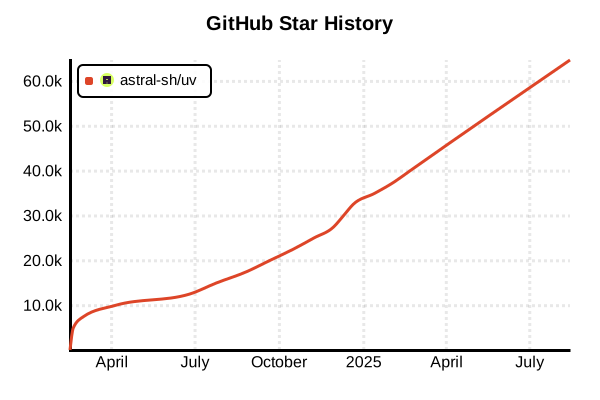
Data as of: 10/22/2025, 04:10 AM
Language Version Management Tool
uv
Overview
uv is an extremely fast Python package and version management tool written in Rust. It integrates the functionality of pip, pip-tools, virtualenv, and pyenv, achieving 10-100x performance improvements over traditional tools. Developed by the Astral team in 2024, it's rapidly becoming the new standard in the Python ecosystem.
Details
Key Features
- Blazing Fast: 10-100x speed improvement with Rust implementation
- All-in-One: Integrates package management, virtual environments, and Python version management
- Auto Python Install: Automatically downloads and installs required Python versions
- Single Binary: Distributed as a static binary with no Python dependencies
- Compatibility: Drop-in replacement for pip, pip-tools, and virtualenv
- Project Management: Modern project management with pyproject.toml
Architecture
uv is implemented in Rust and doesn't depend on Python itself. It uses distributions from the python-build-standalone project to install Python and employs efficient dependency resolution algorithms.
Integrated Features
- pip functionality: Package install, uninstall, and update
- pip-tools functionality: Dependency synchronization from requirements.txt
- virtualenv functionality: Virtual environment creation and management
- pyenv functionality: Multiple Python version management
- pipx functionality: CLI tool installation in isolated environments
Advantages and Disadvantages
Advantages
- Ultra-Fast: Dramatic speed improvements over traditional tools
- Unified Environment: Replace multiple tools with one
- Zero Configuration: Works even without Python installed
- Reproducibility: Platform-independent dependency resolution
- Memory Efficient: Low memory usage with Rust implementation
- Active Development: Frequent updates by the Astral team
Disadvantages
- New Tool: Released in 2024 with limited track record
- No Global Python: Python installed by uv isn't globally available
- Unofficial Builds: Uses python-build-standalone instead of official Python distributions
- Ecosystem: Limited plugins and third-party tools
- Learning Curve: Need to adapt to new command structure
Reference Pages
- uv Official Documentation
- uv GitHub Repository
- Astral Official Blog
- Python Version Guide
- uv Concepts Documentation
Usage Examples
Installation
# macOS/Linux (standalone installer)
curl -LsSf https://astral.sh/uv/install.sh | sh

# Windows (PowerShell with admin privileges)
powershell -ExecutionPolicy ByPass -c "irm https://astral.sh/uv/install.ps1 | iex"

# Homebrew (macOS)
brew install uv

# Using pipx
pipx install uv

# Using pip (not recommended)
pip install uv
Python Version Management
# Check available Python versions
uv python list

# Install specific Python versions
uv python install 3.12.0
uv python install 3.11 3.10  # Multiple versions at once

# Pin Python version for project
uv python pin 3.11

# Check current Python version
uv python show
Project Initialization and Management
# Create new project
uv init my-project
cd my-project

# Project structure
# ├── .gitignore
# ├── .python-version
# ├── README.md
# ├── hello.py
# └── pyproject.toml

# Add dependencies
uv add requests numpy pandas

# Add development dependencies
uv add --dev pytest black ruff

# Sync dependencies
uv sync

# Run project
uv run python hello.py
Virtual Environment Creation and Management
# Create virtual environment with specific Python version
uv venv --python 3.12

# Create virtual environment with default Python
uv venv

# Activate virtual environment
# Linux/macOS
source .venv/bin/activate
# Windows
.venv\Scripts\activate

# Install packages in virtual environment
uv pip install django flask

# Install from requirements.txt
uv pip sync requirements.txt
pip-Compatible Commands
# Install package
uv pip install requests

# Install from requirements.txt
uv pip install -r requirements.txt

# Upgrade package
uv pip install --upgrade requests

# List installed packages
uv pip list

# Uninstall package
uv pip uninstall requests

# Generate requirements.txt
uv pip freeze > requirements.txt
Tool Execution (pipx Alternative)
# Run tools in ephemeral environment
uvx ruff check .
uvx black --check .

# Alias form
uv tool run pytest

# Run specific tool version
uvx [email protected] check .

# Install tools
uv tool install ruff
uv tool install black
Advanced Usage
# Platform-independent resolution
uv pip compile requirements.in --universal

# Dependency overrides
uv add torch --override torch==2.0.0

# Clear cache
uv cache clean

# Self-update
uv self update

# Check configuration
uv --version
uv --help