virtualenv
GitHub Overview
pypa/virtualenv
Virtual Python Environment builder
Repository:https://github.com/pypa/virtualenv
Homepage:https://virtualenv.pypa.io
Stars4,940
Watchers169
Forks1,059
Created:March 6, 2011
Language:Python
License:MIT License
Topics
cythonhacktoberfestjythonlibrarypypapypypypy3pythonvirtualenv
Star History
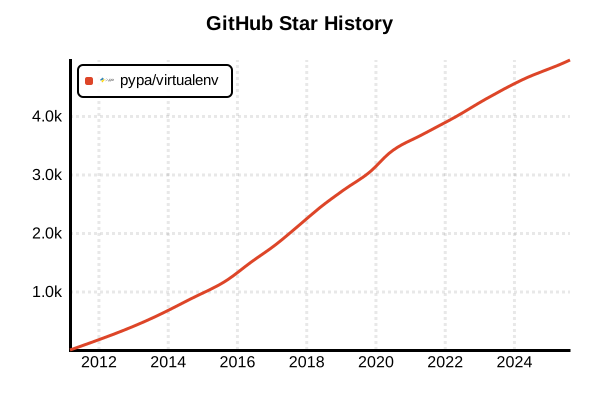
Data as of: 7/20/2025, 02:54 AM
Language Version Management Tool
virtualenv
Overview
virtualenv is a third-party tool for creating isolated virtual environments for Python. It provides more features than the standard library's venv, including faster environment creation, Python 2.x support, and rich customization capabilities. It manages development environments per project while isolating dependencies and preventing pollution of the system Python installation.
Details
Key Features
- Fast Environment Creation: Faster virtual environment creation than venv
- Python 2.x Support: Supports legacy Python versions
- Rich Customization: Detailed configuration and hook functionality
- Embedded Wheels: pip/setuptools updates without internet connection
- Programmatic API: Rich Python API
- Multiple Python Versions: Environment creation with arbitrary Python versions
- Extensible: Feature extension through plugin system
Architecture
virtualenv creates isolated Python environments in specified directories, placing dedicated bin/Scripts, lib, and include directories. The app-data seed method enables fast package installation from cached wheels.
Comparison with venv
- Speed: virtualenv is faster (app-data seed method)
- Features: More features and customization options
- Python 2 Support: Only virtualenv supports it
- Installation: venv is standard, virtualenv requires separate installation
- API: virtualenv provides richer programmatic API
Pros and Cons
Pros
- High Performance: Faster environment creation than venv
- Rich Features: Custom scripts, hooks, and configuration options
- Legacy Support: Usable with Python 2.x projects
- Offline Functionality: Internet-free initialization with embedded wheels
- Flexibility: Environment creation with arbitrary Python interpreters
- Extensibility: Feature addition through plugin system
- Auto-discovery: Automatic detection of Python versions in system
Cons
- Separate Installation: Requires pre-installation as it's not in standard library
- Complexity: More features than venv but higher learning cost
- Dependencies: Requires pip installation
- Overhead: May be overkill for simple use cases
- Maintenance: venv is maintained as standard, virtualenv as separate project
Reference Pages
- virtualenv Official Documentation
- virtualenv GitHub Repository
- PyPI virtualenv
- Python Virtual Environments Guide
Code Examples
Installation
# Install with pip
pip install virtualenv

# Install with pipx (recommended)
pipx install virtualenv

# Install with conda
conda install virtualenv

# Verify installation
virtualenv --version
Basic Virtual Environment Creation
# Basic virtual environment creation
virtualenv myenv

# Specify Python version
virtualenv -p python3.11 myenv
virtualenv -p /usr/bin/python3.11 myenv

# Create with current Python version
virtualenv --python=python3 myenv

# Include system site packages
virtualenv --system-site-packages myenv

# Custom directory name
virtualenv /path/to/custom/location
Virtual Environment Activation
# Linux/macOS
source myenv/bin/activate

# Windows (Command Prompt)
myenv\Scripts\activate.bat

# Windows (PowerShell)
myenv\Scripts\Activate.ps1

# Windows (Git Bash)
source myenv/Scripts/activate

# Deactivate virtual environment
deactivate
Advanced Configuration Options
# Set prompt name
virtualenv --prompt="MyProject" myenv

# Skip latest pip
virtualenv --no-pip myenv

# Skip setuptools
virtualenv --no-setuptools myenv

# Create without seed packages
virtualenv --no-seed myenv

# Run in verbose mode
virtualenv --verbose myenv

# Clear existing environment
virtualenv --clear myenv
Package Management
# After activating virtual environment
source myenv/bin/activate

# Install packages
pip install requests
pip install django==4.2
pip install -r requirements.txt

# Install development packages
pip install pytest black flake8

# Check installed packages
pip list
pip freeze

# Generate requirements.txt
pip freeze > requirements.txt

# Upgrade packages
pip install --upgrade pip
pip install --upgrade requests
Configuration File Usage
# ~/.virtualenv.ini or pyvenv.cfg
[virtualenv]
always-copy = true
system-site-packages = false
download = true
no-pip = false
no-setuptools = false
no-wheel = false
symlinks = true

# Project-specific configuration
# ./virtualenv.ini
[virtualenv]
prompt = MyProject
python = python3.11
Environment Variables and Scripts
# Set environment variables
export VIRTUALENV_PYTHON=/usr/bin/python3.11
export VIRTUALENV_ALWAYS_COPY=1

# Customize activation script
echo 'export PROJECT_ROOT=$(pwd)' >> myenv/bin/activate
echo 'export DEBUG=True' >> myenv/bin/activate

# Deactivation script
echo 'unset PROJECT_ROOT' >> myenv/bin/postdeactivate
Managing Multiple Environments
# Create environments per project
virtualenv ~/venvs/project1
virtualenv ~/venvs/project2
virtualenv ~/venvs/project3

# List environments (when using virtualenvwrapper)
lsvirtualenv

# Switch to specific environment
workon project1

# Remove environment
rmvirtualenv project1
Integration with virtualenvwrapper
# Install virtualenvwrapper
pip install virtualenvwrapper

# Add to bashrc/zshrc
export WORKON_HOME=$HOME/.virtualenvs
export PROJECT_HOME=$HOME/Projects
source /usr/local/bin/virtualenvwrapper.sh

# Reload configuration
source ~/.bashrc

# Create new environment and switch
mkvirtualenv myproject
workon myproject
deactivate
rmvirtualenv myproject

# Associate with project directory
mkproject myproject
Combination with Docker
# Dockerfile example
FROM python:3.11-slim

# Install virtualenv
RUN pip install virtualenv

# Create virtual environment
RUN virtualenv /opt/venv

# Activate virtual environment
ENV PATH="/opt/venv/bin:$PATH"

# Install dependencies
COPY requirements.txt .
RUN pip install -r requirements.txt

# Copy application
COPY . .

CMD ["python", "app.py"]
CI/CD Usage
# GitHub Actions example
name: Test with virtualenv
on: [push, pull_request]

jobs:
  test:
    runs-on: ubuntu-latest
    strategy:
      matrix:
        python-version: [3.8, 3.9, 3.10, 3.11, 3.12]

    steps:
    - uses: actions/checkout@v4

    - name: Set up Python
      uses: actions/setup-python@v4
      with:
        python-version: ${{ matrix.python-version }}

    - name: Install virtualenv
      run: pip install virtualenv

    - name: Create virtual environment
      run: virtualenv venv

    - name: Activate environment and install dependencies
      run: |
        source venv/bin/activate
        pip install -r requirements.txt
        pip install pytest

    - name: Run tests
      run: |
        source venv/bin/activate
        pytest tests/
Script Automation
#!/bin/bash
# setup_env.sh - Development environment setup script

PROJECT_NAME="myproject"
PYTHON_VERSION="python3.11"
VENV_DIR="./venv"

echo "Setting up development environment for $PROJECT_NAME"

# Create virtual environment
if [ ! -d "$VENV_DIR" ]; then
    echo "Creating virtual environment..."
    virtualenv -p $PYTHON_VERSION $VENV_DIR
fi

# Activate virtual environment
source $VENV_DIR/bin/activate

# Install dependencies
if [ -f "requirements.txt" ]; then
    echo "Installing dependencies..."
    pip install -r requirements.txt
fi

# Install development packages
pip install pytest black flake8 mypy

echo "Environment setup complete!"
echo "Activate with: source $VENV_DIR/bin/activate"
Troubleshooting
# Recreate when environment is broken
rm -rf myenv
virtualenv myenv

# Handle SSL certificate errors
pip install --trusted-host pypi.org --trusted-host files.pythonhosted.org package_name

# Clear package cache
pip cache purge

# Upgrade virtualenv itself
pip install --upgrade virtualenv

# Detailed debug information
virtualenv --verbose --debug myenv

# Diagnose path issues
which python
which pip
echo $PATH
Performance Optimization
# Use app-data seed (default)
virtualenv myenv

# Parallelize downloads
virtualenv --download myenv

# Local copy (avoid symbolic links)
virtualenv --always-copy myenv

# Set cache directory
export VIRTUALENV_DOWNLOAD_CACHE=/path/to/cache
virtualenv myenv