chruby
GitHub Overview
Stars2,889
Watchers47
Forks193
Created:August 1, 2012
Language:Shell
License:MIT License
Topics
None
Star History
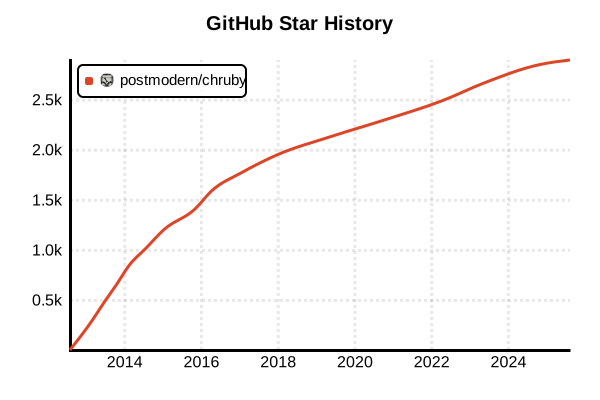
Data as of: 7/20/2025, 02:56 AM
Language Version Management Tool
chruby
Overview
chruby is an ultra-lightweight Ruby version management tool implemented in just 90 lines of code. Based on UNIX philosophy and minimalist design, it provides essential functionality while minimizing impact on the shell environment. By removing unnecessary features, it achieves fast and predictable operation.
Details
Key Features
- Ultra-lightweight: Core implementation in approximately 90 lines of shell script
- Non-invasive: No shims or cd command overrides
- High Performance: No runtime overhead due to direct PATH manipulation
- Transparency: Simple operation that's easy to understand and debug
- Standards Compliant: Follows standard UNIX tools and conventions
- Shell Integration: Native support for bash, zsh, and fish
Design Philosophy "Anti-features"
chruby is characterized by intentionally NOT having the following features:
- No shims: Unlike rbenv or asdf, no executable proxies
- No cd hooks: No cd command overrides like RVM
- No gemsets: Dependency management delegated to Bundler
- No installer: Ruby installation delegated to ruby-install
- No configuration files: No complex configuration needed
How It Works
- Stores available Ruby paths in the
RUBIESarray - Selects specified Ruby with the
chrubyfunction - Directly manipulates
PATH,GEM_HOME, andGEM_PATHenvironment variables - Clears shell's hash table to recognize new Ruby
Pros and Cons
Pros
- Simplicity: Short code that's completely understandable
- Speed: Fast Ruby execution without shims
- Predictability: No magical behavior, easy to identify issues
- Lightweight: Extremely low memory usage
- Compatibility: Works with both ruby-build and ruby-install
- Minimal Dependencies: Uses only standard shell features
Cons
- Limited Features: No advanced features like gemsets or plugin systems
- Manual Switching: No auto-switching by default (requires auto.sh)
- Separate Installer Required: Needs ruby-install for Ruby installation
- No Windows Support: Doesn't work on native Windows
- Initial Setup: Manual shell configuration file editing required
References
- chruby GitHub Repository
- ruby-install (Recommended Installer)
- chruby Wiki
- chruby vs rbenv vs RVM Comparison
Usage Examples
Installation (Linux/macOS)
# Install with Homebrew (recommended for macOS)
brew install chruby ruby-install

# Or manual installation
wget https://github.com/postmodern/chruby/archive/v0.3.9.tar.gz
tar -xzvf v0.3.9.tar.gz
cd chruby-0.3.9/
sudo make install

# Similarly install ruby-install
wget https://github.com/postmodern/ruby-install/archive/v0.9.3.tar.gz
tar -xzvf v0.9.3.tar.gz
cd ruby-install-0.9.3/
sudo make install
Shell Configuration
# Add to ~/.bashrc or ~/.zshrc
source /usr/local/share/chruby/chruby.sh

# Enable auto-switching feature
source /usr/local/share/chruby/auto.sh

# For macOS + Homebrew
source $(brew --prefix)/opt/chruby/share/chruby/chruby.sh
source $(brew --prefix)/opt/chruby/share/chruby/auto.sh

# Add custom Ruby paths if needed
RUBIES+=(
  /opt/rubies/*
  "$HOME/.rubies/*"
  /usr/local/ruby-*
)
Basic Usage
# Install Ruby (using ruby-install)
ruby-install ruby 3.3.0
ruby-install ruby 3.2.3
ruby-install jruby 9.4.5.0

# Check installed Rubies
chruby

# Switch Ruby version
chruby 3.3.0
chruby ruby-3.2.3

# Switch with partial match
chruby 3.3  # Switches to latest 3.3.x

# Check current Ruby version
ruby --version
echo $RUBY_ROOT

# Return to system Ruby
chruby system
Auto-switching Setup
# Create .ruby-version file
cd /path/to/project
echo "3.3.0" > .ruby-version

# With auto.sh enabled, auto-switches on directory change
cd ..         # To parent directory
ruby --version  # Default or system Ruby
cd project    # To project directory
ruby --version  # Automatically switched to 3.3.0

# Hierarchical .ruby-version search
# Project root/.ruby-version → parent directory → ... → home
Detailed ruby-install Usage
# Check available Ruby versions
ruby-install --list

# Install latest stable version
ruby-install ruby

# Install specific version
ruby-install ruby 3.3.0

# Specify installation directory
ruby-install --install-dir ~/.rubies/ruby-3.3.0 ruby 3.3.0

# Specify build options
ruby-install ruby 3.3.0 -- --with-openssl-dir=/usr/local/opt/openssl

# Install JRuby
ruby-install jruby

# Install TruffleRuby
ruby-install truffleruby
Environment Variable Manipulation
# Check environment variables after chruby execution
chruby 3.3.0
echo $RUBY_ROOT     # /opt/rubies/ruby-3.3.0
echo $GEM_HOME      # ~/.gem/ruby/3.3.0
echo $GEM_PATH      # ~/.gem/ruby/3.3.0:/opt/rubies/ruby-3.3.0/lib/ruby/gems/3.3.0
echo $PATH          # /opt/rubies/ruby-3.3.0/bin:~/.gem/ruby/3.3.0/bin:...

# Temporary Ruby switch (using subshell)
(chruby 3.2.3 && ruby script.rb)
ruby --version  # Remains original version
Bundler Integration
# Project setup
mkdir myapp && cd myapp
echo "3.3.0" > .ruby-version
chruby 3.3.0  # Or automatic if auto-switching is enabled

# Install Bundler
gem install bundler

# Create Gemfile
bundle init

# Install dependencies
bundle install

# Use binstubs (recommended)
bundle binstubs --all
export PATH="./bin:$PATH"  # Prioritize project's bin
Using chruby-exec
# Execute command with specific Ruby version using chruby-exec
chruby-exec 3.3.0 -- ruby -v
chruby-exec 3.2.3 -- bundle install
chruby-exec jruby -- irb

# Example in scripts
#!/usr/bin/env bash
chruby-exec 3.3.0 -- ruby <<'EOF'
  puts "Running with Ruby #{RUBY_VERSION}"
  # Script content
EOF
Troubleshooting
# Check Rubies recognized by chruby
echo $RUBIES

# Manually add Ruby
RUBIES+=("/path/to/custom/ruby")

# Check PATH
which ruby
type ruby

# Reset environment variables
chruby_reset

# Reload chruby
source /usr/local/share/chruby/chruby.sh

# Display debug information
set -x  # Enable debug mode in bash
chruby 3.3.0
set +x  # Disable debug mode