frum
GitHub Overview
TaKO8Ki/frum
A little bit fast and modern Ruby version manager written in Rust
Repository:https://github.com/TaKO8Ki/frum
Stars646
Watchers8
Forks14
Created:March 8, 2021
Language:Rust
License:MIT License
Topics
farmrbenvrubyrustversion-manager
Star History
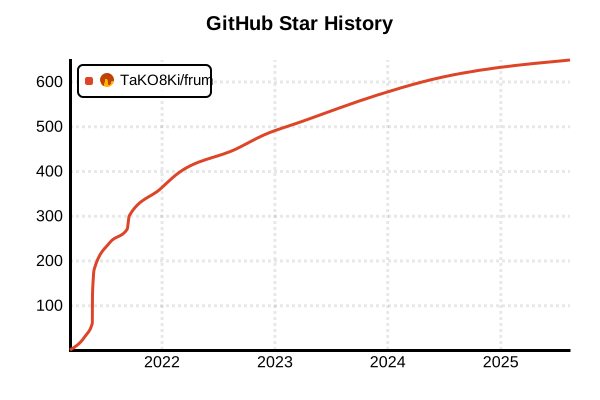
Data as of: 7/20/2025, 02:56 AM
Language Version Management Tool
frum (Fast Ruby Version Manager)
Overview
frum is a fast and modern Ruby version manager implemented in Rust. Released in 2021, this new tool is approximately 7 seconds faster than rbenv and achieves overwhelming speed through a direct approach without shims. With a built-in installer, it provides a complete solution from Ruby installation to management without additional tools.
Details
Key Features
- Rust Implementation: High-speed execution with systems programming language
- Ultra-fast: Order of magnitude speed improvement compared to rbenv
- All-in-one: Built-in Ruby installer eliminates need for additional tools
- Shim-less: Direct execution without proxies
- No Dependencies: Complete in a single Rust executable
- Cross-platform: Supports Linux, macOS, Windows (WSL recommended)
Technical Advantages
frum's speed advantage comes from the following design decisions:
- Native Binary: Single executable compiled with Rust
- Direct PATH Manipulation: No shims or wrapper scripts
- Efficient Caching: Optimization through Rust's ownership system
- Parallel Processing: Leverages Rust's safe concurrency
2024 Evaluation
- Rated as "recommended for balance of speed and functionality"
- Recommended alternative when asdf feels slow
- Stability improved with maturation of Rust-based tools
Pros and Cons
Pros
- Outstanding Speed: Instant startup and version switching
- Simple Installation: One-command install via Homebrew or winget
- Integrated Installer: No need for ruby-build or ruby-install
- Memory Efficiency: Minimal memory usage through Rust implementation
- Modern Design: Optimized for 2020s development environments
- Flexible Configuration: Easy option specification during installation
Cons
- Short History: Released in 2021 with still small community
- Limited Features: No extensibility with plugin systems
- Incomplete rbenv Compatibility: Doesn't support all rbenv features
- Documentation Lacking: Official documentation still developing
- Edge Cases: Few reports on behavior in special environments
References
- frum GitHub Repository
- frum Rust.Tokyo 2021 Presentation
- Mac Install Guide - frum
- Ruby Version Managers Comparison
Usage Examples
Installation
# Install with Homebrew (recommended for macOS/Linux)
brew install frum

# Install with Cargo (if Rust environment exists)
cargo install frum

# Install with winget (Windows)
winget install TaKO8Ki.frum

# Download binary directly
# Download latest version from GitHub Releases page
wget https://github.com/TaKO8Ki/frum/releases/latest/download/frum-{version}-{platform}.tar.gz
tar -xzf frum-{version}-{platform}.tar.gz
sudo mv frum /usr/local/bin/
Shell Configuration
# Add to ~/.bashrc
eval "$(frum init)"

# Add to ~/.zshrc
eval "$(frum init)"

# For fish (~/.config/fish/config.fish)
frum init | source

# For PowerShell (Windows)
Invoke-Expression (& frum init)
Basic Usage
# Show available Ruby versions
frum install --list
frum install -l

# Install latest stable version
frum install

# Install specific version
frum install 3.3.0
frum install 3.2.3

# Check installed versions
frum list
frum ls

# Set global version
frum global 3.3.0

# Check current version
frum current
ruby --version
Installation Options
# Specify OpenSSL directory
frum install 3.3.0 --with-openssl-dir=/usr/local/opt/openssl

# Install with jemalloc enabled
frum install 3.3.0 --with-jemalloc

# Specify multiple options
frum install 3.3.0 \
  --with-openssl-dir=/usr/local/opt/openssl \
  --with-readline-dir=/usr/local/opt/readline \
  --enable-shared

# Install with debug symbols
frum install 3.3.0 --enable-debug
Project-specific Management
# Configure in project directory
cd /path/to/myproject

# Set local version (creates .ruby-version file)
frum local 3.3.0

# Check .ruby-version file
cat .ruby-version
# 3.3.0

# Auto-switching on directory change
cd ..
frum current  # Global or parent setting
cd myproject
frum current  # Auto-switched to 3.3.0
Version Management
# Temporary version switch (current shell only)
frum shell 3.2.3
ruby --version  # 3.2.3

# Returns to original when shell exits
exit
ruby --version  # Original version

# Execute command with different version
frum exec 3.2.3 -- ruby script.rb
frum exec 3.2.3 -- bundle install

# Uninstall
frum uninstall 3.1.0
Advanced Usage
# Set version alias
frum alias create stable 3.3.0
frum global stable

# List aliases
frum alias list

# Delete alias
frum alias delete stable

# Check environment variables
echo $FRUM_DIR         # frum installation directory
echo $FRUM_RUBY_BUILD_MIRROR  # Custom mirror URL (if set)

# Clear cache
frum cache clear
Bundler Integration
# Project setup
mkdir myapp && cd myapp
frum local 3.3.0

# Install Bundler
gem install bundler

# Create Gemfile and install dependencies
bundle init
bundle add rails
bundle install

# Include .ruby-version in version control
git add .ruby-version Gemfile Gemfile.lock
git commit -m "Setup Ruby 3.3.0 with dependencies"
CI/CD Environment Usage
# GitHub Actions example
# .github/workflows/ci.yml
- name: Install frum
  run: |
    curl -L https://github.com/TaKO8Ki/frum/releases/latest/download/frum-linux.tar.gz | tar xz
    sudo mv frum /usr/local/bin/

- name: Setup Ruby
  run: |
    frum install $(cat .ruby-version)
    frum global $(cat .ruby-version)

- name: Install dependencies
  run: bundle install
Troubleshooting
# Verify frum operation
frum --version
which frum

# Run in debug mode
FRUM_DEBUG=1 frum install 3.3.0

# Check installation logs
cat ~/.frum/install.log

# Reset configuration
rm -rf ~/.frum
eval "$(frum init)"

# Check PATH
echo $PATH | grep frum

# Manually add to PATH (temporary)
export PATH="$HOME/.frum/bin:$PATH"