RVM
GitHub Overview
Stars5,174
Watchers160
Forks1,029
Created:August 24, 2009
Language:Shell
License:Other
Topics
jrubymri-rubymrubyrbxrubiniusrubyruby-environmentruby-versionsrvmtruffleruby
Star History
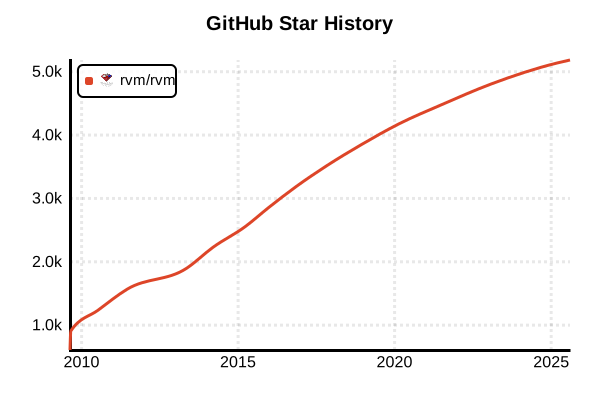
Data as of: 7/20/2025, 02:56 AM
Language Version Management Tool
RVM (Ruby Version Manager)
Overview
RVM is the most established version management tool for managing multiple Ruby versions and gemsets. It features complete dependency isolation through gemsets, support for multiple Ruby implementations, and a rich feature set. Created by Wayne E. Seguin in 2009, it has been one of the most widely used tools in the Ruby ecosystem.
Details
Key Features
- Gemset Management: Create completely isolated gem environments for each project
- Multiple Implementation Support: Supports MRI, JRuby, TruffleRuby, mruby, IronRuby, etc.
- Auto-switching: Directory-based automatic Ruby/gemset switching
- Built-in Installer: Integrated Ruby download and build functionality
- Rich Features: Patch application, dependency management, upgrade features, etc.
- Command Completion: Advanced completion for bash/zsh
Gemset System
RVM's most distinctive feature is the "Named Gem Sets" gemset functionality. By having independent gem environments for each project, it completely prevents dependency conflicts. Gemsets use a common cache directory, eliminating the need for multiple copies of the same gem.
Latest Features (2024)
- Support for Ruby 3.3.6, 3.4.4
- Support for Ruby 3.5.0-preview1
- Enhanced OpenSSL 3.0 support
- Full support for macOS ARM (Apple Silicon)
- Security enhancements (preventing code execution from project files)
- Support for new Linux distributions: Termux, Void Linux, Deepin, etc.
Pros and Cons
Pros
- Complete Isolation: Dependencies are fully separated between projects via gemsets
- Feature-rich: All necessary version management features included
- Ruby Implementation Diversity: Easy management of JRuby, TruffleRuby, etc.
- Mature Ecosystem: Long history and extensive documentation
- Automation: Auto-switching via .ruby-version and .ruby-gemset
- Team Development: Environment settings shareable via files
Cons
- Complexity: Too many features can be overwhelming for beginners
- Heavy: Slow startup affects shell initialization time
- Invasive: Heavy shell environment impact, including cd command override
- Memory Usage: High memory usage due to extensive metadata
- No Windows Support: Requires WSL/Cygwin
References
- RVM Official Site
- RVM Official Documentation
- RVM GitHub Repository
- RVM Best Practices
- Gemset Documentation
Usage Examples
Installation (Linux/macOS)
# Import GPG keys (recommended)
gpg --keyserver keyserver.ubuntu.com --recv-keys 409B6B1796C275462A1703113804BB82D39DC0E3 7D2BAF1CF37B13E2069D6956105BD0E739499BDB

# Run installation script
\curl -sSL https://get.rvm.io | bash -s stable

# Load RVM
source ~/.rvm/scripts/rvm

# Verify installation
rvm --version
type rvm | head -n 1  # Should display "rvm is a function"
Shell Configuration (add to .bashrc or .zshrc)
# Auto-load RVM configuration
[[ -s "$HOME/.rvm/scripts/rvm" ]] && source "$HOME/.rvm/scripts/rvm"

# PATH configuration (usually added automatically)
export PATH="$PATH:$HOME/.rvm/bin"
Basic Usage
# List available Ruby versions
rvm list known

# Install Ruby 3.3.0
rvm install 3.3.0

# Install JRuby
rvm install jruby-9.4.5.0

# Install TruffleRuby
rvm install truffleruby

# List installed Rubies
rvm list

# Set default Ruby
rvm use 3.3.0 --default

# Check current Ruby version
rvm current
ruby -v
Gemset Management
# Create new gemset
rvm gemset create myproject

# Use gemset
rvm use 3.3.0@myproject

# Or specify both at once
rvm use 3.3.0@myproject --create

# List gemsets
rvm gemset list

# Check current gemset
rvm gemset name

# Copy gemset
rvm gemset copy 3.3.0@oldproject 3.3.0@newproject

# Delete gemset
rvm gemset delete myproject

# Use global gemset (shared across all gemsets)
rvm use 3.3.0@global
gem install bundler rake
Project-specific Management
# Configure in project directory
cd /path/to/myproject

# Create .ruby-version file
echo "3.3.0" > .ruby-version

# Create .ruby-gemset file
echo "myproject" > .ruby-gemset

# Auto-switching on directory change
cd ..
ruby -v  # System Ruby or different version
cd myproject
ruby -v  # Auto-switched to 3.3.0
rvm gemset name  # myproject is selected
Advanced Usage
# Specify options during Ruby installation
rvm install 3.3.0 --with-openssl-dir=/usr/local/opt/openssl

# Apply patches
rvm install 3.2.0 --patch /path/to/patch.diff

# Execute commands with multiple versions
rvm all do ruby -v
rvm 3.2.0,3.3.0 do bundle install

# Export/Import gemsets
rvm gemset export Gemfile.lock.gems
rvm gemset import Gemfile.lock.gems

# Upgrade Ruby version
rvm upgrade 3.2.0 3.3.0

# Update RVM itself
rvm get stable
Gemset and Bundler Integration
# Project setup
mkdir myapp && cd myapp
rvm use 3.3.0@myapp --create

# Commit .ruby-version and .ruby-gemset
echo "3.3.0" > .ruby-version
echo "myapp" > .ruby-gemset
git add .ruby-version .ruby-gemset

# Install Bundler
gem install bundler

# Create Gemfile
bundle init

# Install dependencies (isolated in gemset)
bundle install

# Create binstubs (recommended)
bundle binstubs --all
Troubleshooting
# Reload RVM
rvm reload

# Diagnose issues
rvm requirements
rvm doctor

# Clear cache
rvm cleanup all

# Reset gemset
rvm gemset empty myproject

# Complete RVM reinstallation
rvm implode
# Then run installation script again