rustup
GitHub Overview
rust-lang/rustup
The Rust toolchain installer
Repository:https://github.com/rust-lang/rustup
Homepage:https://rust-lang.github.io/rustup/
Stars6,531
Watchers114
Forks964
Created:September 26, 2015
Language:Rust
License:Apache License 2.0
Topics
hacktoberfestrustrustlangtoolchain
Star History
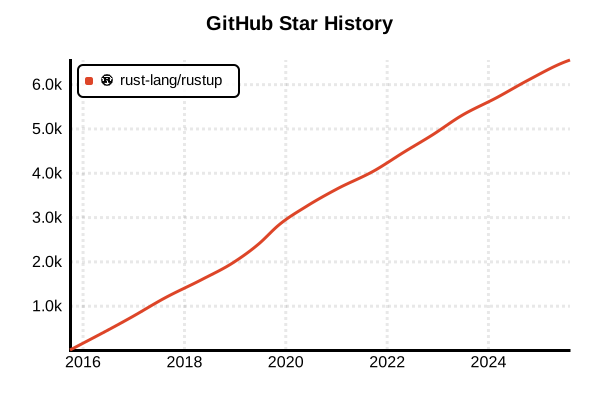
Data as of: 7/20/2025, 03:05 AM
Language Version Management Tool
rustup
Overview
rustup is the official toolchain installer and version manager for the Rust programming language. It enables easy switching between stable, beta, and nightly channels of the Rust compiler and manages various target platforms for cross-compilation. Written in Rust itself, rustup embodies Rust's principles of safety and ease of use.
Details
Key Features
- Channel-based management: Three release channels - stable, beta, and nightly
- 6-week release cycle: Predictable stable releases on a regular schedule
- Cross-compilation support: Easy management of multiple target platforms
- Component management: Additional tools like rustfmt, clippy, rust-src
- Per-project configuration: Automatic version switching via rust-toolchain files
- Offline support: Proxy settings and offline installation capabilities
How It Works
rustup installs all toolchains in the .rustup directory in your home folder and executes the appropriate version of Rust tools through proxy commands added to your shell's PATH. It automatically detects rust-toolchain files in project roots and switches to the specified version.
Toolchain Components
- rustc: The Rust compiler itself
- cargo: Rust's package manager and build tool
- rust-std: The standard library
- rust-docs: Offline documentation
- rustfmt: Code formatter
- clippy: Linting tool
- rust-analyzer: LSP implementation for IDE support
Pros and Cons
Pros
- Official tool: Full support from the official Rust project
- Unified management: Centralized management of compiler, standard library, and tools
- Easy updates: Update everything with a single
rustup update - Cross-platform: Same experience on Windows, macOS, and Linux
- Backward compatibility: Easy installation of older versions
- Rich targets: Support for ARM, WASM, embedded, and various environments
Cons
- Disk usage: Multiple toolchains consume significant storage
- Network dependency: Internet connection required for initial install and updates
- Learning curve: Understanding of nightly channel's unstable features needed
- Package manager conflicts: Care needed when coexisting with system package Rust
- Build times: Large projects may have long dependency build times
Reference Pages
Example Usage
Installation
# Unix-like OS (Linux, macOS, WSL)
curl --proto '=https' --tlsv1.2 -sSf https://sh.rustup.rs | sh

# Installation options
# 1) Proceed with installation (default) - recommended
# 2) Customize installation
# 3) Cancel installation

# Windows (using rustup-init.exe)
# Download from https://rustup.rs/ and run

# Set up environment variables (for bash)
source "$HOME/.cargo/env"

# Verify installation
rustup --version
rustc --version
cargo --version
Channel Management
# Set default channel
rustup default stable
rustup default beta
rustup default nightly

# Install specific version
rustup install 1.75.0
rustup install nightly-2024-01-01

# List installed toolchains
rustup toolchain list

# Show active toolchain
rustup show

# Uninstall toolchain
rustup toolchain uninstall nightly-2023-12-01
Component Management
# List available components
rustup component list

# Add components
rustup component add rustfmt
rustup component add clippy
rustup component add rust-src
rustup component add rust-analyzer

# Add component to specific toolchain
rustup component add rustfmt --toolchain nightly
rustup component add miri --toolchain nightly

# Remove component
rustup component remove rust-docs
Target Management (Cross-compilation)
# List available targets
rustup target list

# Add targets
rustup target add wasm32-unknown-unknown
rustup target add x86_64-pc-windows-gnu
rustup target add aarch64-apple-darwin
rustup target add thumbv7em-none-eabihf  # ARM Cortex-M4

# Add target to specific toolchain
rustup target add wasm32-wasi --toolchain stable

# Remove target
rustup target remove x86_64-pc-windows-gnu
Per-Project Configuration
# In project directory
cd /path/to/my-project

# Create rust-toolchain file
echo "1.75.0" > rust-toolchain
# or
echo "nightly-2024-01-01" > rust-toolchain

# Use rust-toolchain.toml (recommended)
cat > rust-toolchain.toml << EOF
[toolchain]
channel = "stable"
components = ["rustfmt", "clippy"]
targets = ["wasm32-unknown-unknown"]
EOF

# Set override (takes precedence over rust-toolchain)
rustup override set nightly
rustup override set 1.74.0

# List overrides
rustup override list

# Unset override
rustup override unset
Updates and Maintenance
# Update rustup and all toolchains
rustup update

# Update specific toolchain only
rustup update stable
rustup update nightly

# Update rustup itself
rustup self update

# Auto-remove old toolchains
rustup update --no-self-update

# Proxy settings (for corporate environments)
export HTTPS_PROXY=http://proxy.example.com:8080
export HTTP_PROXY=http://proxy.example.com:8080
Advanced Usage
# Run with different toolchain temporarily
rustup run nightly cargo build
rustup run 1.73.0 cargo test

# Start shell with specific toolchain
rustup run stable bash

# Custom toolchain installation
rustup toolchain install nightly --component rust-src rustfmt

# Link toolchain (for local builds)
rustup toolchain link my-custom-rust /path/to/custom/rust

# Complete uninstallation
rustup self uninstall
CI/CD Environment Usage
# GitHub Actions example
- name: Install Rust
  uses: dtolnay/rust-toolchain@stable
  with:
    toolchain: stable
    components: rustfmt, clippy

# GitLab CI example
before_script:
  - curl --proto '=https' --tlsv1.2 -sSf https://sh.rustup.rs | sh -s -- -y
  - source "$HOME/.cargo/env"
  - rustup component add rustfmt clippy