swiftly
GitHub Overview
swiftlang/swiftly
A Swift toolchain installer and manager, written in Swift.
Repository:https://github.com/swiftlang/swiftly
Homepage:https://swift.org/swiftly
Stars759
Watchers30
Forks53
Created:June 20, 2022
Language:Swift
License:Apache License 2.0
Topics
swiftversion-manager
Star History
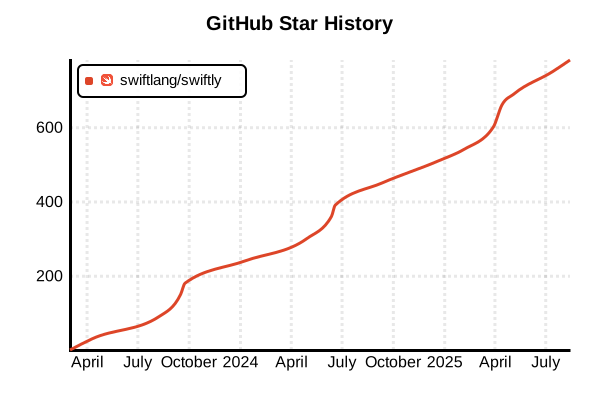
Data as of: 7/20/2025, 03:52 AM
Language Version Management Tool
swiftly
Overview
swiftly is the official Swift toolchain installer and manager. The 1.0 stable version was released in March 2024, making it an officially supported tool by the Swift development team. It enables easy installation, management, and switching between multiple Swift versions, supporting a wide range of Swift toolchains from stable releases to nightly builds. Running on macOS and Linux, it greatly simplifies Swift development outside of Xcode.
Details
Key Features
- Official Support: Formal toolchain management tool by the Swift development team
- Multi-version Management: Simultaneous management of stable releases, snapshots, and specific versions
- Automatic Switching: Project-specific automatic switching via .swift-version files
- Self-updating: Easy updates via swiftly self-update
- Cross-platform: Support for macOS and wide range of Linux distributions
- Snapshot Support: Access to latest development versions and nightly builds
- Swift Implementation: A Swift tool for Swift, implemented in Swift language
How It Works
swiftly stores downloaded Swift toolchains in the ~/.swiftly directory and manages active versions through symbolic links. It manipulates PATH environment variables to route Swift commands to the appropriate versions.
Supported Platforms
- macOS: macOS 10.15 (Catalina) and later
- Linux: Ubuntu, Debian, Fedora, RHEL, Amazon Linux
- Future Plans: Windows support under consideration
Pros and Cons
Pros
- Official Support: Long-term support from Swift development team
- Easy Installation: Start Swift toolchain management with a single command
- Project-specific Management: Automatic version switching via .swift-version
- Comprehensive Coverage: Support for all versions from stable to snapshots
- Automatic Setup: Automatic shell environment configuration
- Lightweight: Focused on essential functionality
- Consistency: Unified operations across all platforms
Cons
- New Tool: Limited track record as 1.0 was released in 2024
- Swift-only: No support for languages other than Swift
- Platform Limited: Not yet natively supported on Windows
- Xcode Independent: Separate management from Xcode-managed Swift
- Limited Community Tools: Underdeveloped third-party plugin ecosystem
Reference Pages
- swiftly Official Repository
- Swift.org - Introducing swiftly 1.0
- swiftly Official Documentation
- Swift.org - macOS Install Guide
- Swift.org - Linux Install Guide
Usage Examples
Installation
# macOS Installation
curl -L https://download.swift.org/swiftly/darwin/swiftly.pkg > swiftly.pkg
sudo installer -pkg swiftly.pkg -target /

# Linux Installation (auto-detect)
curl -L https://download.swift.org/swiftly/linux/swiftly-$(uname -m).tar.gz > swiftly.tar.gz
tar zxf swiftly.tar.gz
./swiftly init

# Verify after initialization
swiftly --version
swift --version
Initial Setup
# Interactive setup (recommended)
swiftly init

# Non-interactive setup (for CI environments)
swiftly init --assume-yes --skip-install

# After setup completion, Swift is available in new shell
which swift
swift --version
Toolchain Management
# List available toolchains
swiftly list-available

# Install latest stable release
swiftly install latest

# Install specific versions
swiftly install 5.10.1
swiftly install 5.9.2

# Install latest main branch snapshot
swiftly install main-snapshot

# Install specific date snapshot
swiftly install main-snapshot-2024-03-15

# Check installed toolchains
swiftly list
Version Switching
# Check current active toolchain
swiftly use

# Switch to specific version
swiftly use 5.10.1

# Switch to latest snapshot
swiftly use main-snapshot

# Set global default
swiftly use --global-default 5.10.1

# Temporarily unset
swiftly use none
Project-specific Management
# Configure in project directory
cd my-swift-project

# Create .swift-version file
echo "5.10.1" > .swift-version

# swiftly automatically uses appropriate version
swift --version  # Uses 5.10.1

# Move to another project
cd ../another-project
echo "main-snapshot" > .swift-version
swift --version  # Uses main-snapshot
Running Commands with Specific Versions
# Execute without changing current default
swiftly run swift build +5.10.1
swiftly run swift test +main-snapshot

# Launch Swift REPL
swiftly run swift repl +5.9.2

# Execute SwiftPM commands
swiftly run swift package init --type executable +latest
swiftly run swift build +5.10.1 --configuration release
Development Workflow
# Start new Swift project
mkdir MyApp && cd MyApp

# Set Swift version for project
echo "5.10.1" > .swift-version

# Initialize SwiftPM project
swift package init --type executable

# Build project
swift build

# Run tests
swift test

# Execute binary
swift run
Continuous Integration (CI) Usage
# GitHub Actions example
name: Swift CI
on: [push, pull_request]

jobs:
  test:
    runs-on: ${{ matrix.os }}
    strategy:
      matrix:
        os: [ubuntu-latest, macos-latest]
        swift-version: [5.9.2, 5.10.1, main-snapshot]

    steps:
    - uses: actions/checkout@v4

    - name: Install swiftly
      run: |
        if [[ "$RUNNER_OS" == "Linux" ]]; then
          curl -L https://download.swift.org/swiftly/linux/swiftly-x86_64.tar.gz > swiftly.tar.gz
          tar zxf swiftly.tar.gz
          ./swiftly init --assume-yes
        elif [[ "$RUNNER_OS" == "macOS" ]]; then
          curl -L https://download.swift.org/swiftly/darwin/swiftly.pkg > swiftly.pkg
          sudo installer -pkg swiftly.pkg -target /
          swiftly init --assume-yes
        fi

    - name: Install Swift
      run: |
        source ~/.bashrc || true
        swiftly install ${{ matrix.swift-version }}
        swiftly use ${{ matrix.swift-version }}

    - name: Build and Test
      run: |
        source ~/.bashrc || true
        swift --version
        swift build
        swift test
Toolchain Updates and Management
# Update installed toolchains
swiftly update

# Update specific version
swiftly update 5.10

# Update swiftly itself
swiftly self-update

# Remove unnecessary toolchains
swiftly uninstall 5.9.0

# Bulk remove old snapshots
swiftly list | grep snapshot | head -5 | xargs -I {} swiftly uninstall {}
Advanced Configuration
# Check configuration file
cat ~/.swiftly/config.json

# Check installation directory
echo $SWIFTLY_HOME_DIR

# Manually check toolchain paths
ls ~/.swiftly/toolchains/

# Check environment variables
env | grep SWIFTLY

# Display debug information
swiftly --verbose install latest