Bun
GitHub Overview
oven-sh/bun
Incredibly fast JavaScript runtime, bundler, test runner, and package manager – all in one
Repository:https://github.com/oven-sh/bun
Homepage:https://bun.com
Stars79,643
Watchers572
Forks3,253
Created:April 14, 2021
Language:Zig
License:Other
Topics
bunbundlerjavascriptjavascriptcorejsxnodejsnpmreacttranspilertypescriptzigziglang
Star History
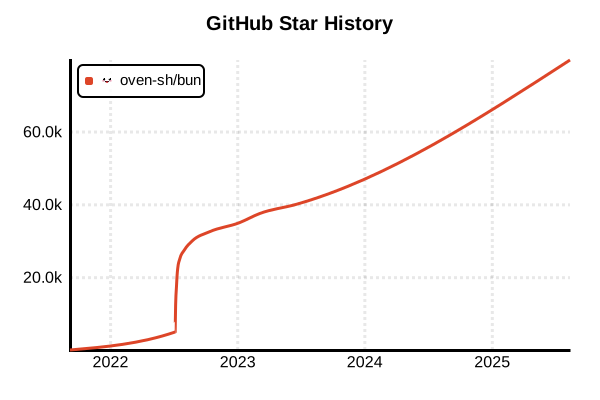
Data as of: 8/13/2025, 01:43 AM
JavaScript Runtime & Package Manager
Bun
Overview
Bun is an ultra-fast all-in-one JavaScript toolkit written in Zig. As of 2025, it integrates a JavaScript runtime, package manager, bundler, and test runner into a single executable, designed as a drop-in replacement for Node.js. Powered by JavaScriptCore engine, it dramatically reduces startup times and memory usage, achieving 10-100x speed improvements compared to npm.
Details
Key Features
- All-in-One Toolkit: Integrates runtime, package manager, bundler, and test runner
- Ultra-Fast Performance: Written in Zig, powered by JavaScriptCore engine
- Native TypeScript Support: Direct execution of
.ts,.tsx,.jsxfiles - Node.js Compatibility: Works with existing Node.js projects
- Web Standard APIs: Native support for fetch, WebSocket, ReadableStream
- Smart Caching: Fast installations through global cache
Package Manager Features
- Fast Installation:
bun installis 20-100x faster than npm - npm Compatible: Uses package.json and node_modules, works with existing projects
- Workspace Support: Built-in monorepo support
- Security Features: Doesn't execute postinstall scripts by default
- Multiple Sources: Fetches packages from npm, Git, HTTP, tarballs
Runtime Features
- Fast Startup: 4x faster startup than Node.js
- Low Memory Usage: Efficient memory management with JavaScriptCore
- ESM First: Supports both ESM and CommonJS
- Native TypeScript: Direct execution without transpilation
- Built-in Test Runner: Jest-compatible test runner included
Bundler Features
- Fast Builds: Outperforms webpack and esbuild
- Tree-shaking: Automatic removal of unused code
- Optimization: Standard support for minification and code splitting
- Plugin System: Extensible custom build processes
Pros and Cons
Pros
- Outstanding Speed: Fast package installation, script execution, and builds
- Integrated Environment: No need to configure and manage multiple tools
- Native TypeScript: Use TypeScript without configuration
- Node.js Compatible: Easy migration of existing projects
- Improved Developer Experience: Fast startup and hot reload
- Disk Efficiency: Storage savings through hardlinks
Cons
- Relatively New: Released in 2023, ecosystem still maturing
- Node.js API Compatibility: Some Node.js APIs not yet implemented
- Windows Support: Windows version in experimental stage
- Debug Tools: Limited compared to Node.js
- Enterprise Adoption: Limited production track record
References
Code Examples
Package Management
# Initialize project
bun init

# Install dependencies (ultra-fast)
bun install

# Add packages
bun add express
bun add -d @types/express

# Global installation
bun add -g typescript

# Remove packages
bun remove express

# Run scripts
bun run dev
bun run build

# Direct execution without package.json scripts
bun run index.ts
Direct TypeScript Execution
// server.ts - TypeScript files can be executed directly
import { serve } from "bun";

serve({
  port: 3000,
  fetch(req) {
    return new Response("Hello from Bun!");
  },
});

// Run command
// bun run server.ts
Fast HTTP Server
// Bun's built-in HTTP server
Bun.serve({
  port: 3000,
  fetch(request) {
    const url = new URL(request.url);

    if (url.pathname === "/") {
      return new Response("Welcome to Bun!");
    }

    if (url.pathname === "/json") {
      return Response.json({ message: "Hello", timestamp: Date.now() });
    }

    return new Response("Not Found", { status: 404 });
  },
});

console.log("Server running at http://localhost:3000");
Running Tests
// math.test.ts
import { expect, test, describe } from "bun:test";

describe("Math operations", () => {
  test("addition", () => {
    expect(2 + 2).toBe(4);
  });

  test("async test", async () => {
    const result = await Promise.resolve(42);
    expect(result).toBe(42);
  });
});

// Run command
// bun test
File Operations
// Bun's fast file API
import { file, write } from "bun";

// Read file
const configFile = file("config.json");
const config = await configFile.json();

// Write file
await write("output.txt", "Hello from Bun!");

// Streaming
const stream = file("large-file.txt").stream();
for await (const chunk of stream) {
  console.log(chunk);
}
Bundling
// build.js
await Bun.build({
  entrypoints: ["./src/index.ts"],
  outdir: "./dist",
  target: "browser",
  minify: true,
  splitting: true,
  sourcemap: "external",
});

// Run command
// bun run build.js
Environment Variables and Process Management
// Automatically loads .env.local file
console.log(process.env.DATABASE_URL);

// Bun global object
console.log(Bun.version);
console.log(Bun.revision);

// Execute shell commands
import { $ } from "bun";

const result = await $`ls -la`.text();
console.log(result);

// Parallel execution
const [npm, yarn, pnpm] = await Promise.all([
  $`npm --version`.text(),
  $`yarn --version`.text(),
  $`pnpm --version`.text(),
]);
WebSocket Server
Bun.serve({
  port: 8080,
  fetch(req, server) {
    // Upgrade to WebSocket
    if (server.upgrade(req)) {
      return; // Upgrade successful
    }
    return new Response("Upgrade failed", { status: 500 });
  },
  websocket: {
    open(ws) {
      console.log("WebSocket opened");
      ws.send("Welcome!");
    },
    message(ws, message) {
      console.log("Received:", message);
      ws.send(`Echo: ${message}`);
    },
    close(ws) {
      console.log("WebSocket closed");
    },
  },
});