uv
GitHub Overview
astral-sh/uv
An extremely fast Python package and project manager, written in Rust.
Repository:https://github.com/astral-sh/uv
Homepage:https://docs.astral.sh/uv
Stars70,583
Watchers133
Forks2,139
Created:October 2, 2023
Language:Rust
License:Apache License 2.0
Topics
packagingpythonresolveruv
Star History
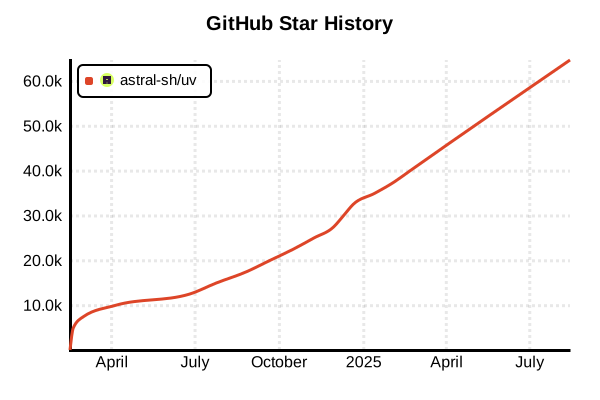
Data as of: 10/22/2025, 04:10 AM
Python Package & Project Manager
uv
Overview
uv is an ultra-fast Python package and project manager written in Rust. As of 2025, it integrates the functionality of multiple Python tools including pip, pip-tools, pipx, poetry, pyenv, virtualenv, and twine into a single tool, achieving 10-100x speed improvements over pip. Developed by Astral, like Ruff, it's revolutionizing Python development workflows as a high-performance developer tool.
Details
Key Features
- Ultra-Fast Performance: Written in Rust with parallelization and optimization for outstanding speed
- All-in-One Tool: Replaces pip, poetry, pyenv, virtualenv, and more
- Python Management: Integrated Python installation and version management
- Project Management: Lockfiles, workspaces, and dependency management
- Tool Management: Isolated environment execution for command-line tools
- Standards Compliant: Fully compatible with PyPI, requirements.txt, pyproject.toml
Package Management Features
- Fast Installation: 20-100x faster package installation than pip
- Dependency Resolution: Efficient and accurate dependency resolution
- Lockfiles: Cross-platform reproducibility with uv.lock
- Caching: Deduplication through global cache
- Multiple Sources: Supports PyPI, Git, HTTP, and local packages
Project Management Features
- Project Initialization: Create new projects with
uv init - Dependency Management: Intuitive management with
uv add,uv remove - Sync Function: Environment reproduction from lockfile with
uv sync - Script Execution: Automatic virtual environment management with
uv run - Workspaces: Native monorepo support
Python Management Features
- Python Installation: Manage multiple versions with
uv python install - Version Pinning: Specify project Python version with
uv python pin - Auto-detection: Automatically selects optimal Python version for project
- CPython/PyPy Support: Supports multiple Python implementations
Tool Management Features
- Tool Installation: Install in isolated environments with
uv tool install - One-off Execution: Temporary execution with
uvx(alias foruv tool run) - Environment Isolation: Manage each tool in independent virtual environment
- PEP 723 Support: Execute scripts with inline dependency metadata
Pros and Cons
Pros
- Outstanding Speed: Fast installation, resolution, and builds
- Unified Interface: Reduced learning and management costs for multiple tools
- Excellent Error Messages: Clear errors with suggested solutions
- Reproducibility Guarantee: Complete environment reproduction with lockfiles
- Existing Project Support: Easy migration from pip and poetry projects
- Active Development: Frequent updates and responsive support
Cons
- Relatively New: Released in 2024, ecosystem still developing
- Rust Dependency: May require Rust toolchain for building
- Configuration Files: Uses uv.toml instead of pip.conf
- Partial Incompatibility: Some advanced pip features not implemented
- Enterprise Adoption: Limited track record in large-scale projects
References
Code Examples
Project Management
# Create new project
uv init my-project
cd my-project

# Specify Python version
uv python pin 3.12

# Add dependencies
uv add fastapi uvicorn
uv add --dev pytest black ruff

# Generate lockfile
uv lock

# Sync environment (from lockfile)
uv sync

# Run scripts (auto-manages virtual environment)
uv run python main.py
uv run pytest
Package Installation (pip-compatible)
# Using pip interface
uv pip install requests numpy pandas

# Install from requirements.txt
uv pip install -r requirements.txt

# Install development dependencies
uv pip install -e ".[dev]"

# Install specific version
uv pip install "django>=4.0,<5.0"

# Upgrade
uv pip install --upgrade requests
Python Management
# List available Python versions
uv python list

# Install Python 3.12
uv python install 3.12

# Install multiple versions
uv python install 3.11 3.12 pypy3.10

# Pin project Python version
uv python pin 3.12

# Run with specific Python
uv run --python 3.11 python script.py
Virtual Environment Management
# Create virtual environment
uv venv

# Create with specific Python version
uv venv --python 3.12

# Create with custom name
uv venv myenv

# Activate virtual environment (usually unnecessary due to auto-management)
source .venv/bin/activate  # Linux/Mac
.venv\Scripts\activate     # Windows
Tool Management
# Install global tools
uv tool install ruff
uv tool install black
uv tool install mypy

# Run tools
uv tool run ruff check .
uv tool run black --check .

# Use uvx (alias) for temporary execution
uvx ruff check .
uvx --from jupyter-core jupyter --version

# Run specific tool version
uvx --with "ruff==0.1.0" ruff check
Project Configuration (pyproject.toml)
[project]
name = "my-project"
version = "0.1.0"
description = "My awesome Python project"
requires-python = ">=3.11"
dependencies = [
    "fastapi>=0.100.0",
    "uvicorn[standard]>=0.23.0",
    "pydantic>=2.0.0",
]

[project.optional-dependencies]
dev = [
    "pytest>=7.0.0",
    "black>=23.0.0",
    "ruff>=0.1.0",
]

[tool.uv]
dev-dependencies = [
    "pytest-cov>=4.0.0",
    "mypy>=1.0.0",
]
Workspace Management
# Root pyproject.toml
[tool.uv.workspace]
members = ["packages/*", "apps/*"]

[tool.uv]
constraint-dependencies = [
    "django>=4.2",
    "numpy<2.0",
]
# Sync workspace
uv sync --all-packages

# Run command in specific package
uv run --package my-app python -m my_app

# Test entire workspace
uv run --all-packages pytest
Script Execution (PEP 723)
# script.py - with inline metadata
# /// script
# requires-python = ">=3.11"
# dependencies = [
#   "requests",
#   "rich",
# ]
# ///

import requests
from rich import print

response = requests.get("https://api.github.com")
print(response.json())

# Run command
# uv run script.py
Fast Build and Publishing
# Build package
uv build

# Upload to PyPI
uv publish

# Upload to Test PyPI
uv publish --repository testpypi