Cypress
GitHub Overview
cypress-io/cypress
Fast, easy and reliable testing for anything that runs in a browser.
Topics
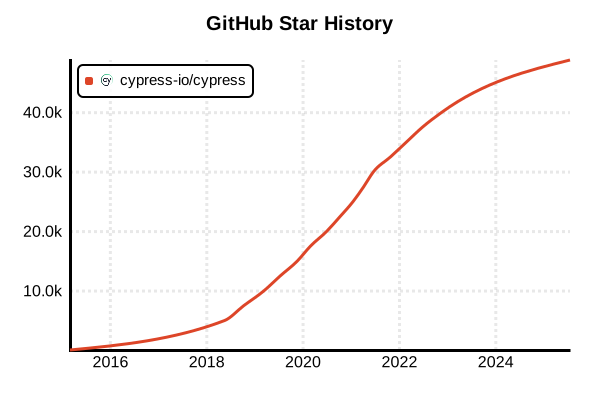
Star History
Testing Tool
Cypress
Overview
Cypress is a modern testing framework that supports "component testing and unit testing" in addition to traditional E2E testing. It provides the ability to test React, Vue, Angular, and other framework components in isolation, significantly improving development efficiency through excellent developer experience and real-time debugging capabilities. With the cy.mount() command for component mounting, automatic test re-execution, and intuitive test syntax, it has established itself as one of the most user-friendly unit testing tools for frontend developers.
Details
Cypress Unit Testing (Component Testing) was released as beta in 2022 and officially launched in 2023, extending the excellent developer experience cultivated in traditional E2E testing to the unit test level. By actually rendering and testing components in a real browser environment, comprehensive testing including DOM manipulation, event handling, and styling is possible. It supports major frameworks such as React, Vue, Angular, and Svelte, and also handles framework-specific features (props, slots, signals, etc.). Popular E2E test features like Test Runner UI for real-time execution monitoring, automatic screenshots, time-travel debugging, and network stubbing are also available for unit testing. You can start immediately without configuration, with seamless integration with Webpack and Vite, complete TypeScript support, and rich assertion capabilities that naturally integrate into modern frontend development workflows.
Key Features
- Real Browser Testing: Execute and validate components in actual browser environments
- cy.mount(): Dedicated command for mounting components independently
- Real-time Debugging: Real-time monitoring of DOM and network during test execution
- Framework Support: Support for major frameworks including React, Vue, Angular, and Svelte
- Auto Re-execution: Automatic test execution and Hot Reload on file changes
- Visual Debugging: Time-travel functionality and automatic screenshot generation
Pros and Cons
Pros
- Same intuitive API and excellent developer experience as E2E testing
- High reliability and complete DOM manipulation support through real browser environment
- Efficient debugging and troubleshooting via visual Test Runner UI
- Complete support for framework-specific features (props, events, slots, etc.)
- Immediate start without configuration and easy integration with Webpack/Vite
- Rich assertion capabilities and network mocking/stubbing features
- Complete TypeScript support and type-safe syntax
- Unified writing approach for both E2E and component testing
Cons
- Ecosystem still developing as it's a relatively new feature
- Slightly slower test execution compared to traditional tools like Jest
- High resource consumption due to real browser execution, unsuitable for large test suites
- Learning cost for Cypress and migration cost from existing tests
- Somewhat complex headless execution setup on CI servers
- No support for Node.js environment unit tests, frontend-only
Reference Links
- Cypress Official Site
- Cypress Component Testing Documentation
- Cypress GitHub Repository
- Cypress Real World Testing Course
- Component Testing Examples
Code Examples
Installation and Setup
# Install Cypress
npm install --save-dev cypress

# Initialize Cypress configuration
npx cypress open

# Select component testing configuration
# → Choose "Component Testing"
# → Select framework (React, Vue, Angular, etc.)
# → Confirm automatic configuration file generation

# Run component tests via CLI
npx cypress run --component

# Run specific test file
npx cypress run --component --spec "src/**/*.cy.{js,jsx,ts,tsx}"
Basic Component Testing (React)
// components/Button.cy.jsx
import React from 'react'
import Button from './Button'

describe('<Button />', () => {
  it('mounts and verifies basic display', () => {
    cy.mount(<Button>Click me!</Button>)
    cy.get('button').should('contain.text', 'Click me!')
    cy.get('button').should('be.visible')
  })

  it('props are passed correctly', () => {
    cy.mount(
      <Button variant="primary" disabled={true}>
        Primary Button
      </Button>
    )

    cy.get('button')
      .should('have.class', 'btn-primary')
      .should('be.disabled')
      .should('contain.text', 'Primary Button')
  })

  it('click event is triggered', () => {
    const onClickSpy = cy.spy().as('onClickSpy')
    cy.mount(<Button onClick={onClickSpy}>Click me</Button>)

    cy.get('button').click()
    cy.get('@onClickSpy').should('have.been.called')
  })

  it('multiple click test', () => {
    const onClickSpy = cy.spy().as('onClickSpy')
    cy.mount(<Button onClick={onClickSpy}>Multi Click</Button>)

    cy.get('button').click().click().click()
    cy.get('@onClickSpy').should('have.been.calledThrice')
  })
})
Component Testing (Vue)
// components/Counter.cy.js
import Counter from './Counter.vue'

describe('<Counter />', () => {
  it('initial value displays correctly', () => {
    cy.mount(Counter, {
      props: {
        initialValue: 10
      }
    })

    cy.get('[data-cy=counter-value]').should('contain.text', '10')
  })

  it('increment and decrement functionality', () => {
    cy.mount(Counter)

    // Check initial value
    cy.get('[data-cy=counter-value]').should('contain.text', '0')

    // Increment
    cy.get('[data-cy=increment-btn]').click()
    cy.get('[data-cy=counter-value]').should('contain.text', '1')

    // Decrement
    cy.get('[data-cy=decrement-btn]').click()
    cy.get('[data-cy=counter-value]').should('contain.text', '0')
  })

  it('event emission test', () => {
    const onChangeSpy = cy.spy().as('onChangeSpy')
    cy.mount(Counter, {
      props: {
        onChange: onChangeSpy
      }
    })

    cy.get('[data-cy=increment-btn]').click()
    cy.get('@onChangeSpy').should('have.been.calledWith', 1)
  })

  it('slot content test', () => {
    cy.mount(Counter, {
      slots: {
        default: '<span>Custom Content</span>',
        footer: 'Footer Content'
      }
    })

    cy.get('span').should('contain.text', 'Custom Content')
    cy.contains('Footer Content').should('be.visible')
  })
})
Component Testing (Angular)
// components/stepper.component.cy.ts
import { StepperComponent } from './stepper.component'
import { createOutputSpy } from 'cypress/angular'

describe('StepperComponent', () => {
  it('mounts and displays initial value', () => {
    cy.mount(StepperComponent)
    cy.get('[data-cy=counter]').should('contain.text', '0')
  })

  it('input property test', () => {
    cy.mount(StepperComponent, {
      componentProperties: {
        count: 100
      }
    })

    cy.get('[data-cy=counter]').should('contain.text', '100')
  })

  it('output event test', () => {
    cy.mount(StepperComponent, {
      componentProperties: {
        change: createOutputSpy('changeSpy')
      }
    })

    cy.get('[data-cy=increment]').click()
    cy.get('@changeSpy').should('have.been.calledWith', 1)
  })

  it('complex operation test scenario', () => {
    const changeSpy = createOutputSpy('changeSpy')
    cy.mount(StepperComponent, {
      componentProperties: {
        count: 50,
        change: changeSpy
      }
    })

    // Start from 50
    cy.get('[data-cy=counter]').should('contain.text', '50')

    // Increment 3 times
    cy.get('[data-cy=increment]').click().click().click()
    cy.get('[data-cy=counter]').should('contain.text', '53')
    cy.get('@changeSpy').should('have.been.calledWith', 53)

    // Decrement 2 times
    cy.get('[data-cy=decrement]').click().click()
    cy.get('[data-cy=counter]').should('contain.text', '51')
  })
})
Form Component Testing
// components/LoginForm.cy.jsx
import LoginForm from './LoginForm'

describe('<LoginForm />', () => {
  it('form elements display correctly', () => {
    cy.mount(<LoginForm />)

    cy.get('input[name="username"]').should('be.visible')
    cy.get('input[name="password"]').should('have.attr', 'type', 'password')
    cy.get('button[type="submit"]').should('contain.text', 'Login')
  })

  it('validation functionality test', () => {
    cy.mount(<LoginForm />)

    // Submit with empty state
    cy.get('button[type="submit"]').click()
    cy.get('.error-message').should('contain.text', 'Username is required')

    // Enter username only
    cy.get('input[name="username"]').type('testuser')
    cy.get('button[type="submit"]').click()
    cy.get('.error-message').should('contain.text', 'Password is required')
  })

  it('normal login flow test', () => {
    const onSubmitSpy = cy.spy().as('onSubmitSpy')
    cy.mount(<LoginForm onSubmit={onSubmitSpy} />)

    // Form input
    cy.get('input[name="username"]').type('validuser')
    cy.get('input[name="password"]').type('validpass123')

    // Submit execution
    cy.get('button[type="submit"]').click()

    // Verify submit with expected data
    cy.get('@onSubmitSpy').should('have.been.calledWith', {
      username: 'validuser',
      password: 'validpass123'
    })
  })

  it('password show/hide functionality', () => {
    cy.mount(<LoginForm showPasswordToggle={true} />)

    // Initial state is password type
    cy.get('input[name="password"]').should('have.attr', 'type', 'password')

    // Click show button
    cy.get('[data-cy=toggle-password]').click()
    cy.get('input[name="password"]').should('have.attr', 'type', 'text')

    // Click again to hide
    cy.get('[data-cy=toggle-password]').click()
    cy.get('input[name="password"]').should('have.attr', 'type', 'password')
  })
})
Asynchronous Processing and Mocking
// components/UserProfile.cy.jsx
import UserProfile from './UserProfile'

describe('<UserProfile />', () => {
  it('user data loading test', () => {
    // Mock API call
    cy.intercept('GET', '/api/users/123', {
      fixture: 'user.json'
    }).as('getUser')

    cy.mount(<UserProfile userId={123} />)

    // Check loading state
    cy.get('[data-cy=loading]').should('be.visible')

    // Wait for API call
    cy.wait('@getUser')

    // Check data display
    cy.get('[data-cy=user-name]').should('contain.text', 'Test User')
    cy.get('[data-cy=user-email]').should('contain.text', '[email protected]')
    cy.get('[data-cy=loading]').should('not.exist')
  })

  it('error handling test', () => {
    // Mock error response
    cy.intercept('GET', '/api/users/123', {
      statusCode: 404,
      body: { error: 'User not found' }
    }).as('getUserError')

    cy.mount(<UserProfile userId={123} />)

    cy.wait('@getUserError')

    // Check error message
    cy.get('[data-cy=error-message]')
      .should('be.visible')
      .should('contain.text', 'User not found')
  })

  it('reload functionality test', () => {
    cy.intercept('GET', '/api/users/123', {
      fixture: 'user.json'
    }).as('getUser')

    cy.mount(<UserProfile userId={123} />)
    cy.wait('@getUser')

    // Click reload button
    cy.get('[data-cy=reload-btn]').click()

    // Verify API is called again
    cy.wait('@getUser')
    cy.get('[data-cy=user-name]').should('contain.text', 'Test User')
  })
})
Custom Hooks and Utility Function Testing
// utils/math.cy.js - Pure function testing
import { add, subtract, multiply, divide, calculateTax } from '../src/utils/math'

describe('Math Utils', () => {
  context('Basic Operations', () => {
    it('addition test', () => {
      expect(add(2, 3)).to.equal(5)
      expect(add(-1, 1)).to.equal(0)
      expect(add(0.1, 0.2)).to.be.closeTo(0.3, 0.001)
    })

    it('subtraction test', () => {
      expect(subtract(5, 3)).to.equal(2)
      expect(subtract(1, 1)).to.equal(0)
      expect(subtract(-5, -3)).to.equal(-2)
    })

    it('multiplication test', () => {
      expect(multiply(3, 4)).to.equal(12)
      expect(multiply(-2, 5)).to.equal(-10)
      expect(multiply(0, 100)).to.equal(0)
    })

    it('division test', () => {
      expect(divide(10, 2)).to.equal(5)
      expect(divide(7, 2)).to.equal(3.5)
      expect(() => divide(5, 0)).to.throw('Division by zero')
    })
  })

  context('Tax Calculation', () => {
    it('consumption tax calculation (10%)', () => {
      expect(calculateTax(1000, 0.1)).to.equal(100)
      expect(calculateTax(250, 0.1)).to.equal(25)
    })

    it('decimal handling test', () => {
      expect(calculateTax(333, 0.1)).to.be.closeTo(33.3, 0.1)
    })

    it('error case test', () => {
      expect(() => calculateTax(-100, 0.1)).to.throw('Amount must be positive')
      expect(() => calculateTax(100, -0.1)).to.throw('Tax rate must be positive')
    })
  })
})
Configuration and Best Practices
// cypress/support/component.js - Support file
import './commands'
import '../../src/styles/index.css'

// Custom mount for React Router
Cypress.Commands.add('mount', (component, options = {}) => {
  const { routerProps = { initialEntries: ['/'] }, ...mountOptions } = options

  const wrapped = (
    <BrowserRouter {...routerProps}>
      {component}
    </BrowserRouter>
  )

  return mount(wrapped, mountOptions)
})

// Custom mount for Redux
Cypress.Commands.add('mountWithRedux', (component, options = {}) => {
  const { reduxStore = getStore(), ...mountOptions } = options

  const wrapped = (
    <Provider store={reduxStore}>
      {component}
    </Provider>
  )

  return mount(wrapped, mountOptions)
})

// cypress.config.js - Configuration file
module.exports = {
  component: {
    devServer: {
      framework: 'react',
      bundler: 'vite', // or 'webpack'
    },
    specPattern: 'src/**/*.cy.{js,jsx,ts,tsx}',
    viewportWidth: 1280,
    viewportHeight: 720,
    video: false,
    screenshotOnRunFailure: true,
  },

  e2e: {
    baseUrl: 'http://localhost:3000',
    supportFile: 'cypress/support/e2e.js',
  }
}