memory-cache
GitHub概要
dotnet/runtime
.NET is a cross-platform runtime for cloud, mobile, desktop, and IoT apps.
スター17,028
ウォッチ458
フォーク5,203
作成日:2019年9月24日
言語:C#
ライセンス:MIT License
トピックス
dotnethacktoberfesthelp-wanted
スター履歴
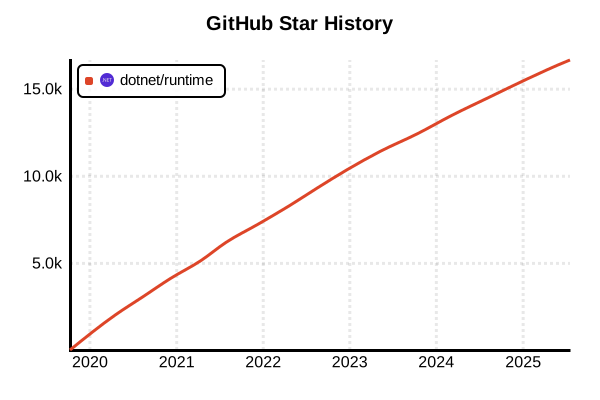
データ取得日時: 2025/10/22 10:03
ライブラリ
memory-cache
概要
memory-cacheはNode.js向けのシンプルなインメモリキャッシュライブラリです。基本的なput/get/delメソッドによる軽量なキーバリューストレージを提供し、最小限の機能セットで高速なデータアクセスを実現します。2025年現在、8年前に最後の更新が行われた0.2.0が最新版ですが、730以上のプロジェクトで継続利用され、シンプルなキャッシュニーズに対する堅実な選択肢として重宝されています。モダンな代替案の台頭により新規採用は減少していますが、既存プロジェクトでの安定動作実績があります。
詳細
memory-cache 0.2.0は8年前にリリースされた安定版で、Node.jsエコシステムの基盤となるシンプルなキャッシュ実装を提供。外部依存なしの純粋JavaScriptライブラリとして、TTL機能なし、統計機能なし、イベント機能なしという最小限の設計。メモリ上のObjectを直接操作するため高速動作を実現し、理解しやすいAPIで学習コストを最小化。現在はnode-cache、lru-cache、cache-managerなどの高機能な代替品が主流となっているため、新規プロジェクトでは慎重な検討が必要。
主な特徴
- シンプルAPI: put(), get(), del()による直感的な操作
- 軽量実装: 外部依存なしの最小限コードベース
- 高速アクセス: 直接的なオブジェクト操作による高速データアクセス
- 即座利用: 設定不要で即座に利用開始可能
- 互換性: 古いNode.jsバージョンでも動作
- 予測可能性: 複雑な機能がないため動作が予測しやすい
メリット・デメリット
メリット
- 極めてシンプルで理解しやすいAPI(学習コスト最小)
- 外部依存なしで即座に利用開始可能
- 軽量で高速なメモリアクセス(オーバーヘッド最小)
- 8年間の安定動作実績による信頼性
- 古いNode.jsバージョンとの高い互換性
- デバッグが容易(シンプルな内部構造)
デメリット
- 8年間更新停止(メンテナンス放棄状態)
- TTL機能なし(期限切れ管理不可)
- 統計機能なし(監視・最適化困難)
- イベント機能なし(キャッシュ状態変化の監視不可)
- メモリリーク対策なし(手動でのクリーンアップ必要)
- モダンなTypeScript対応なし
参考ページ
書き方の例
インストールと基本セットアップ
# NPM でのインストール
npm install memory-cache

# Yarn でのインストール
yarn add memory-cache

# TypeScript定義は含まれていません(型定義ファイルが別途必要)
npm install --save-dev @types/memory-cache
基本的なキャッシュ操作
const cache = require('memory-cache')

// 基本的なput/get操作
cache.put('user:1', { name: 'John', age: 30 })
const user = cache.get('user:1')
console.log(user) // { name: 'John', age: 30 }

// TTL付きでのデータ設定(ミリ秒)
cache.put('session:abc123', 'session_data', 5 * 60 * 1000) // 5分

// 存在しないキーの取得
const notFound = cache.get('nonexistent')
console.log(notFound) // null

// キーの削除
cache.del('user:1')

// 全データの削除
cache.clear()

// 現在のキー一覧を取得
const keys = cache.keys()
console.log('Cache keys:', keys)

// キャッシュサイズ取得
const size = cache.size()
console.log('Cache size:', size)

// 特定キーの存在確認(カスタム実装)
function hasKey(key) {
  return cache.get(key) !== null
}

console.log('Has user:1:', hasKey('user:1'))
TTL管理とクリーンアップシステム
const cache = require('memory-cache')

class TTLCacheWrapper {
  constructor() {
    this.cache = cache
    this.cleanupInterval = null
    this.setupCleanup()
  }

  // 定期的なクリーンアップの設定
  setupCleanup() {
    // 5分ごとに期限切れアイテムをチェック
    this.cleanupInterval = setInterval(() => {
      this.cleanup()
    }, 5 * 60 * 1000)
  }

  // 期限切れアイテムのクリーンアップ
  cleanup() {
    const keys = this.cache.keys()
    let cleanedCount = 0

    keys.forEach(key => {
      // memory-cacheは自動的に期限切れアイテムを削除するため、
      // 存在確認だけで十分
      if (this.cache.get(key) === null) {
        cleanedCount++
      }
    })

    console.log(`Cleaned up ${cleanedCount} expired items`)
  }

  // 短期キャッシュ(5分)
  putShort(key, value) {
    return this.cache.put(key, value, 5 * 60 * 1000)
  }

  // 中期キャッシュ(30分)
  putMedium(key, value) {
    return this.cache.put(key, value, 30 * 60 * 1000)
  }

  // 長期キャッシュ(2時間)
  putLong(key, value) {
    return this.cache.put(key, value, 2 * 60 * 60 * 1000)
  }

  // 永続キャッシュ(TTLなし)
  putPermanent(key, value) {
    return this.cache.put(key, value)
  }

  get(key) {
    return this.cache.get(key)
  }

  del(key) {
    return this.cache.del(key)
  }

  clear() {
    return this.cache.clear()
  }

  // カスタム統計情報
  getStats() {
    const keys = this.cache.keys()
    const validKeys = keys.filter(key => this.cache.get(key) !== null)

    return {
      totalKeys: keys.length,
      validKeys: validKeys.length,
      expiredKeys: keys.length - validKeys.length,
      memoryUsage: process.memoryUsage().heapUsed
    }
  }

  // リソースクリーンアップ
  destroy() {
    if (this.cleanupInterval) {
      clearInterval(this.cleanupInterval)
      this.cleanupInterval = null
    }
    this.cache.clear()
  }
}

// 使用例
const ttlCache = new TTLCacheWrapper()

// 異なるTTLでのデータ設定
ttlCache.putShort('temp:calc', { result: 42 })
ttlCache.putMedium('user:session', { userId: 123, authenticated: true })
ttlCache.putLong('config:app', { theme: 'dark', language: 'ja' })
ttlCache.putPermanent('constants:pi', 3.14159)

// 統計情報の確認
setInterval(() => {
  console.log('Cache Stats:', ttlCache.getStats())
}, 60000)

// アプリケーション終了時のクリーンアップ
process.on('SIGINT', () => {
  ttlCache.destroy()
  process.exit()
})
Express.js での統合
const express = require('express')
const cache = require('memory-cache')

const app = express()

// キャッシュミドルウェア
function cacheMiddleware(duration = 5 * 60 * 1000) {
  return (req, res, next) => {
    const key = req.originalUrl || req.url
    const cached = cache.get(key)

    if (cached) {
      console.log(`Cache HIT: ${key}`)
      return res.json(cached)
    }

    console.log(`Cache MISS: ${key}`)

    // レスポンスのキャプチャ
    const originalJson = res.json
    res.json = function(data) {
      // レスポンスをキャッシュに保存
      cache.put(key, data, duration)
      console.log(`Cache SET: ${key} (TTL: ${duration}ms)`)

      originalJson.call(this, data)
    }

    next()
  }
}

// 条件付きキャッシュミドルウェア
function conditionalCache(condition, duration = 5 * 60 * 1000) {
  return (req, res, next) => {
    if (condition && !condition(req)) {
      return next()
    }
    return cacheMiddleware(duration)(req, res, next)
  }
}

// APIエンドポイント
app.get('/api/users',
  cacheMiddleware(10 * 60 * 1000), // 10分キャッシュ
  async (req, res) => {
    // 重い処理をシミュレーション
    await new Promise(resolve => setTimeout(resolve, 1000))

    const users = [
      { id: 1, name: 'John', email: '[email protected]' },
      { id: 2, name: 'Jane', email: '[email protected]' }
    ]

    res.json(users)
  }
)

// ユーザー固有データのキャッシュ
app.get('/api/user/:id',
  conditionalCache(
    req => req.params.id && !isNaN(req.params.id),
    15 * 60 * 1000 // 15分キャッシュ
  ),
  async (req, res) => {
    const userId = req.params.id

    // データベースアクセスのシミュレーション
    await new Promise(resolve => setTimeout(resolve, 500))

    const user = {
      id: parseInt(userId),
      name: `User ${userId}`,
      email: `user${userId}@example.com`,
      lastAccess: new Date()
    }

    res.json(user)
  }
)

// キャッシュ統計エンドポイント
app.get('/cache/stats', (req, res) => {
  const keys = cache.keys()
  const validKeys = keys.filter(key => cache.get(key) !== null)

  res.json({
    totalKeys: keys.length,
    validKeys: validKeys.length,
    expiredKeys: keys.length - validKeys.length,
    keys: validKeys.slice(0, 10), // 最初の10キーのみ表示
    memoryUsage: process.memoryUsage()
  })
})

// キャッシュクリアエンドポイント
app.delete('/cache/:pattern?', (req, res) => {
  const pattern = req.params.pattern

  if (pattern) {
    // パターンマッチングでの部分削除
    const keys = cache.keys()
    const matchedKeys = keys.filter(key => key.includes(pattern))

    matchedKeys.forEach(key => cache.del(key))

    res.json({
      message: `Cache cleared for pattern: ${pattern}`,
      clearedKeys: matchedKeys.length,
      clearedItems: matchedKeys
    })
  } else {
    // 全キャッシュクリア
    const beforeKeys = cache.keys().length
    cache.clear()

    res.json({
      message: 'All cache cleared',
      clearedKeys: beforeKeys
    })
  }
})

app.listen(3000, () => {
  console.log('Server running on port 3000')

  // 定期的なキャッシュ監視
  setInterval(() => {
    const keys = cache.keys()
    console.log(`Cache status - Total keys: ${keys.length}`)
  }, 60000)
})
バックアップとリストア機能
const cache = require('memory-cache')
const fs = require('fs')
const path = require('path')

class BackupCacheManager {
  constructor() {
    this.cache = cache
    this.backupFile = path.join(__dirname, 'cache-backup.json')
    this.autoBackupInterval = null
  }

  // キャッシュデータのバックアップ
  backup() {
    try {
      const keys = this.cache.keys()
      const backupData = {
        timestamp: Date.now(),
        data: {}
      }

      keys.forEach(key => {
        const value = this.cache.get(key)
        if (value !== null) {
          backupData.data[key] = value
        }
      })

      fs.writeFileSync(this.backupFile, JSON.stringify(backupData, null, 2))
      console.log(`Cache backup completed: ${keys.length} items saved`)

      return {
        success: true,
        itemCount: Object.keys(backupData.data).length,
        file: this.backupFile
      }
    } catch (error) {
      console.error('Backup failed:', error)
      return { success: false, error: error.message }
    }
  }

  // キャッシュデータのリストア
  restore() {
    try {
      if (!fs.existsSync(this.backupFile)) {
        throw new Error('Backup file not found')
      }

      const backupContent = fs.readFileSync(this.backupFile, 'utf8')
      const backupData = JSON.parse(backupContent)

      // 既存キャッシュをクリア
      this.cache.clear()

      // バックアップデータをリストア
      let restoredCount = 0
      Object.entries(backupData.data).forEach(([key, value]) => {
        this.cache.put(key, value)
        restoredCount++
      })

      console.log(`Cache restore completed: ${restoredCount} items restored`)

      return {
        success: true,
        itemCount: restoredCount,
        backupTimestamp: backupData.timestamp
      }
    } catch (error) {
      console.error('Restore failed:', error)
      return { success: false, error: error.message }
    }
  }

  // 自動バックアップの設定
  enableAutoBackup(intervalMinutes = 30) {
    if (this.autoBackupInterval) {
      clearInterval(this.autoBackupInterval)
    }

    this.autoBackupInterval = setInterval(() => {
      console.log('Performing automatic backup...')
      this.backup()
    }, intervalMinutes * 60 * 1000)

    console.log(`Auto backup enabled: every ${intervalMinutes} minutes`)
  }

  // 自動バックアップの無効化
  disableAutoBackup() {
    if (this.autoBackupInterval) {
      clearInterval(this.autoBackupInterval)
      this.autoBackupInterval = null
      console.log('Auto backup disabled')
    }
  }

  // キャッシュのエクスポート(JSON形式)
  exportToJSON(filePath) {
    try {
      const keys = this.cache.keys()
      const exportData = {
        exportDate: new Date().toISOString(),
        totalItems: keys.length,
        items: {}
      }

      keys.forEach(key => {
        const value = this.cache.get(key)
        if (value !== null) {
          exportData.items[key] = {
            value: value,
            type: typeof value,
            exportedAt: Date.now()
          }
        }
      })

      fs.writeFileSync(filePath, JSON.stringify(exportData, null, 2))

      return {
        success: true,
        itemCount: Object.keys(exportData.items).length,
        file: filePath
      }
    } catch (error) {
      return { success: false, error: error.message }
    }
  }

  // キャッシュのインポート(JSON形式)
  importFromJSON(filePath) {
    try {
      const importContent = fs.readFileSync(filePath, 'utf8')
      const importData = JSON.parse(importContent)

      let importedCount = 0
      Object.entries(importData.items || {}).forEach(([key, item]) => {
        this.cache.put(key, item.value)
        importedCount++
      })

      return {
        success: true,
        itemCount: importedCount,
        originalExportDate: importData.exportDate
      }
    } catch (error) {
      return { success: false, error: error.message }
    }
  }

  // リソースクリーンアップ
  destroy() {
    this.disableAutoBackup()
  }
}

// 使用例
const backupManager = new BackupCacheManager()

// データの設定
cache.put('user:1', { name: 'John', email: '[email protected]' })
cache.put('config:app', { theme: 'dark', version: '1.0' })
cache.put('session:abc', { userId: 1, loginTime: Date.now() })

// バックアップとリストア
const backupResult = backupManager.backup()
console.log('Backup result:', backupResult)

// 自動バックアップの有効化(10分間隔)
backupManager.enableAutoBackup(10)

// エクスポート機能のテスト
const exportResult = backupManager.exportToJSON('./cache-export.json')
console.log('Export result:', exportResult)

// プロセス終了時のクリーンアップ
process.on('SIGINT', () => {
  backupManager.backup() // 最終バックアップ
  backupManager.destroy()
  process.exit()
})
モダンライブラリへの移行支援
const memoryCache = require('memory-cache')

/**
 * memory-cache から node-cache への移行ヘルパー
 */
class MigrationHelper {
  constructor() {
    this.oldCache = memoryCache
    this.migrationLog = []
  }

  // データの移行準備
  prepareMigration() {
    const keys = this.oldCache.keys()
    const migrationData = []

    keys.forEach(key => {
      const value = this.oldCache.get(key)
      if (value !== null) {
        migrationData.push({
          key,
          value,
          type: typeof value,
          migrationTime: Date.now()
        })
      }
    })

    console.log(`Migration preparation completed: ${migrationData.length} items ready`)
    return migrationData
  }

  // node-cache形式への変換
  convertToNodeCache(migrationData) {
    const NodeCache = require('node-cache')
    const newCache = new NodeCache({ stdTTL: 600, checkperiod: 120 })

    migrationData.forEach(item => {
      newCache.set(item.key, item.value)
      this.migrationLog.push({
        action: 'migrated',
        key: item.key,
        timestamp: Date.now()
      })
    })

    console.log(`Migration to node-cache completed: ${migrationData.length} items`)
    return newCache
  }

  // lru-cache形式への変換
  convertToLRUCache(migrationData) {
    const { LRUCache } = require('lru-cache')
    const newCache = new LRUCache({ max: 500, ttl: 1000 * 60 * 10 })

    migrationData.forEach(item => {
      newCache.set(item.key, item.value)
      this.migrationLog.push({
        action: 'migrated',
        key: item.key,
        timestamp: Date.now()
      })
    })

    console.log(`Migration to lru-cache completed: ${migrationData.length} items`)
    return newCache
  }

  // 移行ログの取得
  getMigrationLog() {
    return this.migrationLog
  }

  // 互換性レイヤー(一時的な使用のみ推奨)
  createCompatibilityLayer(newCache) {
    return {
      put: (key, value, ttl) => {
        if (ttl) {
          return newCache.set(key, value, ttl)
        }
        return newCache.set(key, value)
      },
      get: (key) => {
        const value = newCache.get(key)
        return value !== undefined ? value : null
      },
      del: (key) => {
        return newCache.delete ? newCache.delete(key) : newCache.del(key)
      },
      clear: () => {
        return newCache.clear ? newCache.clear() : newCache.flushAll()
      },
      keys: () => {
        return newCache.keys ? newCache.keys() : []
      },
      size: () => {
        return newCache.size || newCache.getStats().keys
      }
    }
  }
}

// 移行例
const migrationHelper = new MigrationHelper()

// 既存データの準備
memoryCache.put('user:1', { name: 'John' })
memoryCache.put('config:app', { theme: 'dark' })

// 移行実行
const migrationData = migrationHelper.prepareMigration()
const newNodeCache = migrationHelper.convertToNodeCache(migrationData)

// 互換性レイヤーでの一時的な使用
const compatCache = migrationHelper.createCompatibilityLayer(newNodeCache)

// 既存コードがそのまま動作
console.log(compatCache.get('user:1')) // { name: 'John' }
console.log(compatCache.size()) // 2

console.log('Migration log:', migrationHelper.getMigrationLog())
TypeScript での型定義補強
// TypeScript環境での型安全な使用
declare module 'memory-cache' {
  interface CacheStatic {
    put<T>(key: string, value: T, time?: number): T
    get<T>(key: string): T | null
    del(key: string): boolean
    clear(): void
    size(): number
    keys(): string[]
  }

  const cache: CacheStatic
  export = cache
}

// 使用例
import cache = require('memory-cache')

interface User {
  id: number
  name: string
  email: string
}

interface CacheWrapper {
  setUser(userId: number, user: User): User
  getUser(userId: number): User | null
  deleteUser(userId: number): boolean
  getAllUsers(): User[]
}

class TypedMemoryCache implements CacheWrapper {
  setUser(userId: number, user: User): User {
    return cache.put<User>(`user:${userId}`, user, 30 * 60 * 1000) // 30分
  }

  getUser(userId: number): User | null {
    return cache.get<User>(`user:${userId}`)
  }

  deleteUser(userId: number): boolean {
    return cache.del(`user:${userId}`)
  }

  getAllUsers(): User[] {
    const keys = cache.keys()
    return keys
      .filter(key => key.startsWith('user:'))
      .map(key => cache.get<User>(key))
      .filter((user): user is User => user !== null)
  }

  getStats() {
    return {
      totalKeys: cache.size(),
      keys: cache.keys()
    }
  }
}

// 使用例
const typedCache = new TypedMemoryCache()

const user: User = {
  id: 1,
  name: 'John Doe',
  email: '[email protected]'
}

typedCache.setUser(1, user)
const cachedUser = typedCache.getUser(1) // 型は User | null