caffeine
Java/Kotlin向けの高性能インメモリキャッシュライブラリ。優れたヒット率、効率的なメモリ使用、自動的な古いエントリの削除などの機能を提供。
GitHub概要
ben-manes/caffeine
A high performance caching library for Java
スター17,137
ウォッチ363
フォーク1,666
作成日:2014年12月13日
言語:Java
ライセンス:Apache License 2.0
トピックス
なし
スター履歴
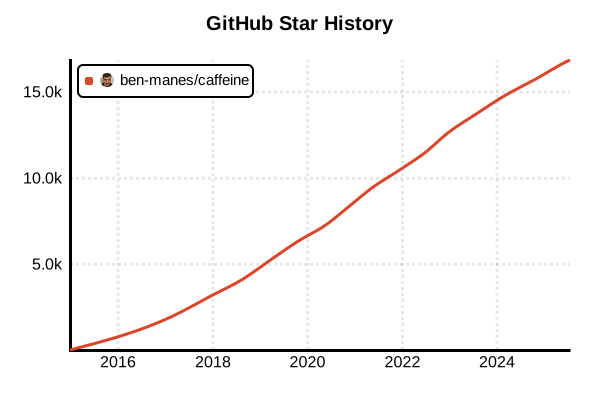
データ取得日時: 2025/10/22 09:55
概要
CaffeineはJavaおよびKotlin向けの高性能なインメモリキャッシュライブラリです。Google GuavaのCacheをベースに、現代のハードウェアに最適化された実装を提供しています。Window TinyLFU、可変的な期限切れ、非同期リフレッシュなどの高度な機能により、優れたキャッシュヒット率とパフォーマンスを実現します。
主な特徴
- 高いヒット率: Window TinyLFUアルゴリズムによる効率的なキャッシュ管理
- 非同期サポート: CompletableFutureベースの非同期キャッシュ操作
- 自動削除ポリシー: サイズベース、時間ベース、参照ベースの削除
- 統計情報: 詳細なキャッシュ統計とモニタリング
- JCache互換: JSR-107 JCache標準に準拠
- Kotlin対応: Kotlin向けの拡張関数とコルーチンサポート
インストール
Gradle (Kotlin DSL)
dependencies {
    implementation("com.github.ben-manes.caffeine:caffeine:3.2.1")

    // オプション:Guavaアダプター
    implementation("com.github.ben-manes.caffeine:guava:3.2.1")

    // オプション:JCache統合
    implementation("com.github.ben-manes.caffeine:jcache:3.2.1")
}
Android プロジェクトでの設定
android {
    packagingOptions {
        resources {
            excludes += "/META-INF/{AL2.0,LGPL2.1}"
        }
    }
}

dependencies {
    implementation("com.github.ben-manes.caffeine:caffeine:3.2.1") {
        // Android向けの最適化
        exclude(group = "com.google.errorprone", module = "error_prone_annotations")
    }
}
基本的な使い方
シンプルなキャッシュの作成
import com.github.benmanes.caffeine.cache.Cache
import com.github.benmanes.caffeine.cache.Caffeine
import java.time.Duration

// 基本的なキャッシュの作成
val cache: Cache<String, User> = Caffeine.newBuilder()
    .maximumSize(10_000)
    .expireAfterWrite(Duration.ofMinutes(5))
    .build()

// データの追加
cache.put("user:123", User(id = 123, name = "田中太郎"))

// データの取得
val user = cache.getIfPresent("user:123")
println(user?.name) // 田中太郎

// データが存在しない場合の処理
val defaultUser = cache.get("user:456") { key ->
    // DBやAPIから取得する処理
    fetchUserFromDatabase(key)
}
LoadingCacheの使用
import com.github.benmanes.caffeine.cache.LoadingCache

// LoadingCacheの作成
val loadingCache: LoadingCache<String, Product> = Caffeine.newBuilder()
    .maximumSize(1_000)
    .expireAfterAccess(Duration.ofMinutes(10))
    .refreshAfterWrite(Duration.ofMinutes(1))
    .build { key ->
        // キャッシュミス時に自動的に呼ばれる
        loadProductFromApi(key)
    }

// 使用例
val product = loadingCache.get("product:789")

// 複数のキーを一度に取得
val products = loadingCache.getAll(listOf("product:1", "product:2", "product:3"))
高度な使い方
非同期キャッシュ(AsyncCache)
import com.github.benmanes.caffeine.cache.AsyncCache
import kotlinx.coroutines.*
import kotlinx.coroutines.future.await
import kotlinx.coroutines.future.future
import java.util.concurrent.CompletableFuture

// 非同期キャッシュの作成
val asyncCache: AsyncCache<String, String> = Caffeine.newBuilder()
    .maximumSize(5_000)
    .expireAfterWrite(Duration.ofMinutes(5))
    .buildAsync()

// Kotlin Coroutinesとの統合
suspend fun getCachedData(key: String): String {
    return asyncCache.get(key) { k, executor ->
        // CompletableFutureを返す
        GlobalScope.future(executor.asCoroutineDispatcher()) {
            fetchDataFromNetwork(k)
        }
    }.await()
}

// 使用例
runBlocking {
    val data = getCachedData("api:weather:tokyo")
    println(data)
}
カスタム削除ポリシー
// 重み付けベースのキャッシュ
val weightedCache: Cache<String, ByteArray> = Caffeine.newBuilder()
    .maximumWeight(10_000_000) // 10MB
    .weigher<String, ByteArray> { key, value ->
        value.size
    }
    .expireAfterWrite(Duration.ofHours(1))
    .removalListener<String, ByteArray> { key, value, cause ->
        println("削除: $key, 理由: $cause")
    }
    .build()

// 使用例
weightedCache.put("image:1", loadImageBytes("image1.jpg"))
統計情報の収集
// 統計情報を有効にしたキャッシュ
val monitoredCache: Cache<String, Any> = Caffeine.newBuilder()
    .maximumSize(1_000)
    .recordStats()
    .build()

// 統計情報の取得
val stats = monitoredCache.stats()
println("ヒット率: ${stats.hitRate()}")
println("ミス数: ${stats.missCount()}")
println("削除数: ${stats.evictionCount()}")
println("平均ロード時間: ${stats.averageLoadPenalty()}ns")
実践的な例
Android向けのリポジトリパターン実装
class UserRepository(
    private val apiService: ApiService,
    private val database: UserDao
) {
    // メモリキャッシュ
    private val memoryCache: Cache<Long, User> = Caffeine.newBuilder()
        .maximumSize(100)
        .expireAfterWrite(Duration.ofMinutes(5))
        .build()

    // 非同期でユーザーを取得
    suspend fun getUser(userId: Long): User? {
        // 1. メモリキャッシュを確認
        memoryCache.getIfPresent(userId)?.let { return it }

        // 2. データベースを確認
        database.getUser(userId)?.let { user ->
            memoryCache.put(userId, user)
            return user
        }

        // 3. APIから取得
        return try {
            val user = apiService.fetchUser(userId)
            database.insertUser(user)
            memoryCache.put(userId, user)
            user
        } catch (e: Exception) {
            null
        }
    }

    // キャッシュの無効化
    fun invalidateUser(userId: Long) {
        memoryCache.invalidate(userId)
    }

    // 全キャッシュクリア
    fun clearCache() {
        memoryCache.invalidateAll()
    }
}
計算結果のメモ化
class ExpensiveCalculator {
    // 計算結果をキャッシュ
    private val computationCache: LoadingCache<ComputationKey, Result> =
        Caffeine.newBuilder()
            .maximumSize(1_000)
            .expireAfterAccess(Duration.ofHours(1))
            .build { key ->
                performExpensiveCalculation(key)
            }

    data class ComputationKey(
        val input1: Double,
        val input2: Double,
        val algorithm: String
    )

    data class Result(
        val value: Double,
        val computationTime: Long
    )

    suspend fun calculate(
        input1: Double,
        input2: Double,
        algorithm: String
    ): Result = withContext(Dispatchers.Default) {
        val key = ComputationKey(input1, input2, algorithm)
        computationCache.get(key)
    }

    private fun performExpensiveCalculation(key: ComputationKey): Result {
        val startTime = System.currentTimeMillis()

        // 重い計算処理
        val result = when (key.algorithm) {
            "COMPLEX" -> complexAlgorithm(key.input1, key.input2)
            "SIMPLE" -> simpleAlgorithm(key.input1, key.input2)
            else -> throw IllegalArgumentException("Unknown algorithm")
        }

        val computationTime = System.currentTimeMillis() - startTime
        return Result(result, computationTime)
    }
}
レート制限付きAPIキャッシュ
class RateLimitedApiCache(
    private val apiClient: ApiClient,
    private val rateLimiter: RateLimiter
) {
    // APIレスポンスのキャッシュ
    private val responseCache: AsyncCache<String, ApiResponse> =
        Caffeine.newBuilder()
            .maximumSize(500)
            .expireAfterWrite(Duration.ofMinutes(15))
            .buildAsync()

    // 失敗したリクエストの一時的なブロック
    private val failureCache: Cache<String, FailureInfo> =
        Caffeine.newBuilder()
            .maximumSize(100)
            .expireAfterWrite(Duration.ofMinutes(5))
            .build()

    data class FailureInfo(
        val failCount: Int,
        val lastFailure: Instant
    )

    suspend fun get(endpoint: String): ApiResponse? {
        // 失敗キャッシュを確認
        failureCache.getIfPresent(endpoint)?.let { failure ->
            if (failure.failCount >= 3) {
                throw TooManyFailuresException("Endpoint temporarily blocked: $endpoint")
            }
        }

        // キャッシュから取得を試みる
        return responseCache.get(endpoint) { key, executor ->
            GlobalScope.future(executor.asCoroutineDispatcher()) {
                fetchWithRateLimit(key)
            }
        }.await()
    }

    private suspend fun fetchWithRateLimit(endpoint: String): ApiResponse {
        // レート制限の確認
        if (!rateLimiter.tryAcquire()) {
            throw RateLimitExceededException("Rate limit exceeded")
        }

        return try {
            val response = apiClient.fetch(endpoint)
            // 成功時は失敗カウントをリセット
            failureCache.invalidate(endpoint)
            response
        } catch (e: Exception) {
            // 失敗をカウント
            val failure = failureCache.get(endpoint) {
                FailureInfo(0, Instant.now())
            }
            failureCache.put(
                endpoint,
                failure.copy(
                    failCount = failure.failCount + 1,
                    lastFailure = Instant.now()
                )
            )
            throw e
        }
    }
}
JCache統合
import javax.cache.Cache as JCache
import javax.cache.CacheManager
import javax.cache.Caching
import javax.cache.configuration.MutableConfiguration
import javax.cache.expiry.CreatedExpiryPolicy
import javax.cache.expiry.Duration as JDuration

// JCache プロバイダーとしてCaffeineを使用
val cacheManager: CacheManager = Caching.getCachingProvider(
    "com.github.benmanes.caffeine.jcache.spi.CaffeineCachingProvider"
).cacheManager

// JCache設定
val config = MutableConfiguration<String, User>()
    .setTypes(String::class.java, User::class.java)
    .setExpiryPolicyFactory(CreatedExpiryPolicy.factoryOf(
        JDuration(java.util.concurrent.TimeUnit.MINUTES, 10)
    ))

// JCacheの作成
val jcache: JCache<String, User> = cacheManager.createCache("users", config)

// 使用例
jcache.put("user:1", User(1, "山田花子"))
val user = jcache.get("user:1")
ベストプラクティス
1. 適切なサイズとTTL設定
object CacheConfig {
    // 用途別の設定
    val userCache = Caffeine.newBuilder()
        .maximumSize(1_000) // アクティブユーザー数に基づく
        .expireAfterAccess(Duration.ofMinutes(30)) // セッション時間
        .build<Long, User>()

    val apiCache = Caffeine.newBuilder()
        .maximumSize(10_000)
        .expireAfterWrite(Duration.ofMinutes(5)) // API更新頻度
        .refreshAfterWrite(Duration.ofMinutes(1)) // プロアクティブリフレッシュ
        .build<String, String>()
}
2. エラーハンドリング
class SafeCache<K, V>(
    private val cache: Cache<K, V>,
    private val logger: Logger
) {
    fun get(key: K, loader: (K) -> V): V? {
        return try {
            cache.get(key, loader)
        } catch (e: Exception) {
            logger.error("Cache load failed for key: $key", e)
            null
        }
    }

    fun getIfPresent(key: K): V? {
        return try {
            cache.getIfPresent(key)
        } catch (e: Exception) {
            logger.error("Cache get failed for key: $key", e)
            null
        }
    }
}
3. テスト可能な設計
interface CacheProvider<K, V> {
    fun get(key: K): V?
    fun put(key: K, value: V)
    fun invalidate(key: K)
    fun invalidateAll()
}

class CaffeineProvider<K, V>(
    cacheBuilder: Caffeine<Any, Any>
) : CacheProvider<K, V> {
    private val cache = cacheBuilder.build<K, V>()

    override fun get(key: K): V? = cache.getIfPresent(key)
    override fun put(key: K, value: V) = cache.put(key, value)
    override fun invalidate(key: K) = cache.invalidate(key)
    override fun invalidateAll() = cache.invalidateAll()
}

// テスト用のモック実装
class MockCacheProvider<K, V> : CacheProvider<K, V> {
    private val map = mutableMapOf<K, V>()

    override fun get(key: K): V? = map[key]
    override fun put(key: K, value: V) { map[key] = value }
    override fun invalidate(key: K) { map.remove(key) }
    override fun invalidateAll() { map.clear() }
}
他のキャッシュライブラリとの比較
Caffeine vs Guava Cache
| 特徴 | Caffeine | Guava Cache |
|---|---|---|
| パフォーマンス | ◎ | ○ |
| メモリ効率 | ◎ | ○ |
| 非同期サポート | ◎ | △ |
| Window TinyLFU | ○ | × |
| Android対応 | ○ | ◎ |
Caffeine vs Android LruCache
| 特徴 | Caffeine | Android LruCache |
|---|---|---|
| 機能の豊富さ | ◎ | △ |
| 設定の柔軟性 | ◎ | △ |
| 統計情報 | ○ | × |
| メモリフットプリント | △ | ◎ |
| Android最適化 | △ | ◎ |
まとめ
CaffeineはJava/Kotlin環境で最も高性能なインメモリキャッシュライブラリの一つです。豊富な機能、優れたパフォーマンス、柔軟な設定オプションにより、小規模なアプリケーションから大規模なエンタープライズシステムまで幅広く活用できます。Kotlinとの相性も良く、コルーチンとの統合により非同期処理も簡潔に実装できます。