cURL
PHP標準ライブラリのcURL関数群。libcurlライブラリをPHPから利用可能にするネイティブ拡張。HTTP/HTTPS、FTP等多数のプロトコル対応、Cookie管理、SSL設定、プロキシサポート。軽量で高性能なHTTP通信を実現。
GitHub概要
curl/curl
A command line tool and library for transferring data with URL syntax, supporting DICT, FILE, FTP, FTPS, GOPHER, GOPHERS, HTTP, HTTPS, IMAP, IMAPS, LDAP, LDAPS, MQTT, POP3, POP3S, RTMP, RTMPS, RTSP, SCP, SFTP, SMB, SMBS, SMTP, SMTPS, TELNET, TFTP, WS and WSS. libcurl offers a myriad of powerful features
トピックス
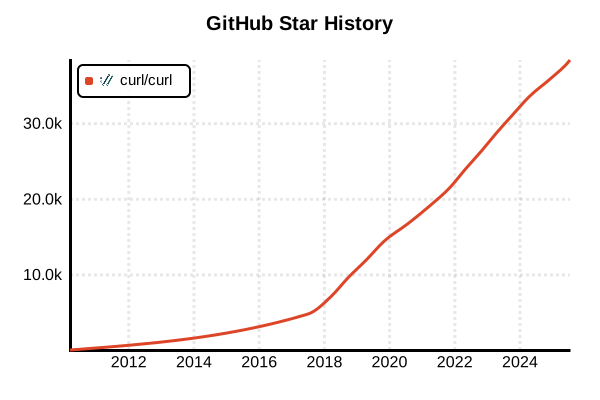
スター履歴
ライブラリ
cURL
概要
cURLは「URL構文でデータを転送するコマンドラインツール」として開発された、世界で最も広く使用されているHTTPクライアントツールです。「Client for URLs」の略称であり、HTTP/HTTPS、FTP、SCP、SFTP等50以上のプロトコルをサポート。Unix/Linux系OSで標準搭載され、Windows、macOS等でも利用可能。シンプルなコマンドライン操作でWebAPI呼び出し、ファイルダウンロード、認証、プロキシ経由通信など、あらゆるネットワーク操作を実現し、開発者のデバッグ・テスト・自動化作業に不可欠なツールとして地位を確立しています。
詳細
cURL 2025年版は30年近くの開発実績により圧倒的な安定性と汎用性を誇ります。libcurlライブラリをベースとした高機能なコマンドラインインターフェースにより、複雑なHTTP通信を単一コマンドで実現可能。Basic/Digest/OAuth認証、クライアント証明書、プロキシ設定、クッキー管理、リダイレクト追跡、レジューム機能など企業レベルの要件に対応。REST API開発、CI/CDパイプライン、システム監視、データ収集等で幅広く活用され、特にDocker環境やクラウドネイティブ開発では標準的なHTTPクライアントツールとして確固たる地位を維持しています。
主な特徴
- 50以上のプロトコルサポート: HTTP/HTTPS、FTP、SCP、SFTP、LDAP、SMTP等の包括的対応
- 圧倒的な移植性: Unix/Linux、Windows、macOS等幅広いプラットフォーム対応
- 豊富な認証機能: Basic、Digest、NTLM、OAuth、Kerberos、クライアント証明書認証
- 高度なHTTP機能: カスタムヘッダー、クッキー管理、リダイレクト追跡、レジューム
- プロキシ完全対応: HTTP/HTTPS/SOCKS4/SOCKS5プロキシとプロキシ認証
- 詳細なデバッグ機能: 通信内容の完全表示とトレース機能
メリット・デメリット
メリット
- Unix/Linux系OSで標準装備されており追加インストール不要
- シンプルなコマンドライン操作による高い学習効率と自動化対応
- 50以上のプロトコル対応による汎用性とワンストップソリューション
- 30年近い開発実績による圧倒的な安定性と信頼性
- ライブラリ(libcurl)としても利用可能でプログラム組み込み対応
- Docker、Kubernetes等のコンテナ環境での標準的なデバッグツール
デメリット
- 単一ファイル転送に特化しており大規模サイトミラーリングには不向き
- JavaScriptやブラウザ固有の機能をサポートしない制約
- 複雑なオプション組み合わせによる学習コストの高さ
- GUI環境がなくコマンドライン操作に限定
- 大量の並列接続処理には他の専用ツールが必要
- エラーメッセージが技術的で初心者には理解困難
参考ページ
書き方の例
インストールと基本確認
# システム標準のcURLバージョン確認
curl --version

# Ubuntu/Debianでのインストール(通常は標準装備)
sudo apt update && sudo apt install curl

# CentOS/RHEL/Fedoraでのインストール
sudo yum install curl    # CentOS 7以前
sudo dnf install curl    # CentOS 8以降、Fedora

# macOSでのインストール(Homebrewを使用)
brew install curl

# Windowsでのインストール(標準搭載済みまたはWinGet使用)
winget install curl.curl

# インストール確認と詳細情報表示
curl --version
curl --help

# サポートされているプロトコル一覧表示
curl --version | grep -i protocols
基本的なHTTPリクエスト(GET/POST/PUT/DELETE)
# 基本的なGETリクエスト
curl https://api.example.com/users

# レスポンスヘッダーも表示
curl -i https://api.example.com/users
curl --include https://api.example.com/users

# ヘッダーのみ表示(HEADリクエスト)
curl -I https://api.example.com/users
curl --head https://api.example.com/users

# 詳細な通信内容表示(デバッグ用)
curl -v https://api.example.com/users
curl --verbose https://api.example.com/users

# より詳細なトレース情報
curl --trace-ascii trace.log https://api.example.com/users

# JSONレスポンスの整形表示(jqと組み合わせ)
curl -s https://api.example.com/users | jq '.'

# クエリパラメータ付きGETリクエスト
curl "https://api.example.com/users?page=1&limit=10&sort=created_at"

# URL エンコードが必要な場合
curl -G -d "search=田中太郎" -d "page=1" https://api.example.com/users

# POSTリクエスト(JSON送信)
curl -X POST https://api.example.com/users \
  -H "Content-Type: application/json" \
  -H "Authorization: Bearer your-token" \
  -d '{
    "name": "田中太郎",
    "email": "[email protected]",
    "age": 30
  }'

# POSTリクエスト(フォームデータ送信)
curl -X POST https://api.example.com/login \
  -H "Content-Type: application/x-www-form-urlencoded" \
  -d "username=testuser&password=secret123"

# POSTリクエスト(ファイルから読み込み)
curl -X POST https://api.example.com/users \
  -H "Content-Type: application/json" \
  -H "Authorization: Bearer your-token" \
  -d @user_data.json

# PUTリクエスト(データ更新)
curl -X PUT https://api.example.com/users/123 \
  -H "Content-Type: application/json" \
  -H "Authorization: Bearer your-token" \
  -d '{
    "name": "田中次郎",
    "email": "[email protected]"
  }'

# DELETEリクエスト
curl -X DELETE https://api.example.com/users/123 \
  -H "Authorization: Bearer your-token"

# レスポンスをファイルに保存
curl -o response.json https://api.example.com/users
curl --output response.json https://api.example.com/users

# ステータスコードのみ表示
curl -o /dev/null -s -w "%{http_code}\n" https://api.example.com/users

# レスポンス時間測定
curl -o /dev/null -s -w "Total time: %{time_total}s\n" https://api.example.com/users
認証とヘッダー設定
# Basic認証
curl -u username:password https://api.example.com/protected
curl --user username:password https://api.example.com/protected

# パスワードを隠して入力(対話的)
curl -u username https://api.example.com/protected

# Bearer Token認証
curl -H "Authorization: Bearer your-jwt-token" https://api.example.com/protected

# API Key認証(カスタムヘッダー)
curl -H "X-API-Key: your-api-key" https://api.example.com/data
curl -H "Authorization: API-Key your-api-key" https://api.example.com/data

# Digest認証
curl --digest -u username:password https://api.example.com/digest-auth

# NTLM認証(Windows環境)
curl --ntlm -u domain\\username:password https://api.example.com/ntlm-auth

# OAuth 2.0 Bearer Token
curl --oauth2-bearer "mF_9.B5f-4.1JqM" https://api.example.com/oauth-protected

# 複数のカスタムヘッダー設定
curl -H "Accept: application/json" \
     -H "Content-Type: application/json" \
     -H "User-Agent: MyApp/1.0" \
     -H "X-Request-ID: req-12345" \
     -H "Authorization: Bearer your-token" \
     https://api.example.com/data

# Referrer設定
curl -e "https://www.example.org" https://api.example.com/data
curl --referer "https://www.example.org" https://api.example.com/data

# User-Agent設定
curl -A "Mozilla/5.0 (compatible; MyBot/1.0)" https://api.example.com/data
curl --user-agent "Mozilla/5.0 (compatible; MyBot/1.0)" https://api.example.com/data

# ヘッダーをファイルから読み込み
curl -H @headers.txt https://api.example.com/data

# デフォルトヘッダーを削除
curl -H "Host:" https://api.example.com/data
curl -H "User-Agent:" https://api.example.com/data
SSL/TLS設定とプロキシ
# SSL証明書検証をスキップ(開発時のみ)
curl -k https://self-signed.example.com/
curl --insecure https://self-signed.example.com/

# 特定のCA証明書を使用
curl --cacert /path/to/ca-cert.pem https://secure.example.com/

# クライアント証明書を使用
curl --cert /path/to/client.pem https://secure.example.com/
curl --cert /path/to/client.pem:password https://secure.example.com/

# 秘密鍵を指定
curl --cert /path/to/client.pem --key /path/to/private.key https://secure.example.com/

# TLS 1.2以上を強制
curl --tlsv1.2 https://api.example.com/data

# 特定のTLSバージョンを指定
curl --tls-max 1.2 https://api.example.com/data

# HTTPプロキシ使用
curl -x http://proxy.example.com:8080 https://api.example.com/data
curl --proxy http://proxy.example.com:8080 https://api.example.com/data

# 認証付きプロキシ
curl -x http://user:[email protected]:8080 https://api.example.com/data
curl --proxy-user user:pass -x http://proxy.example.com:8080 https://api.example.com/data

# SOCKS5プロキシ使用
curl --socks5 proxy.example.com:1080 https://api.example.com/data

# 特定のホストをプロキシ除外
curl -x http://proxy.example.com:8080 --noproxy localhost,127.0.0.1 https://api.example.com/data

# システムプロキシ設定を無視
curl --noproxy "*" https://api.example.com/data
クッキー管理とセッション
# クッキーを保存
curl -c cookies.txt https://api.example.com/login \
  -d "username=user&password=pass"

# 保存されたクッキーを使用
curl -b cookies.txt https://api.example.com/dashboard

# クッキーの保存と使用を同時に行う
curl -c cookies.txt -b cookies.txt https://api.example.com/api

# 特定のクッキーを直接指定
curl -b "session_id=abc123; user_pref=dark_mode" https://api.example.com/data

# ヘッダーダンプでクッキー情報確認
curl --dump-header headers.txt https://api.example.com/login

# セッション維持のログインシーケンス例
# 1. ログインしてクッキーを保存
curl -c session.txt -X POST https://api.example.com/login \
  -H "Content-Type: application/json" \
  -d '{"username": "user", "password": "pass"}'

# 2. 保存されたセッションでAPIアクセス
curl -b session.txt https://api.example.com/user/profile

# 3. ログアウト
curl -b session.txt -X POST https://api.example.com/logout

# JAR形式でのクッキー管理(Netscape/Mozilla互換)
curl -c cookies.jar -b cookies.jar https://api.example.com/data
ファイル操作と大容量転送
# ファイルダウンロード(ファイル名自動決定)
curl -O https://example.com/files/document.pdf
curl --remote-name https://example.com/files/document.pdf

# ファイルダウンロード(ファイル名指定)
curl -o mydocument.pdf https://example.com/files/document.pdf

# ダウンロード進捗表示
curl --progress-bar -O https://example.com/files/large-file.zip

# 大容量ファイルのレジューム(再開)
curl -C - -O https://example.com/files/large-file.zip

# 複数ファイルの並列ダウンロード
curl -O https://example.com/file1.zip -O https://example.com/file2.zip

# ファイルアップロード(POST)
curl -X POST https://api.example.com/upload \
  -H "Authorization: Bearer your-token" \
  -F "file=@/path/to/upload.pdf" \
  -F "category=documents"

# ファイルアップロード(PUT)
curl -X PUT https://api.example.com/files/document.pdf \
  -H "Content-Type: application/pdf" \
  -H "Authorization: Bearer your-token" \
  --data-binary @document.pdf

# FTPアップロード
curl -T upload.txt ftp://ftp.example.com/uploads/ --user username:password

# ディレクトリの作成(FTP)
curl ftp://ftp.example.com/ --user username:password -Q "MKD newdir"

# ストリーミングダウンロード(標準出力)
curl -s https://api.example.com/stream | jq '.'

# 標準入力からのアップロード
echo '{"message": "Hello World"}' | curl -X POST https://api.example.com/messages \
  -H "Content-Type: application/json" \
  -d @-

# 分割ダウンロード(範囲指定)
curl -r 0-1023 https://example.com/large-file.zip  # 最初の1024バイト
curl -r 1024-2047 https://example.com/large-file.zip  # 次の1024バイト
高度な設定とトラブルシューティング
# タイムアウト設定
curl --connect-timeout 10 --max-time 60 https://api.example.com/data

# リトライ設定
curl --retry 3 --retry-delay 5 --retry-max-time 120 https://api.example.com/data

# リダイレクト追跡
curl -L https://bit.ly/shorturl  # 自動でリダイレクト先を追跡
curl --location --max-redirs 5 https://example.com/redirect

# IPv4/IPv6強制
curl -4 https://api.example.com/data  # IPv4のみ
curl -6 https://api.example.com/data  # IPv6のみ

# DNS指定
curl --resolve api.example.com:443:192.168.1.100 https://api.example.com/data

# インターフェース指定
curl --interface eth0 https://api.example.com/data

# レート制限(帯域制限)
curl --limit-rate 100k https://example.com/large-file.zip

# 無出力モード(サイレント)
curl -s https://api.example.com/data
curl --silent https://api.example.com/data

# エラーでも無出力
curl -s -f https://api.example.com/data  # エラー時はexit code非ゼロ

# 設定ファイル使用
echo 'url = "https://api.example.com/data"' > curl.conf
echo 'header = "Authorization: Bearer token"' >> curl.conf
curl -K curl.conf

# 複数URL処理
curl https://api.example.com/users/{1,2,3,4,5}
curl https://api.example.com/page[1-10]

# 条件付きリクエスト
curl -H "If-Modified-Since: Wed, 21 Oct 2015 07:28:00 GMT" https://api.example.com/data

# gzip/deflate圧縮対応
curl -H "Accept-Encoding: gzip, deflate" --compressed https://api.example.com/data

# パフォーマンス測定詳細
curl -w "DNS lookup: %{time_namelookup}s\n\
Connect: %{time_connect}s\n\
TLS handshake: %{time_appconnect}s\n\
Pre-transfer: %{time_pretransfer}s\n\
Redirect: %{time_redirect}s\n\
Start transfer: %{time_starttransfer}s\n\
Total: %{time_total}s\n\
Speed: %{speed_download} bytes/sec\n" \
-o /dev/null -s https://api.example.com/data
CI/CD・自動化での活用例
# ヘルスチェック(監視スクリプト)
#!/bin/bash
response=$(curl -s -o /dev/null -w "%{http_code}" https://api.example.com/health)
if [ "$response" = "200" ]; then
    echo "Service is healthy"
    exit 0
else
    echo "Service is down (HTTP $response)"
    exit 1
fi

# API テスト(テストスクリプト)
#!/bin/bash
# ユーザー作成テスト
response=$(curl -s -X POST https://api.example.com/users \
  -H "Content-Type: application/json" \
  -H "Authorization: Bearer $API_TOKEN" \
  -d '{"name": "Test User", "email": "[email protected]"}' \
  -w "%{http_code}")

if echo "$response" | tail -1 | grep -q "201"; then
    echo "User creation test: PASS"
    user_id=$(echo "$response" | head -n -1 | jq -r '.id')

    # 作成されたユーザーの削除
    curl -s -X DELETE "https://api.example.com/users/$user_id" \
      -H "Authorization: Bearer $API_TOKEN"
else
    echo "User creation test: FAIL"
    exit 1
fi

# Webhook送信(通知スクリプト)
curl -X POST https://hooks.slack.com/webhook-url \
  -H "Content-Type: application/json" \
  -d '{
    "text": "Deployment completed successfully",
    "username": "Deploy Bot",
    "icon_emoji": ":rocket:"
  }'

# 設定の動的取得(設定管理)
config=$(curl -s -H "Authorization: Bearer $CONFIG_TOKEN" \
  https://config.example.com/api/v1/config/production)
export DATABASE_URL=$(echo "$config" | jq -r '.database.url')
export REDIS_URL=$(echo "$config" | jq -r '.redis.url')

# ログ転送(ログ集約)
tail -f /var/log/application.log | while read line; do
  echo "$line" | curl -X POST https://logs.example.com/api/v1/logs \
    -H "Content-Type: text/plain" \
    -H "Authorization: Bearer $LOG_TOKEN" \
    -d @-
done