coloredlogs
Python標準ライブラリloggingのカラー出力拡張ライブラリ。ANSIエスケープシーケンスによるカスタマイズ可能なカラーフォーマッターを提供し、ログレベルに応じた色分け表示を実現。標準ライブラリとの完全互換性を保持。
GitHub概要
xolox/python-coloredlogs
Colored terminal output for Python's logging module
スター553
ウォッチ10
フォーク45
作成日:2013年5月30日
言語:Python
ライセンス:MIT License
トピックス
ansi-colorscronhtmlloggingpythonsyslogterminal
スター履歴
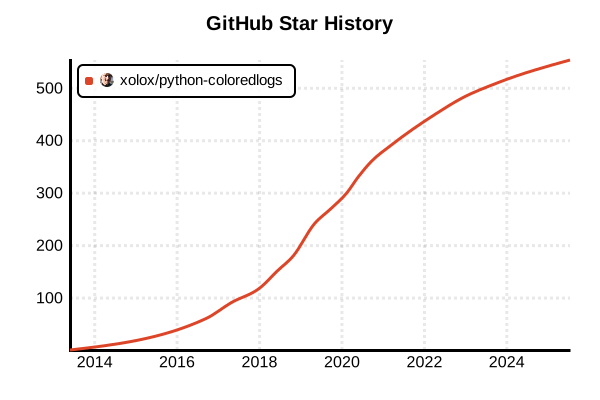
データ取得日時: 2025/7/17 23:24
ライブラリ
coloredlogs
概要
coloredlogsは、Pythonの標準loggingモジュールにカラー端末出力機能を提供するライブラリです。ANSIエスケープシーケンスを使用してログメッセージを色付きで表示し、どのUNIXターミナルでも動作するよう標準色のみを使用します。Windows 10のネイティブANSIサポート自動検出機能を持ち、必要に応じてcoloramaライブラリにフォールバックします。シンプルなインストールで即座に利用でき、開発・デバッグ時の視認性向上に大きく貢献します。
詳細
coloredlogs 2025年版は、Python開発環境での視認性向上とデバッグ効率化のための実用的なソリューションとして確立されています。ColoredFormatterクラスがlogging.Formatterを継承し、ANSIエスケープシーケンスによる色付きログ出力を実現。インタラクティブターミナル検出機能により、cronジョブ等では自動的にANSIシーケンスを無効化し、メール送信時の文字化けを防止します。Windows 10のネイティブANSIサポート対応により、coloramaへの依存を軽減し、軽量化を実現しています。
主な特徴
- ANSIエスケープシーケンス: 標準色による確実なクロスプラットフォーム対応
- インテリジェント検出: ターミナル環境に応じた自動的な色表示制御
- Windows 10サポート: ネイティブANSIサポートの自動検出とフォールバック
- 簡単セットアップ: ワンライン設定で即座に利用開始
- カスタムフォーマッタ: ユーザー定義ログフォーマット対応
- システムログ統合: syslog等のシステムログとの連携機能
メリット・デメリット
メリット
- ワンライン設定でPythonロギングの視認性が劇的に向上
- ANSIエスケープシーケンスによる確実なクロスプラットフォーム動作
- インタラクティブターミナル自動検出による環境適応
- 標準loggingモジュール完全互換でライブラリ間の統合が容易
- Windows 10ネイティブサポートによる軽量化とパフォーマンス向上
- cronジョブ等での自動的な色表示無効化による運用安全性
デメリット
- 色表示が不要な環境では余分な処理オーバーヘッド
- 古いWindowsシステムではcolorama依存が必要
- ログ集約システムでANSIシーケンスの除去が必要な場合がある
- 高度なログレイアウト機能は他の専用ライブラリに劣る
- 大量ログ出力時のパフォーマンス制約
- カスタム色設定の柔軟性に限界
参考ページ
書き方の例
インストールと基本セットアップ
# 基本インストール
pip install coloredlogs

# cronジョブサポート付きインストール
pip install 'coloredlogs[cron]'

# Anaconda環境でのインストール
conda install -c anaconda coloredlogs

# 仮想環境での管理
python -m venv venv
source venv/bin/activate  # Linux/Mac
pip install coloredlogs

# 動作確認
python -c "import coloredlogs; print('coloredlogs installed successfully')"
ワンライン設定(最速セットアップ)
import coloredlogs
import logging

# ワンライン設定でroot loggerに適用
coloredlogs.install(level='DEBUG')

# 以降、標準のloggingモジュールが自動的にカラー表示
logging.debug("デバッグメッセージ - グレー色で表示")
logging.info("情報メッセージ - 青色で表示")
logging.warning("警告メッセージ - 黄色で表示")
logging.error("エラーメッセージ - 赤色で表示")
logging.critical("致命的エラー - 明るい赤色で表示")

# 実際のアプリケーション例
def main():
    coloredlogs.install(level='INFO')

    logging.info("アプリケーション開始")

    try:
        # ビジネスロジック
        process_data()
        logging.info("データ処理完了")
    except Exception as e:
        logging.error(f"データ処理エラー: {e}")

    logging.info("アプリケーション終了")

def process_data():
    logging.debug("データ処理開始")
    # 処理のシミュレーション
    import time
    time.sleep(1)
    logging.debug("データ処理中...")
    time.sleep(1)

if __name__ == "__main__":
    main()
カスタムロガー設定
import coloredlogs
import logging

# 専用ロガーの作成
logger = logging.getLogger('MyApp')

# カスタムロガーに対してcoloredlogsを適用
coloredlogs.install(
    level='DEBUG',
    logger=logger,
    fmt='%(asctime)s.%(msecs)03d %(hostname)s %(name)s[%(process)d] %(levelname)s %(message)s'
)

# 複数ロガーの管理
class DatabaseManager:
    def __init__(self):
        self.logger = logging.getLogger('DatabaseManager')
        coloredlogs.install(
            level='INFO',
            logger=self.logger,
            fmt='[DB] %(asctime)s %(levelname)s: %(message)s'
        )

    def connect(self):
        self.logger.info("データベースに接続中...")
        self.logger.debug("接続パラメータを設定")
        self.logger.info("データベース接続成功")

    def execute_query(self, query):
        self.logger.debug(f"クエリ実行: {query}")
        try:
            # クエリ実行のシミュレーション
            import time
            time.sleep(0.5)
            self.logger.info("クエリ実行完了")
            return "result"
        except Exception as e:
            self.logger.error(f"クエリ実行エラー: {e}")
            raise

class APIClient:
    def __init__(self):
        self.logger = logging.getLogger('APIClient')
        coloredlogs.install(
            level='WARNING',  # APIクライアントは警告以上のみ表示
            logger=self.logger,
            fmt='[API] %(levelname)s: %(message)s'
        )

    def make_request(self, url):
        self.logger.debug(f"リクエスト送信: {url}")  # WARNING以上なので表示されない
        self.logger.warning("APIレスポンス時間が長いです")
        self.logger.error("API接続エラー")

# 使用例
db = DatabaseManager()
db.connect()
db.execute_query("SELECT * FROM users")

api = APIClient()
api.make_request("https://api.example.com/data")
環境別設定とフォーマットカスタマイズ
import coloredlogs
import logging
import os

def setup_logging():
    # 環境変数による動的設定
    log_level = os.getenv('LOG_LEVEL', 'INFO').upper()

    # 環境別のフォーマット設定
    if os.getenv('ENVIRONMENT') == 'production':
        # 本番環境:詳細な構造化ログ
        log_format = '%(asctime)s %(hostname)s %(name)s[%(process)d] %(levelname)s %(funcName)s:%(lineno)d %(message)s'
    elif os.getenv('ENVIRONMENT') == 'development':
        # 開発環境:シンプルで読みやすい形式
        log_format = '%(levelname)s %(name)s: %(message)s'
    else:
        # デフォルト:バランス型
        log_format = '%(asctime)s %(levelname)s %(name)s: %(message)s'

    # カスタムカラー設定
    coloredlogs.install(
        level=log_level,
        fmt=log_format,
        level_styles={
            'critical': {'bold': True, 'color': 'red'},
            'debug': {'color': 'green'},
            'error': {'color': 'red'},
            'info': {'color': 'blue'},
            'notice': {'color': 'magenta'},
            'spam': {'color': 'green', 'faint': True},
            'success': {'bold': True, 'color': 'green'},
            'verbose': {'color': 'blue'},
            'warning': {'color': 'yellow'}
        },
        field_styles={
            'asctime': {'color': 'green'},
            'hostname': {'color': 'magenta'},
            'levelname': {'bold': True, 'color': 'black'},
            'name': {'color': 'blue'},
            'programname': {'color': 'cyan'},
            'username': {'color': 'yellow'}
        }
    )

# ミリ秒精度の設定
def setup_precise_logging():
    coloredlogs.install(
        level='DEBUG',
        milliseconds=True,  # ミリ秒表示を有効
        fmt='%(asctime)s.%(msecs)03d %(levelname)s %(name)s: %(message)s'
    )

# 条件付きカラー設定
def setup_conditional_logging():
    # NO_COLOR環境変数でカラー無効化
    if os.getenv('NO_COLOR'):
        # カラーなしの通常ログ設定
        logging.basicConfig(
            level='DEBUG',
            format='%(asctime)s %(levelname)s %(name)s: %(message)s'
        )
    else:
        # カラー付きログ設定
        coloredlogs.install(level='DEBUG')

# 複数設定の統合例
class LoggingConfig:
    @staticmethod
    def configure():
        environment = os.getenv('ENVIRONMENT', 'development')

        if environment == 'production':
            LoggingConfig._setup_production()
        elif environment == 'testing':
            LoggingConfig._setup_testing()
        else:
            LoggingConfig._setup_development()

    @staticmethod
    def _setup_production():
        coloredlogs.install(
            level='WARNING',
            fmt='%(asctime)s %(hostname)s %(name)s[%(process)d] %(levelname)s %(message)s',
            milliseconds=True
        )

    @staticmethod
    def _setup_testing():
        coloredlogs.install(
            level='DEBUG',
            fmt='[TEST] %(levelname)s %(name)s: %(message)s'
        )

    @staticmethod
    def _setup_development():
        coloredlogs.install(
            level='DEBUG',
            fmt='%(levelname)s %(name)s.%(funcName)s:%(lineno)d - %(message)s'
        )

# 使用例
LoggingConfig.configure()

logger = logging.getLogger(__name__)
logger.info("設定完了")
logger.debug("デバッグ情報")
logger.warning("警告メッセージ")
logger.error("エラーメッセージ")
ファイル出力とシステムログ統合
import coloredlogs
import logging
import logging.handlers
import os
from datetime import datetime

def setup_comprehensive_logging():
    # メインロガーの設定
    logger = logging.getLogger('MyApp')
    logger.setLevel(logging.DEBUG)

    # コンソール出力(カラー付き)
    coloredlogs.install(
        level='DEBUG',
        logger=logger,
        fmt='%(asctime)s %(levelname)s %(name)s: %(message)s'
    )

    # ファイル出力ハンドラー(カラーなし)
    log_dir = 'logs'
    if not os.path.exists(log_dir):
        os.makedirs(log_dir)

    # 日付ベースのログファイル
    today = datetime.now().strftime('%Y-%m-%d')
    file_handler = logging.FileHandler(f'{log_dir}/app-{today}.log')
    file_handler.setLevel(logging.INFO)
    file_formatter = logging.Formatter(
        '%(asctime)s %(levelname)s %(name)s[%(process)d]: %(message)s'
    )
    file_handler.setFormatter(file_formatter)
    logger.addHandler(file_handler)

    # エラー専用ログファイル
    error_handler = logging.FileHandler(f'{log_dir}/error-{today}.log')
    error_handler.setLevel(logging.ERROR)
    error_handler.setFormatter(file_formatter)
    logger.addHandler(error_handler)

    # ローテーティングファイルハンドラー
    rotating_handler = logging.handlers.RotatingFileHandler(
        f'{log_dir}/app-rotating.log',
        maxBytes=1024*1024,  # 1MB
        backupCount=5
    )
    rotating_handler.setLevel(logging.INFO)
    rotating_handler.setFormatter(file_formatter)
    logger.addHandler(rotating_handler)

    return logger

# システムログとの統合
def setup_system_logging():
    # Syslogハンドラーの設定
    syslog_handler = logging.handlers.SysLogHandler(address='/dev/log')
    syslog_formatter = logging.Formatter(
        'MyApp[%(process)d]: %(levelname)s %(message)s'
    )
    syslog_handler.setFormatter(syslog_formatter)

    # メインロガーの設定
    logger = logging.getLogger('MyApp')
    logger.addHandler(syslog_handler)

    # コンソールにはカラー表示
    coloredlogs.install(
        level='DEBUG',
        logger=logger,
        fmt='%(levelname)s %(name)s: %(message)s'
    )

    return logger

# HTTPサーバーログの統合
class WebAppLogging:
    def __init__(self):
        self.access_logger = logging.getLogger('access')
        self.app_logger = logging.getLogger('app')

        # アクセスログは構造化フォーマット
        coloredlogs.install(
            level='INFO',
            logger=self.access_logger,
            fmt='[ACCESS] %(asctime)s %(message)s'
        )

        # アプリケーションログは詳細フォーマット
        coloredlogs.install(
            level='DEBUG',
            logger=self.app_logger,
            fmt='[APP] %(levelname)s %(funcName)s: %(message)s'
        )

    def log_request(self, method, path, status_code, response_time):
        self.access_logger.info(
            f"{method} {path} - {status_code} ({response_time}ms)"
        )

    def log_app_event(self, level, message):
        getattr(self.app_logger, level.lower())(message)

# JSON構造化ログ出力
import json

class StructuredLogger:
    def __init__(self, name):
        self.logger = logging.getLogger(name)

        # コンソール用(カラー付き、人間可読)
        coloredlogs.install(
            level='DEBUG',
            logger=self.logger,
            fmt='%(levelname)s %(name)s: %(message)s'
        )

        # ファイル用(JSON構造化)
        json_handler = logging.FileHandler('logs/structured.jsonl')
        json_handler.setLevel(logging.INFO)
        json_handler.setFormatter(self.JSONFormatter())
        self.logger.addHandler(json_handler)

    class JSONFormatter(logging.Formatter):
        def format(self, record):
            log_data = {
                'timestamp': datetime.fromtimestamp(record.created).isoformat(),
                'level': record.levelname,
                'logger': record.name,
                'module': record.module,
                'function': record.funcName,
                'line': record.lineno,
                'message': record.getMessage()
            }

            if record.exc_info:
                log_data['exception'] = self.formatException(record.exc_info)

            return json.dumps(log_data, ensure_ascii=False)

    def info(self, message, **kwargs):
        if kwargs:
            message = f"{message} - {json.dumps(kwargs, ensure_ascii=False)}"
        self.logger.info(message)

    def error(self, message, **kwargs):
        if kwargs:
            message = f"{message} - {json.dumps(kwargs, ensure_ascii=False)}"
        self.logger.error(message)

# 使用例
if __name__ == "__main__":
    # 包括的ログ設定
    main_logger = setup_comprehensive_logging()

    # テストログ出力
    main_logger.debug("アプリケーション初期化")
    main_logger.info("サーバー開始")
    main_logger.warning("メモリ使用量が高いです")
    main_logger.error("データベース接続エラー")

    # Webアプリログ例
    web_app = WebAppLogging()
    web_app.log_request("GET", "/api/users", 200, 150)
    web_app.log_app_event("info", "ユーザー認証成功")
    web_app.log_app_event("error", "API制限に達しました")

    # 構造化ログ例
    struct_logger = StructuredLogger("StructuredApp")
    struct_logger.info("ユーザーログイン", user_id=12345, ip="192.168.1.100")
    struct_logger.error("支払い処理失敗", order_id=67890, amount=1500, error_code="PAYMENT_DECLINED")
パフォーマンス最適化とベンチマーク
import coloredlogs
import logging
import time
import sys
from contextlib import contextmanager

def performance_comparison():
    """coloredlogsのパフォーマンス測定"""

    # 標準ログ設定
    standard_logger = logging.getLogger('standard')
    standard_handler = logging.StreamHandler(sys.stdout)
    standard_formatter = logging.Formatter('%(levelname)s: %(message)s')
    standard_handler.setFormatter(standard_formatter)
    standard_logger.addHandler(standard_handler)
    standard_logger.setLevel(logging.INFO)

    # coloredlogs設定
    colored_logger = logging.getLogger('colored')
    coloredlogs.install(
        level='INFO',
        logger=colored_logger,
        fmt='%(levelname)s: %(message)s'
    )

    # ベンチマーク実行
    iterations = 10000

    # 標準ログのベンチマーク
    start_time = time.time()
    for i in range(iterations):
        if i % 1000 == 0:
            standard_logger.info(f"標準ログメッセージ {i}")
    standard_time = time.time() - start_time

    # coloredlogsのベンチマーク
    start_time = time.time()
    for i in range(iterations):
        if i % 1000 == 0:
            colored_logger.info(f"カラーログメッセージ {i}")
    colored_time = time.time() - start_time

    print(f"\n=== パフォーマンス比較結果 ===")
    print(f"標準ログ:    {standard_time:.3f}秒")
    print(f"coloredlogs: {colored_time:.3f}秒")
    print(f"オーバーヘッド: {((colored_time - standard_time) / standard_time * 100):.1f}%")

# 環境最適化設定
class OptimizedLogging:
    @staticmethod
    def setup_for_production():
        """本番環境向け最適化設定"""
        # 最小限のログレベル
        coloredlogs.install(
            level='WARNING',
            fmt='%(asctime)s %(levelname)s: %(message)s'
        )

    @staticmethod
    def setup_for_development():
        """開発環境向け最適化設定"""
        # 詳細ログ(パフォーマンスより情報量優先)
        coloredlogs.install(
            level='DEBUG',
            fmt='%(levelname)s %(name)s.%(funcName)s:%(lineno)d - %(message)s',
            milliseconds=True
        )

    @staticmethod
    def setup_for_testing():
        """テスト環境向け最適化設定"""
        # テスト結果が見やすい設定
        coloredlogs.install(
            level='INFO',
            fmt='[TEST] %(levelname)s: %(message)s'
        )

# 条件付きロギング最適化
class ConditionalLogging:
    def __init__(self, logger_name, min_level='INFO'):
        self.logger = logging.getLogger(logger_name)
        self.min_level = getattr(logging, min_level.upper())

        coloredlogs.install(
            level=min_level,
            logger=self.logger
        )

    def debug_if(self, condition, message):
        """条件が真の場合のみデバッグログ出力"""
        if condition and self.logger.isEnabledFor(logging.DEBUG):
            self.logger.debug(message)

    def info_throttled(self, message, throttle_seconds=60):
        """スロットリング付きinfo出力"""
        if not hasattr(self, '_last_info_time'):
            self._last_info_time = {}

        now = time.time()
        if message not in self._last_info_time or \
           now - self._last_info_time[message] > throttle_seconds:
            self.logger.info(message)
            self._last_info_time[message] = now

    @contextmanager
    def timing_context(self, operation_name):
        """処理時間測定コンテキスト"""
        start_time = time.time()
        self.logger.debug(f"{operation_name} 開始")
        try:
            yield
        finally:
            duration = time.time() - start_time
            self.logger.info(f"{operation_name} 完了 ({duration:.3f}秒)")

# メモリ効率的なログ設定
def setup_memory_efficient_logging():
    """メモリ使用量を抑えたログ設定"""

    # バッファサイズを制限
    import io

    class LimitedStringIO(io.StringIO):
        def __init__(self, max_size=1024*1024):  # 1MB制限
            super().__init__()
            self.max_size = max_size

        def write(self, s):
            if self.tell() + len(s) > self.max_size:
                # バッファが満杯の場合、古いデータを削除
                self.seek(0)
                self.truncate()
            return super().write(s)

    # メモリ効率的なハンドラー
    memory_stream = LimitedStringIO()
    memory_handler = logging.StreamHandler(memory_stream)

    logger = logging.getLogger('memory_efficient')
    logger.addHandler(memory_handler)

    coloredlogs.install(
        level='INFO',
        logger=logger,
        fmt='%(levelname)s: %(message)s'
    )

    return logger, memory_stream

# 大量ログ処理最適化
class BulkLoggingOptimizer:
    def __init__(self, logger_name):
        self.logger = logging.getLogger(logger_name)
        self.pending_logs = []
        self.batch_size = 100

        coloredlogs.install(
            level='INFO',
            logger=self.logger,
            fmt='%(levelname)s: %(message)s'
        )

    def add_log(self, level, message):
        """ログをバッチに追加"""
        self.pending_logs.append((level, message))

        if len(self.pending_logs) >= self.batch_size:
            self.flush()

    def flush(self):
        """蓄積されたログを一括出力"""
        if not self.pending_logs:
            return

        # ログレベル別にまとめて出力
        level_counts = {}
        for level, message in self.pending_logs:
            level_counts[level] = level_counts.get(level, 0) + 1
            getattr(self.logger, level.lower())(message)

        # 統計情報を出力
        stats = ", ".join([f"{level}: {count}" for level, count in level_counts.items()])
        self.logger.info(f"バッチ処理完了 ({stats})")

        self.pending_logs.clear()

# 使用例とベンチマーク実行
if __name__ == "__main__":
    print("=== coloredlogs パフォーマンステスト ===")

    # パフォーマンス比較
    performance_comparison()

    # 最適化設定テスト
    print("\n=== 最適化設定テスト ===")
    OptimizedLogging.setup_for_development()

    dev_logger = logging.getLogger('dev_test')
    dev_logger.debug("開発環境テストメッセージ")
    dev_logger.info("情報メッセージ")
    dev_logger.warning("警告メッセージ")

    # 条件付きロギングテスト
    print("\n=== 条件付きロギングテスト ===")
    conditional = ConditionalLogging('conditional_test')

    conditional.debug_if(True, "条件が真なので表示される")
    conditional.debug_if(False, "条件が偽なので表示されない")

    # スロットリングテスト
    for i in range(5):
        conditional.info_throttled("スロットリングテストメッセージ", throttle_seconds=2)
        time.sleep(0.5)

    # タイミング測定テスト
    with conditional.timing_context("サンプル処理"):
        time.sleep(1)

    # メモリ効率テスト
    print("\n=== メモリ効率テスト ===")
    memory_logger, memory_stream = setup_memory_efficient_logging()

    for i in range(100):
        memory_logger.info(f"メモリ効率テストメッセージ {i}")

    print(f"メモリストリームサイズ: {memory_stream.tell()} bytes")

    # バルク処理テスト
    print("\n=== バルク処理テスト ===")
    bulk_optimizer = BulkLoggingOptimizer('bulk_test')

    for i in range(250):
        level = 'info' if i % 2 == 0 else 'debug'
        bulk_optimizer.add_log(level, f"バルクメッセージ {i}")

    bulk_optimizer.flush()  # 残りを出力

    print("\ncoloredlogs パフォーマンステスト完了")