Rich (Logging)
リッチテキスト表示ライブラリの一部として提供されるロギング機能。美しいフォーマット、シンタックスハイライト、テーブル形式表示、プログレスバーなど豊富な表示オプションを提供。コンソールアプリケーションでの高品質な出力体験を実現。
GitHub概要
Textualize/rich
Rich is a Python library for rich text and beautiful formatting in the terminal.
スター52,884
ウォッチ537
フォーク1,859
作成日:2019年11月10日
言語:Python
ライセンス:MIT License
トピックス
ansi-colorsemojimarkdownprogress-barprogress-bar-pythonpythonpython-librarypython3richsyntax-highlightingtablesterminalterminal-colortracebacktracebacks-richtui
スター履歴
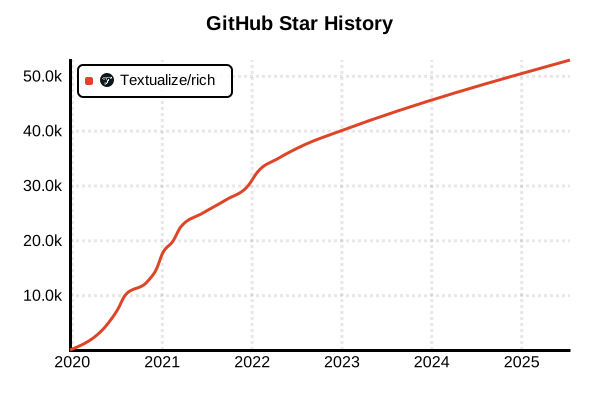
データ取得日時: 2025/7/17 23:24
ライブラリ
Rich (Logging)
概要
Richは単なるロギングライブラリを超えた、Python向けの包括的なテキスト表示・ユーザーインターフェースライブラリです。ロギング機能はRichHandlerとして提供され、美しいフォーマット、シンタックスハイライト、テーブル形式表示、プログレスバーなど豊富な表示オプションを活用できます。コンソールアプリケーションでの高品質な出力体験を実現し、開発者の体験とデバッグ効率を劇的に向上させます。2025年においてPythonの視覚的出力の新たな標準として急速に普及している注目ライブラリです。
詳細
Rich 2025年版は、Pythonエコシステムにおける視覚的出力の革命として位置づけられています。従来のプレーンテキストログとは一線を画す、リッチなコンソール体験を提供。カラフルなテキスト表示、構文ハイライト、表形式データ、プログレスバー、スピナー、トレースバック表示の全てが統合されています。標準ライブラリloggingとの完全互換性を保ちながら、RichHandlerにより既存コードに容易に統合可能。マークアップ記法による直感的なスタイリング、emoji対応、ハイパーリンク機能により、コンソールアプリケーションの表現力を飛躍的に向上させます。
主な特徴
- 美しいログ表示: カラフルな出力とシンタックスハイライト機能
- 豊富なレンダリング: テーブル、プログレスバー、パネル、ツリー表示
- 標準ライブラリ統合: Python標準loggingとの完全互換性
- 高度なトレースバック: 構文ハイライト付きの詳細エラー表示
- マークアップ記法: 直感的なテキストスタイリング
- アダプティブ表示: ターミナル幅に応じた動的レイアウト調整
メリット・デメリット
メリット
- コンソールアプリケーションの視覚的品質が劇的に向上
- 複雑なデータ構造やログ情報の視認性が大幅に改善
- 標準ライブラリとの互換性により既存コードへの導入が容易
- プログレスバーやスピナーによるユーザー体験の向上
- 詳細なトレースバック表示により問題解決が迅速化
- 豊富なドキュメントと活発なコミュニティサポート
デメリット
- ログ出力以外の機能が豊富で学習コストがやや高い
- 視覚的表示が不要な環境では機能過多の場合がある
- カラー表示に対応していないターミナルでは恩恵が限定的
- 大量ログ出力時のパフォーマンスは他の軽量ライブラリに劣る
- 構造化ログ出力には追加のカスタマイズが必要
- 外部依存関係の増加
参考ページ
書き方の例
基本的なロギング設定
import logging
from rich.logging import RichHandler

# Richハンドラーの基本設定
logging.basicConfig(
    level="NOTSET",
    format="%(message)s",
    datefmt="[%X]",
    handlers=[RichHandler()]
)

# ロガーの取得と基本使用
log = logging.getLogger("rich")
log.info("Hello, World!")
log.debug("デバッグ情報を表示")
log.warning("警告メッセージ")
log.error("エラーが発生しました")

# 例外情報付きログ
try:
    result = 1 / 0
except ZeroDivisionError:
    log.exception("ゼロ除算エラーが発生")

# 構造化されたオブジェクトのログ
data = {
    "user_id": 12345,
    "action": "login",
    "timestamp": "2025-06-24T10:30:00Z",
    "metadata": {"ip": "192.168.1.100", "user_agent": "Mozilla/5.0"}
}
log.info("ユーザーアクション実行", extra={"data": data})

# マークアップを有効にしたログ
log.error("[bold red blink]サーバーがシャットダウンしています![/]",
         extra={"markup": True})

# ハイライトを無効にしたログ
log.error("123 はハイライトされません",
         extra={"highlighter": None})
高度なRichハンドラー設定
import logging
from rich.logging import RichHandler
from rich.console import Console
from rich.traceback import install

# リッチトレースバックをグローバルにインストール
install(show_locals=True)

# カスタムコンソールの設定
console = Console(stderr=True, style="bold white on blue")

# 高度なRichハンドラー設定
rich_handler = RichHandler(
    console=console,
    show_time=True,
    show_level=True,
    show_path=True,
    enable_link_path=True,
    rich_tracebacks=True,
    tracebacks_show_locals=True,
    tracebacks_suppress=["click", "urllib3"],  # フレームワークフレームを抑制
    markup=True
)

# 複数ハンドラーの統合設定
logging.basicConfig(
    level=logging.DEBUG,
    format="%(name)s: %(message)s",
    handlers=[
        rich_handler,
        logging.FileHandler("app.log", encoding="utf-8")  # ファイル出力も併用
    ]
)

class ApplicationService:
    def __init__(self):
        self.logger = logging.getLogger(self.__class__.__name__)

    def process_data(self, data):
        self.logger.info(f"データ処理開始: {len(data)} 件")

        try:
            # データ処理のシミュレーション
            for i, item in enumerate(data):
                if i % 100 == 0:
                    self.logger.debug(f"処理進捗: {i}/{len(data)}")

                if item.get("error"):
                    raise ValueError(f"データエラー: {item['error']}")

            self.logger.info("[green]データ処理完了[/]", extra={"markup": True})
            return True

        except Exception as e:
            self.logger.exception("データ処理中にエラーが発生")
            return False

# 使用例
service = ApplicationService()
test_data = [{"id": i, "value": f"data_{i}"} for i in range(500)]
service.process_data(test_data)
Rich Console統合とライブ表示
import logging
import time
from rich.console import Console
from rich.logging import RichHandler
from rich.live import Live
from rich.table import Table
from rich.progress import Progress, SpinnerColumn, TextColumn, BarColumn
from rich.status import Status

# Rich統合ログ設定
console = Console()
logging.basicConfig(
    level=logging.INFO,
    format="%(message)s",
    handlers=[RichHandler(console=console)]
)
logger = logging.getLogger("app")

class DataProcessor:
    def __init__(self):
        self.console = console
        self.logger = logger

    def process_with_progress(self, total_items=100):
        """プログレスバー付きデータ処理"""
        with Progress(
            SpinnerColumn(),
            TextColumn("[progress.description]{task.description}"),
            BarColumn(),
            TextColumn("[progress.percentage]{task.percentage:>3.0f}%"),
            console=self.console
        ) as progress:

            task = progress.add_task("データ処理中...", total=total_items)

            for i in range(total_items):
                # プログレスバーの上にログを表示
                if i % 20 == 0:
                    progress.console.log(f"[blue]チェックポイント {i}: メモリ使用量チェック[/]")

                # 実際の処理をシミュレート
                time.sleep(0.02)

                # エラーケースのシミュレーション
                if i == 75:
                    progress.console.log("[yellow]警告: 一時的な接続問題を検出[/]")

                progress.advance(task)

            progress.console.log("[green bold]✓ 全データ処理完了[/]")

    def process_with_live_table(self):
        """ライブアップデートテーブル付き処理"""

        # 結果テーブルの初期化
        table = Table()
        table.add_column("ステップ", style="cyan")
        table.add_column("ステータス", style="magenta")
        table.add_column("処理時間", style="green")
        table.add_column("詳細", style="yellow")

        steps = [
            "初期化",
            "データ検証",
            "データ変換",
            "品質チェック",
            "最終確認"
        ]

        with Live(table, refresh_per_second=4, console=self.console) as live:
            for i, step in enumerate(steps):
                start_time = time.time()

                # ライブ表示の上にログを出力
                live.console.log(f"[blue]開始: {step}[/]")

                # 処理のシミュレーション
                if step == "データ検証":
                    time.sleep(0.8)
                    status = "[yellow]警告あり[/]"
                    detail = "欠損値 5件検出"
                    live.console.log("[yellow]⚠ 欠損値が検出されましたが処理を継続[/]")
                elif step == "品質チェック":
                    time.sleep(0.5)
                    status = "[red]エラー[/]"
                    detail = "品質基準未達"
                    live.console.log("[red]✗ 品質チェックでエラーが発生[/]")
                else:
                    time.sleep(0.3)
                    status = "[green]成功[/]"
                    detail = "正常完了"

                duration = f"{time.time() - start_time:.2f}s"
                table.add_row(step, status, duration, detail)

    def process_with_status(self):
        """ステータススピナー付き処理"""
        tasks = [
            ("データベース接続", "データベースに接続中..."),
            ("スキーマ検証", "テーブル構造を確認中..."),
            ("データ同期", "最新データを同期中..."),
            ("インデックス更新", "検索インデックスを更新中..."),
            ("キャッシュクリア", "古いキャッシュをクリア中...")
        ]

        for task_name, status_msg in tasks:
            with self.console.status(status_msg, spinner="dots"):
                self.logger.info(f"[cyan]{task_name}[/] を開始", extra={"markup": True})

                # 処理時間をランダムに変更
                import random
                time.sleep(random.uniform(0.5, 2.0))

                # 成功率をシミュレート
                if random.random() > 0.8:  # 20%の確率でエラー
                    self.logger.error(f"[red]{task_name}[/] でエラーが発生", extra={"markup": True})
                    break
                else:
                    self.logger.info(f"[green]✓ {task_name}[/] 完了", extra={"markup": True})

# 使用例
processor = DataProcessor()

# 各種処理の実行
print("=== プログレスバー付き処理 ===")
processor.process_with_progress(50)

print("\n=== ライブテーブル付き処理 ===")
processor.process_with_live_table()

print("\n=== ステータススピナー付き処理 ===")
processor.process_with_status()
Richマークアップとスタイリング
import logging
from rich.logging import RichHandler
from rich.console import Console
from rich import print
from rich.table import Table
from rich.tree import Tree
from rich.panel import Panel
from rich.columns import Columns

# マークアップ対応ログ設定
console = Console()
logging.basicConfig(
    handlers=[RichHandler(console=console, markup=True)],
    format="%(message)s",
    level=logging.DEBUG
)
logger = logging.getLogger("markup_demo")

class MarkupLoggingDemo:
    def __init__(self):
        self.logger = logger
        self.console = console

    def basic_markup_logging(self):
        """基本的なマークアップロギング"""
        self.logger.info("[bold blue]アプリケーション起動[/bold blue]")
        self.logger.info("[green]✓[/green] 設定ファイル読み込み完了")
        self.logger.warning("[yellow]⚠[/yellow] メモリ使用量が閾値の80%に到達")
        self.logger.error("[bold red]✗ データベース接続エラー[/bold red]")
        self.logger.info("[link=https://example.com]詳細情報[/link]")

    def emoji_logging(self):
        """絵文字を活用したログ"""
        self.logger.info(":rocket: アプリケーション開始")
        self.logger.info(":white_check_mark: ユーザー認証成功")
        self.logger.warning(":warning: API制限に近づいています")
        self.logger.error(":x: 重大なエラーが発生")
        self.logger.info(":chart_increasing: パフォーマンス向上: 15%")

    def complex_data_logging(self):
        """複雑なデータ構造のログ表示"""

        # テーブル形式でのデータログ
        table = Table(title="処理結果サマリー", show_header=True, header_style="bold magenta")
        table.add_column("項目", style="cyan")
        table.add_column("件数", justify="right", style="green")
        table.add_column("成功率", justify="right", style="yellow")
        table.add_column("ステータス", style="red")

        table.add_row("ユーザー登録", "1,234", "98.5%", "✓ 正常")
        table.add_row("データ更新", "5,678", "99.2%", "✓ 正常")
        table.add_row("通知送信", "987", "87.3%", "⚠ 要注意")

        self.console.log(table)

        # ツリー構造でのデータログ
        tree = Tree("システム状態")
        tree.add("[green]API サーバー[/green]").add("応答時間: 45ms").add("稼働率: 99.9%")
        tree.add("[yellow]データベース[/yellow]").add("接続数: 234/500").add("レスポンス: 120ms")
        tree.add("[red]キャッシュサーバー[/red]").add("ヒット率: 45%").add("メモリ使用: 89%")

        self.console.log(tree)

        # パネルでの重要情報ログ
        important_info = Panel(
            "[bold red]緊急メンテナンス通知[/bold red]\n\n"
            "日時: 2025-06-24 02:00-04:00 JST\n"
            "対象: 全サービス\n"
            "影響: 一時的なサービス停止\n\n"
            "[blue]詳細: https://status.example.com[/blue]",
            title="システム通知",
            border_style="red"
        )
        self.console.log(important_info)

    def performance_logging(self):
        """パフォーマンス情報のログ"""

        # カラム表示での比較ログ
        before_panel = Panel(
            "[red]改善前[/red]\n\n"
            "API応答時間: 450ms\n"
            "メモリ使用量: 2.1GB\n"
            "CPU使用率: 78%\n"
            "エラー率: 2.3%",
            title="Before",
            border_style="red"
        )

        after_panel = Panel(
            "[green]改善後[/green]\n\n"
            "API応答時間: 120ms\n"
            "メモリ使用量: 1.4GB\n"
            "CPU使用率: 45%\n"
            "エラー率: 0.1%",
            title="After",
            border_style="green"
        )

        comparison = Columns([before_panel, after_panel])
        self.console.log(comparison)

    def conditional_markup(self, success_rate):
        """条件に基づく動的マークアップ"""
        if success_rate >= 95:
            status_style = "[bold green]"
            icon = ":white_check_mark:"
        elif success_rate >= 80:
            status_style = "[bold yellow]"
            icon = ":warning:"
        else:
            status_style = "[bold red]"
            icon = ":x:"

        self.logger.info(
            f"{icon} 処理成功率: {status_style}{success_rate}%[/{status_style.split()[1]}]"
        )

# 使用例とデモ実行
demo = MarkupLoggingDemo()

print("=== 基本マークアップログ ===")
demo.basic_markup_logging()

print("\n=== 絵文字ログ ===")
demo.emoji_logging()

print("\n=== 複雑なデータ構造ログ ===")
demo.complex_data_logging()

print("\n=== パフォーマンス比較ログ ===")
demo.performance_logging()

print("\n=== 条件付きマークアップ ===")
for rate in [98, 85, 45]:
    demo.conditional_markup(rate)
トレースバックとデバッグ機能
import logging
from rich.logging import RichHandler
from rich.console import Console
from rich.traceback import install, Traceback
from rich import print
import traceback as tb

# リッチトレースバックのグローバル設定
install(
    show_locals=True,
    max_frames=10,
    suppress=["click", "urllib3", "requests"]
)

# デバッグ用ログ設定
console = Console()
debug_handler = RichHandler(
    console=console,
    rich_tracebacks=True,
    tracebacks_show_locals=True,
    tracebacks_suppress=["requests", "urllib3"]
)

logging.basicConfig(
    level=logging.DEBUG,
    format="%(name)s: %(message)s",
    handlers=[debug_handler]
)

logger = logging.getLogger("debug_demo")

class DebugLoggingDemo:
    def __init__(self):
        self.logger = logger
        self.console = console
        self.user_data = {
            "id": 12345,
            "name": "田中太郎",
            "email": "[email protected]"
        }

    def demonstration_with_locals(self):
        """ローカル変数表示付きデバッグ"""
        processing_count = 0
        error_count = 0
        batch_size = 100

        try:
            # 意図的なエラーを発生
            data = [1, 2, 3, "invalid", 5]
            for i, item in enumerate(data):
                processing_count += 1
                result = 10 / item  # ここでエラーが発生

        except Exception as e:
            error_count += 1
            # ローカル変数がトレースバックに表示される
            self.logger.exception("データ処理エラーが発生")

    def nested_function_debug(self):
        """ネストした関数のデバッグ"""
        def outer_function(data):
            self.logger.debug("外部関数開始")
            processed_data = []

            def inner_function(item):
                self.logger.debug(f"内部関数: {item} を処理中")
                if isinstance(item, str):
                    raise ValueError(f"文字列は処理できません: {item}")
                return item * 2

            for item in data:
                processed_data.append(inner_function(item))

            return processed_data

        try:
            test_data = [1, 2, "error", 4, 5]
            result = outer_function(test_data)
            self.logger.info(f"処理結果: {result}")

        except Exception:
            self.logger.exception("ネストした関数でエラーが発生")

    def custom_exception_handling(self):
        """カスタム例外ハンドリング"""
        class CustomBusinessError(Exception):
            def __init__(self, message, error_code, context=None):
                super().__init__(message)
                self.error_code = error_code
                self.context = context or {}

        def risky_business_operation():
            user_input = "invalid_format"
            validation_rules = ["required", "format", "length"]

            if user_input == "invalid_format":
                raise CustomBusinessError(
                    "入力データの形式が無効です",
                    error_code="INVALID_FORMAT",
                    context={
                        "input": user_input,
                        "expected_format": "email",
                        "validation_rules": validation_rules
                    }
                )

        try:
            risky_business_operation()
        except CustomBusinessError as e:
            # カスタム例外の詳細情報をログ出力
            self.logger.error(
                f"ビジネスロジックエラー: {e}",
                extra={
                    "error_code": e.error_code,
                    "context": e.context
                }
            )
            self.logger.exception("詳細なトレースバック")

    def console_debug_utilities(self):
        """Console.logを使った高度なデバッグ"""
        # 複雑なデータ構造のデバッグ
        complex_data = {
            "users": [
                {"id": 1, "name": "Alice", "roles": ["admin", "user"]},
                {"id": 2, "name": "Bob", "roles": ["user"]},
            ],
            "settings": {
                "theme": "dark",
                "notifications": True,
                "api_config": {
                    "timeout": 30,
                    "retries": 3,
                    "endpoints": ["api.example.com", "backup.example.com"]
                }
            }
        }

        self.console.log("複雑なデータ構造", complex_data)

        # ローカル変数のデバッグ出力
        current_user = "admin"
        session_id = "sess_12345"
        permissions = ["read", "write", "delete"]

        # log_locals=True でローカル変数を一覧表示
        self.console.log("デバッグポイント到達", log_locals=True)

        # JSON形式での詳細ログ
        from rich.json import JSON
        self.console.log(JSON(str(complex_data).replace("'", '"')))

    def performance_debugging(self):
        """パフォーマンスデバッグ"""
        import time

        def timed_function(name, duration):
            start_time = time.time()
            self.logger.debug(f"[cyan]{name}[/] 開始", extra={"markup": True})

            time.sleep(duration)  # 処理のシミュレーション

            end_time = time.time()
            execution_time = end_time - start_time

            if execution_time > 1.0:
                self.logger.warning(
                    f"[yellow]{name}[/] が予想より時間がかかっています: {execution_time:.3f}秒",
                    extra={"markup": True}
                )
            else:
                self.logger.debug(
                    f"[green]{name}[/] 完了: {execution_time:.3f}秒",
                    extra={"markup": True}
                )

        # 複数の処理をタイミング測定
        operations = [
            ("データベース接続", 0.2),
            ("データ検索", 1.5),  # 時間がかかる処理
            ("結果の処理", 0.1),
            ("キャッシュ保存", 0.05)
        ]

        for op_name, duration in operations:
            timed_function(op_name, duration)

# デバッグ機能のデモ実行
debug_demo = DebugLoggingDemo()

print("=== ローカル変数表示付きデバッグ ===")
debug_demo.demonstration_with_locals()

print("\n=== ネストした関数のデバッグ ===")
debug_demo.nested_function_debug()

print("\n=== カスタム例外ハンドリング ===")
debug_demo.custom_exception_handling()

print("\n=== コンソールデバッグユーティリティ ===")
debug_demo.console_debug_utilities()

print("\n=== パフォーマンスデバッグ ===")
debug_demo.performance_debugging()