rustup
GitHub概要
rust-lang/rustup
The Rust toolchain installer
スター6,531
ウォッチ114
フォーク964
作成日:2015年9月26日
言語:Rust
ライセンス:Apache License 2.0
トピックス
hacktoberfestrustrustlangtoolchain
スター履歴
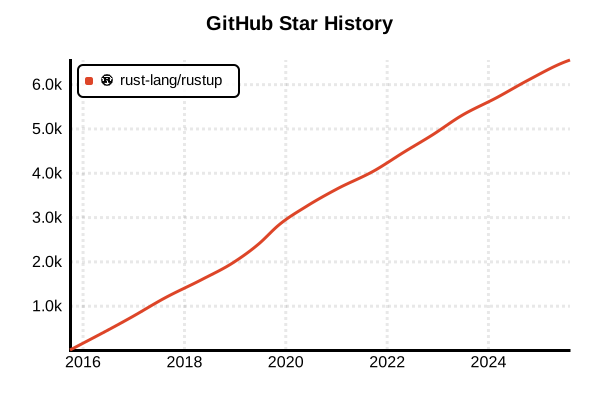
データ取得日時: 2025/7/20 03:05
言語バージョン管理ツール
rustup
概要
rustupは、Rust言語の公式ツールチェーンインストーラーおよびバージョン管理ツールです。stable、beta、nightlyチャンネルのRustコンパイラを簡単に切り替えでき、クロスコンパイルのための各種ターゲットプラットフォームの管理も可能です。Rustで書かれたrustup自体も、Rustの理念である安全性と使いやすさを体現しています。
詳細
主な特徴
- チャンネルベースの管理: stable、beta、nightlyの3つのリリースチャンネル
- 6週間リリースサイクル: 定期的な安定版リリースによる予測可能性
- クロスコンパイル対応: 複数のターゲットプラットフォームを簡単に管理
- コンポーネント管理: rustfmt、clippy、rust-srcなどの追加ツール管理
- プロジェクト別設定: rust-toolchainファイルによる自動バージョン切り替え
- オフライン対応: プロキシ設定やオフラインインストールのサポート
動作原理
rustupはホームディレクトリの.rustupに全てのツールチェーンをインストールし、シェルのPATHに追加されたプロキシコマンドを通じて適切なバージョンのRustツールを実行します。プロジェクトのルートにあるrust-toolchainファイルを自動的に検出し、指定されたバージョンに切り替えます。
ツールチェーンの構成要素
- rustc: Rustコンパイラ本体
- cargo: Rustのパッケージマネージャー兼ビルドツール
- rust-std: 標準ライブラリ
- rust-docs: オフラインドキュメント
- rustfmt: コードフォーマッタ
- clippy: Lintツール
- rust-analyzer: LSP実装(IDE支援)
メリット・デメリット
メリット
- 公式ツール: Rust公式プロジェクトによる完全なサポート
- 統一的な管理: コンパイラ、標準ライブラリ、ツールの一元管理
- 簡単なアップデート:
rustup update一つで全て最新化 - マルチプラットフォーム: Windows、macOS、Linux全てで同じ使用感
- 後方互換性: 古いバージョンも簡単にインストール可能
- 豊富なターゲット: ARM、WASM、組み込みなど多様な環境対応
デメリット
- ディスク使用量: 複数のツールチェーンで容量を消費
- ネットワーク依存: 初回インストールやアップデートに接続必要
- 学習曲線: nightlyチャンネルの不安定機能への理解が必要
- パッケージマネージャーとの競合: システムパッケージのRustと共存注意
- ビルド時間: 大規模プロジェクトでは依存関係のビルドに時間
参考ページ
書き方の例
インストール
# Unix系OS(Linux、macOS、WSL)
curl --proto '=https' --tlsv1.2 -sSf https://sh.rustup.rs | sh

# インストール中の選択肢
# 1) Proceed with installation (default) - 推奨
# 2) Customize installation
# 3) Cancel installation

# Windows(rustup-init.exe使用)
# https://rustup.rs/ からダウンロード後実行

# 環境変数の設定(bashの場合)
source "$HOME/.cargo/env"

# インストール確認
rustup --version
rustc --version
cargo --version
チャンネル管理
# デフォルトチャンネルの設定
rustup default stable
rustup default beta
rustup default nightly

# 特定バージョンのインストール
rustup install 1.75.0
rustup install nightly-2024-01-01

# インストール済みツールチェーンの一覧
rustup toolchain list

# アクティブなツールチェーンの確認
rustup show

# ツールチェーンの削除
rustup toolchain uninstall nightly-2023-12-01
コンポーネント管理
# 利用可能なコンポーネントの一覧
rustup component list

# コンポーネントの追加
rustup component add rustfmt
rustup component add clippy
rustup component add rust-src
rustup component add rust-analyzer

# 特定のツールチェーンにコンポーネントを追加
rustup component add rustfmt --toolchain nightly
rustup component add miri --toolchain nightly

# コンポーネントの削除
rustup component remove rust-docs
ターゲット管理(クロスコンパイル)
# 利用可能なターゲットの一覧
rustup target list

# ターゲットの追加
rustup target add wasm32-unknown-unknown
rustup target add x86_64-pc-windows-gnu
rustup target add aarch64-apple-darwin
rustup target add thumbv7em-none-eabihf  # ARM Cortex-M4

# 特定ツールチェーンにターゲットを追加
rustup target add wasm32-wasi --toolchain stable

# ターゲットの削除
rustup target remove x86_64-pc-windows-gnu
プロジェクト別設定
# プロジェクトディレクトリで実行
cd /path/to/my-project

# rust-toolchainファイルの作成
echo "1.75.0" > rust-toolchain
# または
echo "nightly-2024-01-01" > rust-toolchain

# rust-toolchain.tomlの使用(推奨)
cat > rust-toolchain.toml << EOF
[toolchain]
channel = "stable"
components = ["rustfmt", "clippy"]
targets = ["wasm32-unknown-unknown"]
EOF

# オーバーライドの設定(rust-toolchainより優先)
rustup override set nightly
rustup override set 1.74.0

# オーバーライドの確認
rustup override list

# オーバーライドの解除
rustup override unset
アップデートとメンテナンス
# rustupとすべてのツールチェーンをアップデート
rustup update

# 特定のツールチェーンのみアップデート
rustup update stable
rustup update nightly

# rustup自体のアップデート
rustup self update

# 古いツールチェーンの自動削除
rustup update --no-self-update

# プロキシ設定(企業環境など)
export HTTPS_PROXY=http://proxy.example.com:8080
export HTTP_PROXY=http://proxy.example.com:8080
高度な使用例
# 一時的に別のツールチェーンで実行
rustup run nightly cargo build
rustup run 1.73.0 cargo test

# 特定のツールチェーンでシェルを起動
rustup run stable bash

# ツールチェーンのカスタムインストール
rustup toolchain install nightly --component rust-src rustfmt

# ツールチェーンのリンク(ローカルビルド用)
rustup toolchain link my-custom-rust /path/to/custom/rust

# 完全なアンインストール
rustup self uninstall
CI/CD環境での使用
# GitHub Actions例
- name: Install Rust
  uses: dtolnay/rust-toolchain@stable
  with:
    toolchain: stable
    components: rustfmt, clippy

# GitLab CI例
before_script:
  - curl --proto '=https' --tlsv1.2 -sSf https://sh.rustup.rs | sh -s -- -y
  - source "$HOME/.cargo/env"
  - rustup component add rustfmt clippy