Cypress
GitHub概要
cypress-io/cypress
Fast, easy and reliable testing for anything that runs in a browser.
トピックス
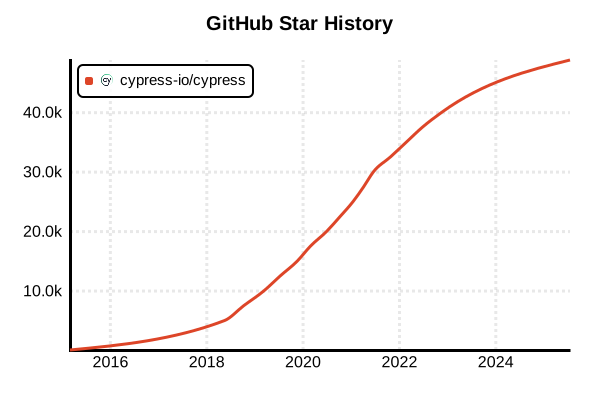
スター履歴
テストツール
Cypress
概要
Cypressは「コンポーネントテストと単体テスト」にも対応したモダンなテストフレームワークです。従来のE2Eテストだけでなく、React、Vue、Angularなどのコンポーネントを単体でテストする機能を提供し、優れた開発者体験とリアルタイムデバッグ機能で開発効率を大幅に向上させます。cy.mount()コマンドによるコンポーネントのマウント、自動的な再テスト実行、直感的なテスト記述構文により、フロントエンド開発者にとって最も使いやすい単体テストツールの一つとして位置づけられています。
詳細
Cypress Unit Testing(コンポーネントテスト)は2022年にベータ版、2023年に正式リリースされた比較的新しい機能で、従来のE2Eテストで培った優れた開発者体験を単体テストレベルに拡張しています。リアルブラウザ環境でコンポーネントを実際にレンダリングしてテストするため、DOM操作、イベントハンドリング、スタイリングなどを含む包括的なテストが可能です。React、Vue、Angular、Svelte等の主要フレームワークをサポートし、各フレームワーク固有の機能(props、slots、signals等)にも対応。Test Runner UIによるリアルタイム実行監視、自動スクリーンショット、タイムトラベルデバッグ、ネットワークスタブ機能など、E2Eテストで人気の機能を単体テストでも利用可能です。設定なしで即座に開始でき、WebpackやViteとの統合、TypeScript完全サポート、豊富なアサーション機能により、モダンなフロントエンド開発ワークフローに自然に組み込むことができます。
主な特徴
- リアルブラウザテスト: 実際のブラウザ環境でコンポーネントを実行・検証
- cy.mount(): コンポーネントを独立してマウントする専用コマンド
- リアルタイムデバッグ: テスト実行中のDOMやネットワークをリアルタイム監視
- フレームワーク対応: React、Vue、Angular、Svelte等の主要フレームワークサポート
- 自動再実行: ファイル変更時の自動テスト実行とHot Reload
- ビジュアルデバッグ: タイムトラベル機能とスクリーンショット自動生成
メリット・デメリット
メリット
- E2Eテストと同じ直感的なAPIと優れた開発者体験
- リアルブラウザ環境による高い信頼性とDOM操作の完全サポート
- ビジュアルなTest Runner UIによる効率的なデバッグとトラブルシューティング
- フレームワーク固有機能(props、events、slots等)の完全サポート
- 設定なしでの即座な開始とWebpack/Vite統合の容易さ
- 豊富なアサーション機能とネットワークモック・スタブ機能
- TypeScript完全サポートと型安全な記述
- E2Eテストとコンポーネントテストの統一的な記述方法
デメリット
- 比較的新しい機能のため、まだエコシステムが発展途上
- Jest等の従来ツールと比較してテスト実行速度が若干遅い傾向
- リアルブラウザ実行のためリソース消費が多く、大量テストには不向き
- Cypressの学習コストと既存テストからの移行コスト
- CIサーバーでのヘッドレス実行設定が若干複雑
- Node.js環境のユニットテストには対応せず、フロントエンド専用
参考ページ
- Cypress公式サイト
- Cypress Component Testing ドキュメント
- Cypress GitHub リポジトリ
- Cypress Real World Testing Course
- Component Testing Examples
書き方の例
インストールとセットアップ
# Cypressのインストール
npm install --save-dev cypress

# Cypress初期設定
npx cypress open

# コンポーネントテスト用の設定を選択
# → "Component Testing" を選択
# → フレームワーク(React、Vue、Angular等)を選択
# → 設定ファイルの自動生成を確認

# CLIでのコンポーネントテスト実行
npx cypress run --component

# 特定テストファイルの実行
npx cypress run --component --spec "src/**/*.cy.{js,jsx,ts,tsx}"
基本的なコンポーネントテスト(React)
// components/Button.cy.jsx
import React from 'react'
import Button from './Button'

describe('<Button />', () => {
  it('マウントされ、基本的な表示を確認', () => {
    cy.mount(<Button>Click me!</Button>)
    cy.get('button').should('contain.text', 'Click me!')
    cy.get('button').should('be.visible')
  })

  it('propsが正しく渡される', () => {
    cy.mount(
      <Button variant="primary" disabled={true}>
        Primary Button
      </Button>
    )

    cy.get('button')
      .should('have.class', 'btn-primary')
      .should('be.disabled')
      .should('contain.text', 'Primary Button')
  })

  it('クリックイベントが発火する', () => {
    const onClickSpy = cy.spy().as('onClickSpy')
    cy.mount(<Button onClick={onClickSpy}>Click me</Button>)

    cy.get('button').click()
    cy.get('@onClickSpy').should('have.been.called')
  })

  it('複数回クリックのテスト', () => {
    const onClickSpy = cy.spy().as('onClickSpy')
    cy.mount(<Button onClick={onClickSpy}>Multi Click</Button>)

    cy.get('button').click().click().click()
    cy.get('@onClickSpy').should('have.been.calledThrice')
  })
})
コンポーネントテスト(Vue)
// components/Counter.cy.js
import Counter from './Counter.vue'

describe('<Counter />', () => {
  it('初期値が正しく表示される', () => {
    cy.mount(Counter, {
      props: {
        initialValue: 10
      }
    })

    cy.get('[data-cy=counter-value]').should('contain.text', '10')
  })

  it('インクリメント・デクリメント機能', () => {
    cy.mount(Counter)

    // 初期値確認
    cy.get('[data-cy=counter-value]').should('contain.text', '0')

    // インクリメント
    cy.get('[data-cy=increment-btn]').click()
    cy.get('[data-cy=counter-value]').should('contain.text', '1')

    // デクリメント
    cy.get('[data-cy=decrement-btn]').click()
    cy.get('[data-cy=counter-value]').should('contain.text', '0')
  })

  it('イベント発火のテスト', () => {
    const onChangeSpy = cy.spy().as('onChangeSpy')
    cy.mount(Counter, {
      props: {
        onChange: onChangeSpy
      }
    })

    cy.get('[data-cy=increment-btn]').click()
    cy.get('@onChangeSpy').should('have.been.calledWith', 1)
  })

  it('スロットコンテンツのテスト', () => {
    cy.mount(Counter, {
      slots: {
        default: '<span>Custom Content</span>',
        footer: 'Footer Content'
      }
    })

    cy.get('span').should('contain.text', 'Custom Content')
    cy.contains('Footer Content').should('be.visible')
  })
})
コンポーネントテスト(Angular)
// components/stepper.component.cy.ts
import { StepperComponent } from './stepper.component'
import { createOutputSpy } from 'cypress/angular'

describe('StepperComponent', () => {
  it('マウントされ、初期値が表示される', () => {
    cy.mount(StepperComponent)
    cy.get('[data-cy=counter]').should('contain.text', '0')
  })

  it('Input プロパティのテスト', () => {
    cy.mount(StepperComponent, {
      componentProperties: {
        count: 100
      }
    })

    cy.get('[data-cy=counter]').should('contain.text', '100')
  })

  it('Output イベントのテスト', () => {
    cy.mount(StepperComponent, {
      componentProperties: {
        change: createOutputSpy('changeSpy')
      }
    })

    cy.get('[data-cy=increment]').click()
    cy.get('@changeSpy').should('have.been.calledWith', 1)
  })

  it('複雑な操作のテストシナリオ', () => {
    const changeSpy = createOutputSpy('changeSpy')
    cy.mount(StepperComponent, {
      componentProperties: {
        count: 50,
        change: changeSpy
      }
    })

    // 50から開始
    cy.get('[data-cy=counter]').should('contain.text', '50')

    // 3回インクリメント
    cy.get('[data-cy=increment]').click().click().click()
    cy.get('[data-cy=counter]').should('contain.text', '53')
    cy.get('@changeSpy').should('have.been.calledWith', 53)

    // 2回デクリメント
    cy.get('[data-cy=decrement]').click().click()
    cy.get('[data-cy=counter]').should('contain.text', '51')
  })
})
フォームコンポーネントのテスト
// components/LoginForm.cy.jsx
import LoginForm from './LoginForm'

describe('<LoginForm />', () => {
  it('フォーム要素が正しく表示される', () => {
    cy.mount(<LoginForm />)

    cy.get('input[name="username"]').should('be.visible')
    cy.get('input[name="password"]').should('have.attr', 'type', 'password')
    cy.get('button[type="submit"]').should('contain.text', 'ログイン')
  })

  it('バリデーション機能のテスト', () => {
    cy.mount(<LoginForm />)

    // 空の状態でSubmit
    cy.get('button[type="submit"]').click()
    cy.get('.error-message').should('contain.text', 'ユーザー名は必須です')

    // ユーザー名のみ入力
    cy.get('input[name="username"]').type('testuser')
    cy.get('button[type="submit"]').click()
    cy.get('.error-message').should('contain.text', 'パスワードは必須です')
  })

  it('正常なログインフローのテスト', () => {
    const onSubmitSpy = cy.spy().as('onSubmitSpy')
    cy.mount(<LoginForm onSubmit={onSubmitSpy} />)

    // フォーム入力
    cy.get('input[name="username"]').type('validuser')
    cy.get('input[name="password"]').type('validpass123')

    // Submit実行
    cy.get('button[type="submit"]').click()

    // 期待するデータでSubmitされることを確認
    cy.get('@onSubmitSpy').should('have.been.calledWith', {
      username: 'validuser',
      password: 'validpass123'
    })
  })

  it('パスワード表示/非表示機能', () => {
    cy.mount(<LoginForm showPasswordToggle={true} />)

    // 初期状態はpassword type
    cy.get('input[name="password"]').should('have.attr', 'type', 'password')

    // 表示ボタンクリック
    cy.get('[data-cy=toggle-password]').click()
    cy.get('input[name="password"]').should('have.attr', 'type', 'text')

    // 再度クリックで非表示
    cy.get('[data-cy=toggle-password]').click()
    cy.get('input[name="password"]').should('have.attr', 'type', 'password')
  })
})
非同期処理とモック
// components/UserProfile.cy.jsx
import UserProfile from './UserProfile'

describe('<UserProfile />', () => {
  it('ユーザーデータの読み込みテスト', () => {
    // API呼び出しをモック
    cy.intercept('GET', '/api/users/123', {
      fixture: 'user.json'
    }).as('getUser')

    cy.mount(<UserProfile userId={123} />)

    // ローディング状態の確認
    cy.get('[data-cy=loading]').should('be.visible')

    // API呼び出し待機
    cy.wait('@getUser')

    // データ表示の確認
    cy.get('[data-cy=user-name]').should('contain.text', 'Test User')
    cy.get('[data-cy=user-email]').should('contain.text', '[email protected]')
    cy.get('[data-cy=loading]').should('not.exist')
  })

  it('エラーハンドリングのテスト', () => {
    // エラーレスポンスをモック
    cy.intercept('GET', '/api/users/123', {
      statusCode: 404,
      body: { error: 'User not found' }
    }).as('getUserError')

    cy.mount(<UserProfile userId={123} />)

    cy.wait('@getUserError')

    // エラーメッセージの確認
    cy.get('[data-cy=error-message]')
      .should('be.visible')
      .should('contain.text', 'ユーザーが見つかりません')
  })

  it('リロード機能のテスト', () => {
    cy.intercept('GET', '/api/users/123', {
      fixture: 'user.json'
    }).as('getUser')

    cy.mount(<UserProfile userId={123} />)
    cy.wait('@getUser')

    // リロードボタンクリック
    cy.get('[data-cy=reload-btn]').click()

    // 再度API呼び出しされることを確認
    cy.wait('@getUser')
    cy.get('[data-cy=user-name]').should('contain.text', 'Test User')
  })
})
カスタムフックとユーティリティ関数のテスト
// utils/math.cy.js - Pure関数のテスト
import { add, subtract, multiply, divide, calculateTax } from '../src/utils/math'

describe('Math Utils', () => {
  context('基本演算', () => {
    it('足し算のテスト', () => {
      expect(add(2, 3)).to.equal(5)
      expect(add(-1, 1)).to.equal(0)
      expect(add(0.1, 0.2)).to.be.closeTo(0.3, 0.001)
    })

    it('引き算のテスト', () => {
      expect(subtract(5, 3)).to.equal(2)
      expect(subtract(1, 1)).to.equal(0)
      expect(subtract(-5, -3)).to.equal(-2)
    })

    it('掛け算のテスト', () => {
      expect(multiply(3, 4)).to.equal(12)
      expect(multiply(-2, 5)).to.equal(-10)
      expect(multiply(0, 100)).to.equal(0)
    })

    it('割り算のテスト', () => {
      expect(divide(10, 2)).to.equal(5)
      expect(divide(7, 2)).to.equal(3.5)
      expect(() => divide(5, 0)).to.throw('Division by zero')
    })
  })

  context('税額計算', () => {
    it('消費税計算(10%)', () => {
      expect(calculateTax(1000, 0.1)).to.equal(100)
      expect(calculateTax(250, 0.1)).to.equal(25)
    })

    it('小数点処理のテスト', () => {
      expect(calculateTax(333, 0.1)).to.be.closeTo(33.3, 0.1)
    })

    it('エラーケースのテスト', () => {
      expect(() => calculateTax(-100, 0.1)).to.throw('Amount must be positive')
      expect(() => calculateTax(100, -0.1)).to.throw('Tax rate must be positive')
    })
  })
})
設定とベストプラクティス
// cypress/support/component.js - サポートファイル
import './commands'
import '../../src/styles/index.css'

// React Router用のカスタムマウント
Cypress.Commands.add('mount', (component, options = {}) => {
  const { routerProps = { initialEntries: ['/'] }, ...mountOptions } = options

  const wrapped = (
    <BrowserRouter {...routerProps}>
      {component}
    </BrowserRouter>
  )

  return mount(wrapped, mountOptions)
})

// Redux用のカスタムマウント
Cypress.Commands.add('mountWithRedux', (component, options = {}) => {
  const { reduxStore = getStore(), ...mountOptions } = options

  const wrapped = (
    <Provider store={reduxStore}>
      {component}
    </Provider>
  )

  return mount(wrapped, mountOptions)
})

// cypress.config.js - 設定ファイル
module.exports = {
  component: {
    devServer: {
      framework: 'react',
      bundler: 'vite', // または 'webpack'
    },
    specPattern: 'src/**/*.cy.{js,jsx,ts,tsx}',
    viewportWidth: 1280,
    viewportHeight: 720,
    video: false,
    screenshotOnRunFailure: true,
  },

  e2e: {
    baseUrl: 'http://localhost:3000',
    supportFile: 'cypress/support/e2e.js',
  }
}